Most small sales teams run on memory and handwriting. After a call, the rep half-remembers what was said, types two lines into the CRM and moves on. Three weeks later nobody can say what the customer actually objected to. AI sales call analysis for small business closes that gap. It’s the same idea as an AI call summary for sales teams, taken a step further: the call becomes a record you can search, learn from and act on.
What it listens for
A summary is only useful if it captures the right things. The tool looks for:
- Needs. What problem the buyer described, in their words.
- Budget and timing. Whether either was mentioned, and what was said.
- Decision-makers. Who else has a say, such as a partner, a board or a manager.
- Objections. Price, timing, a competitor, “I need to think about it”.
- Commitments. What each side agreed to do, and by when.
None of this is mind-reading. The tool works from the words on the transcript, so it can say what was said and what wasn’t. It can’t tell you what the buyer privately thinks, and a good setup says “not mentioned” rather than guessing.
One call, marked up
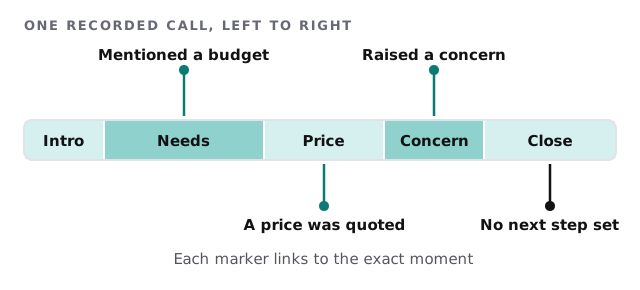
The last marker is the one owners value most. “No next step set” is a flag you’d never see in a quick CRM note, yet it often explains why a deal went cold.
Where each result goes
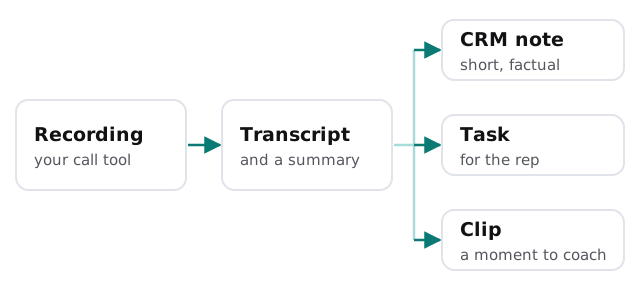
Analysis that sits in a separate app tends to get ignored. So the output goes where the rep already works.
Manager’s questions, answered
| You’d ask | The tool gives you |
|---|---|
| “What are customers pushing back on?” | A running list of objections, grouped and counted |
| “Did she mention the service plan?” | A search across transcripts for the topic |
| “Why did this deal stall?” | The call where the next step went missing |
| “What does a good opening sound like?” | A few clips from calls that went well |
| “Who needs a follow-up today?” | Tasks from calls with open commitments |
Coaching, not surveillance
The easiest way to wreck this is to use it to police people. Three habits help:
- Pick one thing per call. A single moment to improve beats a twelve-point score.
- Share the good ones too. A clip of a rep handling a hard objection well is worth more than any slide.
- Let reps see their own calls first. Nobody should find out in a meeting what the tool said about them.
A word on recording
Before you record anything, settle the basics. Tell people at the start of the call. Decide where recordings live, who can open them and when they’re deleted. Keep the transcript out of anywhere it doesn’t need to be. Laws on recording vary, so check yours.
Signs you’d get value from it
- Reps type very little after a call, or nothing at all.
- You hear about lost deals from the customer, not the CRM.
- New hires learn by sitting next to the owner for months.
- You suspect the same objection keeps ending deals but can’t prove it.
Rather build it yourself?
Several meeting recorders can transcribe and summarise calls out of the box. Our guide to recording and summarising meetings with AI compares the approach, and setting up Fireflies for your team walks through one of them. We build when you want the output shaped to your own sales process and written straight into your CRM.
What we need from you
- Which call or meeting tool your team uses today.
- What a good call looks like in your business, in plain words.
- Your CRM, and which fields a call should fill.
We start with a plan and a fixed quote, and a person approves what gets written to your CRM before anything is saved automatically.
The deal you lose isn’t always lost on the call. Often it’s lost in the follow-up nobody wrote down.