Key takeaways
- Too many apps cost you three ways: the subscriptions, the hours spent copying between them and the logins nobody tracks.
- Make an app inventory from your card statements, then price the copying time alongside the subscriptions.
- Credential abuse, someone signing in with a stolen or guessed login, was a leading way into breaches in Verizon's 2025 report, at 22 percent.
- Before buying another app, connect the ones you have so each fact lives in one place.
Too many apps is a problem nobody chooses. Each one made sense at the time. The booking tool fixed scheduling. The invoicing app fixed billing. The CRM was going to fix follow-ups. Someone signed up for a project board, and someone else for a form builder. Every one of them was cheap, and every one of them solved a real problem.
Then the problems moved into the gaps between the apps. Now a customer’s phone number lives in four places and none of them agree. Somebody spends Friday afternoon copying orders from one screen to another. And when someone leaves, nobody is quite sure which accounts to close.
This post helps you count what that costs, and explains why the usual fix, one more app, tends to make it worse.
How the pile builds up
Apps get added one problem at a time, sometimes by different people. Nobody is in charge of the whole set, because the whole set was never planned. That’s normal. It’s also why nobody can say what it costs.
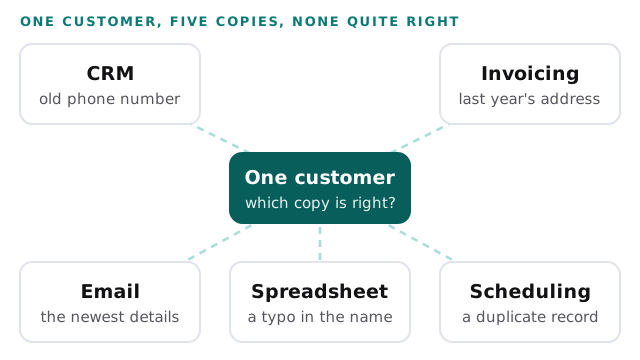
Each app also comes with its own copy of your data. Your invoicing app has customers. So does your CRM, your email marketing tool, your booking system and probably a spreadsheet someone keeps “just in case”. Each copy is updated by whoever happens to be in that app. Over time, they drift.
Make an app inventory
You can’t price what you can’t see, so start with a list. It takes about an hour.
- Go through the last three months of card and bank statements and write down every software charge.
- Add the free tools people use for work, and anything billed yearly that won’t show up in three months.
- For each app, note who uses it, who pays for it and what data it holds.
- Mark every app that holds a copy of data that also lives somewhere else.
Here’s how a few rows might look. The apps and amounts are made up, to show the format.
| App | Monthly cost | Who uses it | Same data also lives in |
|---|---|---|---|
| Booking tool | $60 | Front desk | CRM, spreadsheet |
| Invoicing app | $45 | Owner, bookkeeper | CRM |
| CRM | $150 | Sales, owner | Booking tool, email tool |
| Email marketing | $80 | Owner | CRM |
| Form builder | $35 | Office manager | Spreadsheet |
That last column is where the money really goes.
The costs on top of the subscription
The subscriptions are the cost everyone sees. Three others sit on top of them.
Copying. Every time the same fact lives in two apps, someone keeps them in step by hand. A new customer is typed into the booking tool, then the CRM, then the invoicing app. Each copy takes a few minutes, and each one is a chance for a typo.
Logins. Every app is another username and password, for every person who uses it. That matters more than it sounds. In Verizon’s 2025 Data Breach Investigations Report, credential abuse, meaning someone signing in with a stolen or guessed login, was a leading way into breaches, at 22 percent. The same report found that breaches involving a third party had doubled to 30 percent (Verizon). Every app you add is another login to protect and another company handling your data.
Leavers. When someone leaves, each app is an account to close. Miss one, and a former employee can still sign in to your customer list. Multifactor sign-in helps here. The U.S. Cybersecurity and Infrastructure Security Agency says users who enable it are significantly less likely to get hacked (CISA). But it has to be switched on in each app, one at a time, which is one more job that grows with the pile.
Do the math
Now put a number on it. Add up the subscriptions for a year. Then estimate the hours a week your team spends copying between apps, and multiply by what a staff hour costs and by 50 working weeks.
For the hourly cost, use your own payroll if you can. If not, keep in mind that wages are only part of what an hour costs. In June 2026, private employers paid an average of $46.89 per hour worked, with $32.82 of that in wages (BLS). The example uses $35 to stay on the low side.
| Line | Example | Yours |
|---|---|---|
| Subscriptions per month, all apps | $370 | |
| Subscriptions per year (× 12) | $4,440 | |
| Hours a week spent copying between apps | 6 | |
| Cost of a staff hour | $35 | |
| Copying time per year (6 × $35 × 50) | $10,500 | |
| Total for the year | $14,940 |
In this invented example, the copying costs more than twice what the apps themselves do. That’s the pattern worth checking in your own numbers. If it holds, the subscriptions are not the problem. The gaps are.
Why one more app won’t fix it
When the mess gets bad enough, the natural move is to look for an app that does everything. The pitch is appealing: replace five tools with one. Here’s how it can disappoint a small team.
It may not replace all five. The all-in-one tool is strong at some jobs and weak at others. Your team keeps the old tool for the jobs it does better. Now you have six apps, not one.
The migration is on you. Moving years of data, rebuilding forms and retraining staff takes weeks of work from people who already have full days. Until it’s done, both systems run side by side.
Each vendor solves for its own app. A vendor’s answer to a problem tends to be more of its own product. That’s not dishonest. It’s just not the same as solving for your business, which runs across all of your tools at once.
The copies don’t go away. If the new app doesn’t connect to the ones you keep, the copying simply moves. Someone now types the same customer into the new tool instead of the old one.
Connect before you buy
The better first move is usually the less exciting one. Connect the apps you already have, so each fact is entered once and flows to the places that need it.
| Ask for | Instead of |
|---|---|
| One place where each fact is entered | The same fact typed into several apps |
| Connections between the tools you already pay for | A new tool to replace them all |
| A list of every app, who has access and who owns it | Accounts nobody remembers opening |
| Multifactor sign-in turned on in every app | Passwords alone |
| A clear owner who closes accounts the day someone leaves | Hoping someone remembers |
| A trial on your real data before anything is switched off | A switch-over date set on day one |
Sometimes connecting isn’t enough and a custom tool is the right answer. Our page on custom software vs off the shelf lays out how to tell. Before that, it’s worth seeing whether a few well-built connections remove most of the copying. Our Zapier expert page shows what that kind of work looks like.
One place to ask instead of five
We built an AI assistant and operations dashboard that sits on top of the apps a business already uses. It connects to them and answers questions about sales, orders and cash in one place, and it drafts email replies for a person to approve. It’s a working demo, shown on sample data.
The point isn’t that you need an assistant. It’s that you can get one view across your apps without replacing them. The part worth seeing is how the connections are set up and where each answer comes from.
Behind the scenes
Want a behind-the-scenes walkthrough of a real build?
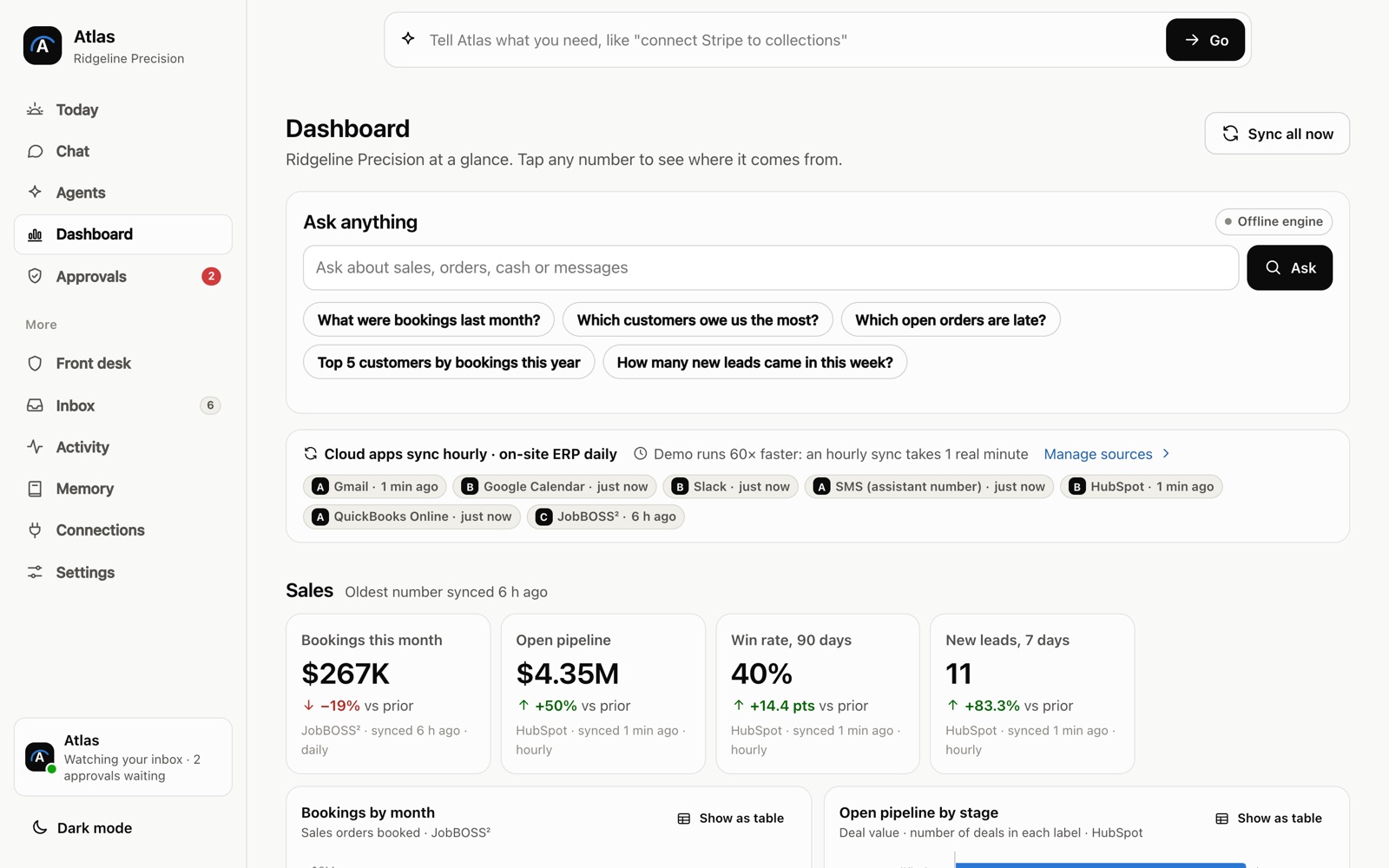
We will take you through it screen by screen: what each person sees, how a record moves through it, and why we built it that way. Then we can talk about the task that costs you most.
Frequently asked questions
How many apps is too many for a small business?
There is no magic number. It is too many when the same fact has to be typed into more than one of them, or when nobody can list them all from memory. Both are signs you are paying in hours as well as subscriptions.
Should we cancel the apps we barely use?
Check two things first: what data lives in them, and who still signs in. Export anything you need, close the accounts properly, then cancel. A forgotten account with old customer data is a risk even if nobody uses it.
Who in a small business should keep the list of apps and logins?
One named person, with a backup. They add every new app to the list, note who has access and remove people the day they leave. It takes minutes a month once the list exists.
Sources
- Verizon's 2025 Data Breach Investigations Report: Alarming surge in cyberattacks through third-parties (Verizon, April 2025)
- More than a Password (Cybersecurity and Infrastructure Security Agency)
- Compensation costs for private industry workers averaged $46.89 per hour worked in June 2026 (U.S. Bureau of Labor Statistics)
About the author
Andy Kang, AI Partner Team. Andy Kang writes the blog for AI Partner Team, which builds AI tools and internal apps for small businesses alongside managed IT and IT projects. The blog shows the math and the reasoning behind that work, so you can check it against your own business.
- Every fact links to the page it came from, listed under Sources.
- Example numbers are labelled as examples, and you can swap in your own.
- Builds are shown on sample data, with no client names or client figures.