Everyone on your team has typed the same preamble into ChatGPT: “You’re an assistant for a landscaping company, we quote like this, our tone is friendly but short.” A custom GPT saves that preamble. It’s a ChatGPT helper configured once, then opened by anyone you give access to. Custom GPT development for business is mostly the careful part: deciding what it should know, how it should answer, and what it must refuse.
Custom GPT or custom app?
People often mix these up, and the difference decides the project. A custom GPT is built and used inside ChatGPT. A custom app is your own software that calls the OpenAI API, which is the route covered on our page on OpenAI API integration.
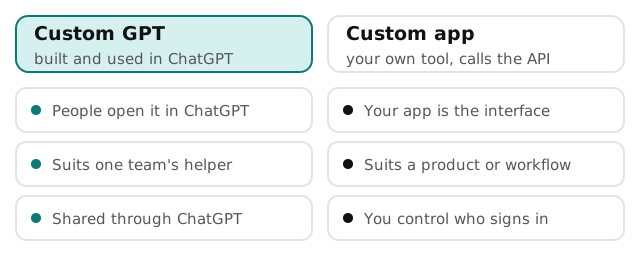
| If you need | Lean towards |
|---|---|
| A shared helper for your own team | Custom GPT |
| A customer-facing tool on your website | Custom app |
| Your own sign-in and access rules | Custom app |
| A quick trial of an idea | Custom GPT |
| Deep connection to your database | Custom app, or a GPT with Actions |
What’s inside one
A custom GPT is a few simple pieces layered together. None is difficult alone. What takes skill is getting them to work as a set.
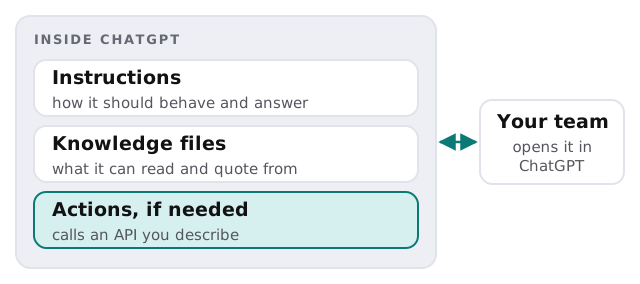
Instructions
This is where the tone, the format and the limits live. “Answer in three sentences or fewer. If you don’t know, say so and name who to ask.” Good instructions are specific and tested, not clever.
Knowledge
Your price list, your procedures, your FAQs. The quality of the answers is capped by the quality of these documents, so old or contradictory ones get fixed first. See also our work on an AI knowledge base for employees.
Actions, only if needed
Actions let a GPT call an external API. OpenAI’s documentation describes them as built on function calling: the developer describes the API call in a schema, can configure authentication, and gives the GPT guidance on using it. They’re powerful and need care. A person should approve anything that changes a record.
What a GPT shouldn’t be trusted with
A GPT can sound sure when it’s wrong. It shouldn’t be the last word on prices, legal wording or anything a client will rely on without a person reading it first. We build that into the instructions, so the helper drafts and flags, and your team decides. We also tell staff plainly what they shouldn’t paste in, such as client personal data, until you’ve agreed the rules.
Good first uses
- A proposal-drafting helper that knows your standard wording.
- A new-starter helper that answers from your procedures.
- A tone-checker for customer emails.
- A quote assistant that asks for the missing details before drafting.
How we build one
- Pick the job. One sentence, one audience.
- Gather the documents. We read them with you and remove what’s out of date.
- Write and test the instructions. Against a list of real questions where you know the right answer.
- Decide who can open it, and what they shouldn’t paste in.
- Hand it over, with a short guide and a note on how to update it.
You get a plan and a fixed quote before we begin. If your team hasn’t set up ChatGPT yet, our guide to setting up ChatGPT for your business is a good first step, and ChatGPT integration for small business covers the wider picture. Decide the ground rules early too, using our guide to writing an AI use policy.
A custom GPT is a well-briefed assistant. It’s only as good as the brief and the documents you give it.