A new Slack workspace feels tidy for about a week. Then there are forty channels, three called “general-chat”, and nobody can find last Tuesday’s decision. Slack setup for small business is the work of preventing that before the invitations go out. If you are setting up a Slack workspace for the first time, the choices below take an afternoon and save months of cleaning.
Your first week
- Day one: pick the owners. Two people with the authority to change settings, so a holiday does not freeze the workspace.
- Day one: create the channels you can name a purpose for. Aim for fewer than ten.
- Day two: write the topic line. One sentence per channel, saying what belongs there and what does not.
- Day three: invite the first team only. Let one group live in it for a few days before adding the rest.
- Day five: decide what stays in email. Anything external, anything contractual, anything needing a formal record.
Public first, private on purpose
Slack’s help centre describes the split plainly. Public channels can be found, viewed and joined by workspace members, and their messages show up in search for all of them. Private channels need an existing member to add you, and their messages appear in search only for the people inside. Slack recommends public by default because shared knowledge stays visible to the whole workspace.
You can switch a channel from public to private, or back, later. It is still worth getting the first choice right, because people write differently in a room they believe is private.
| Channel kind | Good for | Careful about |
|---|---|---|
| Public, whole company | Announcements, wins, general questions | Too many posts turn it into noise |
| Public, one team | Day-to-day team talk | A team of two does not need its own |
| Public, one job or client | Everything about a single piece of work | Close it when the work ends |
| Private | Pay, hiring, anything sensitive | If it fills with ordinary work, it hides things from people who need them |
A map people can learn
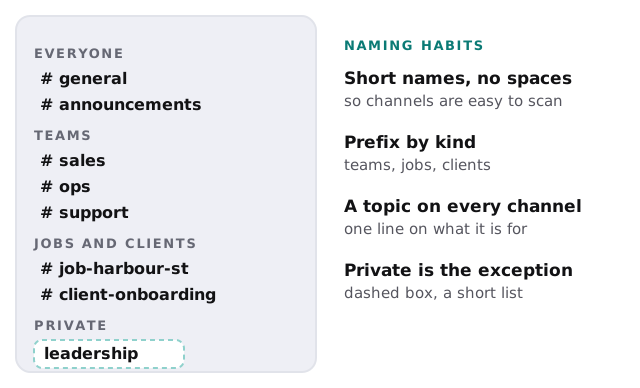
The channel names above are examples, not a template to copy. What matters is that a new hire can guess where to ask a question. If they cannot, the sidebar is too long or the names are too clever.
Teach one routing rule
Most Slack clutter is a message in the wrong place. A single page showing where things go fixes more than a long policy.
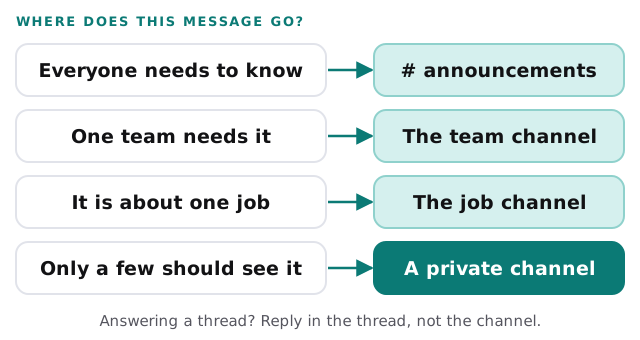
Setting it up in order
- Create the workspace and name it the way customers know your business.
- Set who can create channels. Slack’s default is that members can. Keep the default for a small team and tighten it only if sprawl appears.
- Make the starting channels. On the sidebar, use the plus sign, choose Channel, name it, and pick public or private.
- Add topics and descriptions straight away.
- Pin the routing page in the general channel.
- Invite people in groups, each with a short note on how you want it used.
- Review at four weeks. Archive anything quiet, merge anything duplicated.
What goes wrong
- Everyone is invited on day one, with no guidance.
- Every project gets a channel and none are ever archived. Slack itself suggests archiving channels you no longer need.
- Private channels become the default because people feel shy.
- Decisions are made in threads and nobody writes them down.
If you are weighing it against Teams
If you already pay for Microsoft 365, our page on Microsoft Teams setup for small business covers the same ground for that tool. Either works. What fails is having both half-used. We can set up one and help you retire the other.
What we need from you
- The teams, jobs or clients that need their own space.
- Who owns the workspace, and who covers them.
- Which tools should post into Slack, such as a form, a booking tool or a support inbox.
- What must stay out of Slack altogether.
Ten channels people use beat forty they ignore. Start small, and let usage tell you what is missing.