Twilio’s API makes sending a text look like ten lines of code. A Twilio integration developer’s job starts after those ten lines work. Real use means a public web address that strangers can try to call, delivery reports that arrive in a jumble, carrier rules for US numbers, and people who reply STOP. If you want a Twilio SMS integration for your business that survives all that, this is the checklist we work through.
Before any code: two rules
- Register your US texting. Twilio’s A2P 10DLC page describes it as a carrier standard meant to make sure texts to US users from 10-digit local numbers are “verified and consensual”. Unregistered traffic picks up additional carrier fees, while registration brings lower message filtering and higher throughput. Toll-free numbers and short codes are outside this system.
- Settle consent. Who agreed to be texted, how, and what do they see when they agree? Our other page on appointment reminder automation covers the wording side.
On consent, US federal rules at 47 CFR 64.1200 restrict autodialled and prerecorded calls and texts to certain lines without prior express consent, and require prior express written consent for telemarketing. Section (a)(10) lets a person revoke consent by any reasonable method, with requests honoured within a stated number of business days. This is a summary, not legal advice. Ask your lawyer how it applies to you.
Inbound: trust nothing until it is verified
Your Twilio webhook is a public address. Anyone can send it a request that looks like a text or a call. Twilio’s security guidance shows how to tell real from fake.
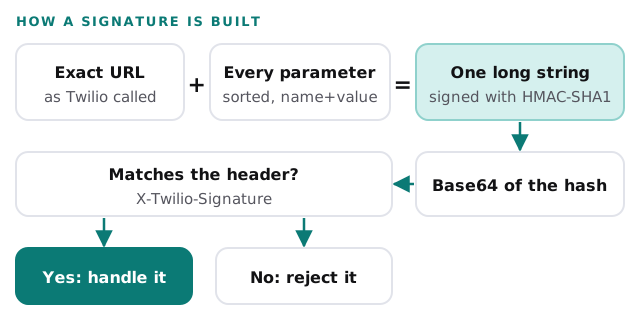
Twilio’s documented pitfalls are all small, and each one has broken a real integration:
- Some frameworks trim whitespace from POST fields, which changes the signature.
- A web server can add a trailing slash to the URL, which also changes it.
- The check must use your primary Auth Token, not a secondary one not yet promoted.
- The validator needs all received parameters, because Twilio can add new ones without notice.
Use HTTPS, use the SDK’s own validator rather than writing one, and act only when it returns true.
Outbound: a text has a life
A message is not “sent” the moment your code calls the API. It is queued, then sent, then, with luck, delivered.
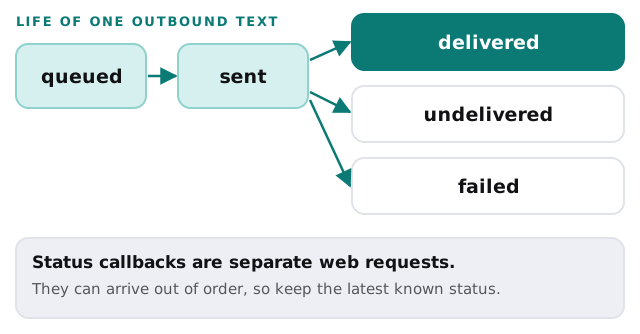
Twilio sends status updates as POST requests, and asks your endpoint to return HTTP 200. Failures include an error code. Because callbacks can arrive out of order, a sound handler never lets an older status overwrite a newer one.
Where callbacks are sent
Twilio’s guide says the callback address needs a valid hostname, and underscores are not allowed. With a Messaging Service you can set one address for the whole service, or pass a message-specific address when you send. If you pass the message-specific one, Twilio uses it even when a service-level address exists. That is handy for tracing one campaign, and a classic cause of “why did my handler never fire” when two settings disagree. We keep a single written list of which address applies to which flow.
Twilio also notes that on RCS and WhatsApp the event type becomes READ once the recipient has opened a message, and an extra channel status message appears only when delivery fails. If you plan to text and use WhatsApp from one system, the handler needs to tell the channels apart.
What we build and what we check
| Piece | What we do | Why |
|---|---|---|
| Signature check | Validate every inbound request with the SDK | Stops forged requests |
| Status handling | Store the furthest state reached | Late callbacks cannot undo it |
| Error codes | Log them and alert on patterns | Spots registration or number problems early |
| Stop requests | Mark the person as opted out at once, everywhere | A single list, honoured by every flow |
| Quiet hours | Hold sends outside the window you choose | Respect the people you text |
| Human handover | Route replies a person should answer | Not every reply is for a bot |
What we need from you
- The use case in one sentence: reminders, alerts, two-way chat.
- Where phone numbers come from, and what people agreed to.
- The business details needed for registration.
- A named person who reads failed-delivery alerts.
Rather start in your CRM?
If texts should land on a contact record, our WhatsApp business integration page covers the equivalent design for that channel, and our guide to setting up HubSpot for your team covers the CRM end.
Treat every inbound request as a stranger until its signature checks out, and every status as a rumour until it is the last one.