AI automation for childcare centers should feel boring to the families who experience it and a great relief to the staff who run it. Directors at small centers wear every hat: enrollment, billing, hiring, parent conversations and, some days, a spare pair of hands in the toddler room. A lot of what fills their evenings is repetitive writing and re-entering.
We build small AI tools and internal tools around the systems you already use. Your director or a lead teacher approves anything a parent sees.
The waitlist is the first place to look
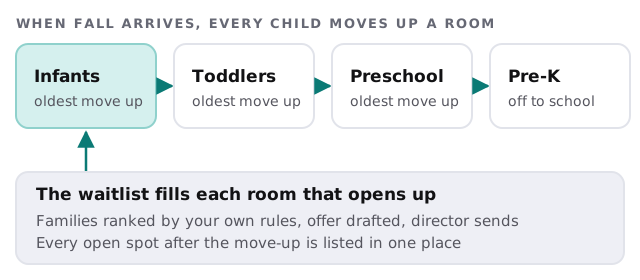
A waitlist sounds like a list. In practice it is a set of promises: sibling priority, a preferred start month, a room that only opens in fall. Most centers hold it in a spreadsheet, an inbox and the director’s memory.
A tool can keep one record per family, track which age group they need and when, and draft the next step as soon as something changes. When a spot opens, it ranks the families by your own rules and drafts the offer. The director reads it and sends it.
Tours that don’t go cold
A parent who emails at nine in the evening is comparing three centers. A tool can reply with a draft that confirms the tour options and attaches your handbook, held for the director’s approval in the morning. After the tour it drafts a short follow-up that mentions what the family asked about, such as the age group, the schedule or the outdoor space.
Daily notes without the typing
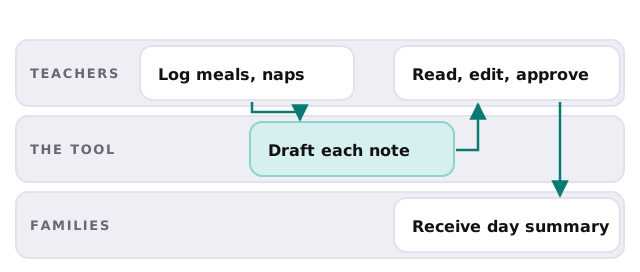
Parents love the end-of-day update, and teachers dread writing twenty of them. The tool works from what teachers already log, such as meals, naps, diapers and activities, and drafts a warm, short note for each child. The lead teacher edits the ones that need a personal line and approves the batch.
A Monday in late August
Three families who toured in spring still haven’t returned their enrollment forms, and two preschool spots open at the start of the month. By eight, the tool has listed the missing forms by family and drafted a gentle reminder for each. It has also ranked the waitlist for the two spots, with a note on who has a sibling enrolled. The director reads both lists over coffee, adjusts one ranking, and sends. The whole job takes ten minutes instead of an evening.
What the office side looks like
- Staff coverage. When someone calls out, the tool lists who is qualified for that room and available, and drafts the message to them. The director chooses.
- Tuition reminders. Drafted from the billing system’s own balances, in the tone you pick.
- Paperwork nudges. Missing immunization forms or enrollment documents are flagged by family, with a polite request ready to send.
- Newsletters. A monthly note assembled from the calendar and teacher updates, for the director to polish.
Your software, by category
| Category | What centers often run | What the tool adds |
|---|---|---|
| Enrollment and billing | A childcare management platform | Reads waitlist, balances, attendance |
| Parent communication | An app or text tool | Holds drafts for approval |
| Staff scheduling and payroll | Scheduling and payroll software | Lists coverage options |
| Accounting | Bookkeeping software | Matches tuition payments |
We don’t claim to have integrated any particular product. If you’d like to start with something simple, setting up Zapier for your team shows how to connect a form to a spreadsheet and a message.
What stays human
- Anything about a child’s behavior, health or safety.
- Conversations with a parent who is worried or upset.
- Decisions about who gets an offered spot when your rules don’t settle it.
- Rules that apply to your license or your state, which your own records and regulator define.
Getting started
Tell us how you track the waitlist today, which system holds enrollment and billing, and the one chore your director would most like to lose. We return a plan and a fixed quote after the free IT check. A real person replies within 1 business hour, Monday to Friday, 9am to 5pm Pacific.
The best thing a center can offer is attention. Let software do the typing so people can do the noticing.