AI automation for HR teams has an unusual boundary to respect: the work is about people, so the line between a helpful draft and an inappropriate decision matters more than in most departments. The aim here is to take the paperwork off HR’s desk, not the judgment.
Draw the data line first
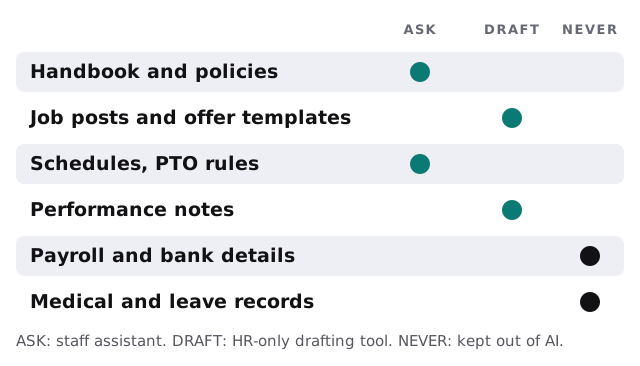
Before any tool is built, decide what it may see. This is a design choice, not a technical limit, and it’s worth doing on paper.
A Monday in a ten-person company
The office manager, who also runs HR, opens her laptop to six messages. Two ask about holiday pay, one is a manager wanting last year’s job post for a coordinator role, one is a new hire who can’t find the direct deposit form, and two are reminders for reviews due Friday. With a staff assistant, the first two already have answers. With a drafting tool, the job post is a revised draft by lunch. The remaining three still need her, which is as it should be.
A staff assistant that answers “How many PTO days do I carry over?” only needs the handbook and the policy documents. It doesn’t need anyone’s file.
Follow the employee
Onboarding
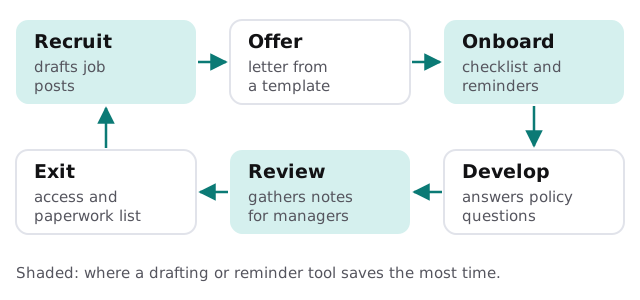
New hires generate the most repeated work in HR. A checklist tool can build the list from the role and location, nudge the hire and the manager when something is outstanding, and tell you what’s left before day one.
Some steps carry a clock. USCIS says employers complete Section 2 of Form I-9 within 3 business days of the date of hire. A reminder that counts those days from the start date is exactly the kind of boring tool that prevents a problem.
Review season
Managers dislike writing reviews and HR dislikes chasing them. A tool can send each manager the prompts they need, gather their notes through the year, and assemble a first draft for them to rewrite in their own words. The manager owns every sentence that reaches the employee.
Exit
When someone leaves, a list of accounts to close, equipment to collect and final paperwork prevents the quiet risks: a former employee who can still sign in, or a laptop nobody remembers lending.
What we would not build
Some things look efficient and cause trouble. These are the ones we turn down:
- A tool that scores or ranks applicants.
- A tool that recommends discipline or termination.
- Anything that reads medical or leave records.
The software around it
Most small HR teams run a payroll and HR system (the kind where you add people, set pay and track time off), an applicant tracking tool, a benefits portal, an e-signature service and a shared drive of policies. A custom tool works with these through their own sign-in. It doesn’t replace them.
If you want to look at the staff-facing part first, our guide on writing an AI use policy for your small business is a sensible first step, because the same rules apply to the HR tools.
Pressure points on the calendar
| When | What piles up |
|---|---|
| Open enrollment | The same ten benefits questions, hundreds of times |
| Start dates | Paperwork, accounts and equipment, all due together |
| Review cycle | Chasing managers for notes |
| Year-end | Corrections, final headcounts, policy updates |
Getting started
Tell us what takes up your week. The free IT check looks at which systems hold employee information and who can open them, and we return a plan and a fixed quote. A real person replies within 1 business hour, Monday to Friday, 9am to 5pm Pacific.
HR automation should make people feel looked after, not processed.