AI automation for finance teams pays off in the dull middle of the work: comparing, reconciling, coding and explaining. The judgment calls stay with the controller, the bookkeeper or the owner, which is where a finance function wants them.
Here is how that splits in practice for a team of two to ten people.
Accounts payable: check before approving
Most small AP processes fail the same way. A bill arrives, someone approves it because the vendor is familiar, and only later does anyone notice it doesn’t match what was ordered. A tool can do the comparison first.
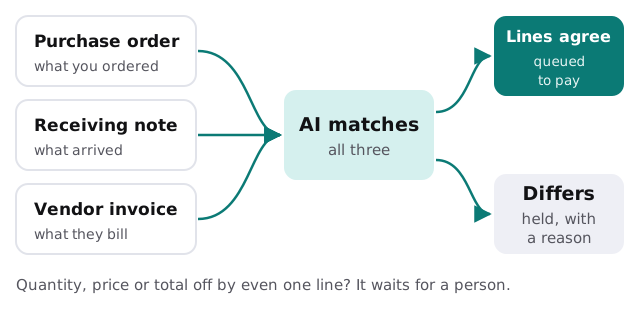
It reads the invoice, finds the purchase order and receiving note, and compares quantities, prices and totals. Clean matches go to the approver’s queue already coded. Anything off is held with a one-line reason such as “billed for 40, received 36.”
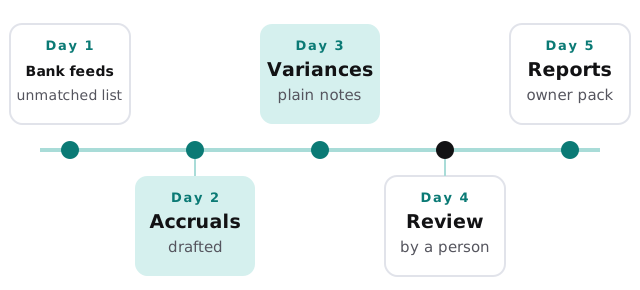
Month-end: start the close on day one
The week as it could run
Variance notes
The tedious part of reporting is writing why a line moved. A tool can compare this month with last month and with budget, find the largest movements, and draft a sentence for each from invoices and memos in the ledger. The controller edits, because only they know that the jump in repairs was the roof and not the routine.
A bookkeeper who reconciled the bank by hand last month will recognize the effect. The tool proposes matches between statement lines and ledger entries, shows the ones it is sure about, and lists the leftovers. She confirms the sure ones in a few clicks and spends her time on the leftovers, which is where the real errors hide.
What belongs on the list
| Task | Automate? | Why |
|---|---|---|
| Reading invoices into fields | Yes | Repetitive, easy to check |
| Coding expense receipts | Yes, with review | Patterns repeat per vendor |
| Drafting accruals from last month | Yes, with review | A starting point, not an answer |
| Bank reconciliation suggestions | Yes | Matches proposed, confirmed by a person |
| Approving payments | No | An accountability decision |
| Judging whether an expense is allowable | No | Depends on your policy and context |
The software it connects to
A finance team usually sits across four categories: the general ledger (QuickBooks Online, Xero or something larger), a bill-pay or AP tool, an expense and card platform, and a pile of spreadsheets that hold what the other three can’t. Our guides on setting up Xero for your team, Expensify and Ramp are a fair way to see what those tools already handle on their own.
The spreadsheets are usually where custom work starts. The purchasing tracker that three people edit, or the allocation workbook only one person understands, can be turned into a small internal tool with a clear audit trail.
The calendar has hard edges
Month-end repeats every thirty days or so, but year-end has fixed dates. The IRS says W-2 forms must go to employees by January 31, and Form 1099-NEC is due to recipients by January 31 too. Vendor tax details collected in November are far easier than chasing them in January, and a tool can quietly track who has sent a W-9 and who hasn’t.
Questions for any provider
- Which systems will it read, and which can it write to?
- Where in the process does a person sign off?
- Can I trace any figure in a report back to its source document?
- What does it do with an invoice from a vendor it hasn’t seen?
We answer those on the free IT check, then come back with a plan and a fixed quote. A real person replies within 1 business hour, Monday to Friday, 9am to 5pm Pacific.
Automate the matching and the drafting. Keep the approving yours.