On a Tuesday in the middle of the month, one of your bookkeepers is looking at forty bank lines for a client and a folder of invoices that came in by email, text and the occasional phone photo. Most of the work isn’t accounting. It’s finding which invoice belongs to which line. That’s the part QuickBooks invoice matching automation takes off her desk.
A Tuesday with the queue
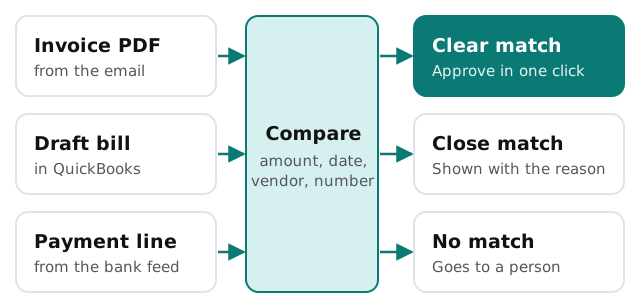
The invoices arrive wherever they arrive. The AI reads each one: vendor, number, date, amount and what it was for. It then looks in QuickBooks for the draft bill or the open bill it belongs to, and for the bank line that paid it.
By the time your bookkeeper opens the queue, the easy ones are already lined up with a “looks right” note. The doubtful ones are sorted into a second list with the reason attached: amount differs by a small amount, vendor name spelled differently, same invoice number seen twice. Anything without a plausible partner is left for her to chase.
She approves the first list in a few passes. The second takes judgment, and that’s where her attention goes.
What gets matched to what
| The document | Matched against | What the AI checks |
|---|---|---|
| Vendor invoice | The bill in QuickBooks | Vendor, invoice number, amount, due date |
| Bill | The payment on the bank feed | Amount, date window, payee text |
| Receipt | The card transaction | Amount, date, merchant name |
| Customer payment | The open invoice you sent | Customer, invoice number, amount |
Where the line sits
Matching is never certain, so what counts as “sure enough to propose” is a decision for your firm, not a setting we pick and hide.
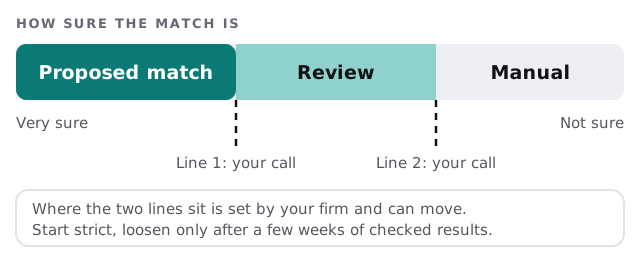
Start strict. Put the lines where only obvious matches get proposed, check the results for a few weeks against what your people would have done, and loosen them only if the checks come back clean.
What trips matching up
Most wrong guesses come from the same handful of situations. Tell us which apply to your clients:
- One payment settling several invoices, or one invoice paid in parts
- Credit memos and refunds that reverse an earlier bill
- Vendors who change their name or remit from a different entity
- Duplicate invoice numbers across vendors
- Rounding, tips or foreign-currency differences
- Invoices dated in one month and paid in another
None of these are reasons not to automate. They are the reasons the review lane exists.
Who does which part
The split is simple. The AI does the reading, comparing and sorting. Your bookkeeper decides what’s posted. QuickBooks stays your system of record, so your reports, your client permissions and your audit trail are the ones you already know.
If you want to get invoices into one place before matching them, our AI invoice tracking tool page covers collecting and tracking, and client document collection for accounting firms covers getting the paperwork out of clients in the first place. Rather set up the capture side yourself? Our guides on setting up QuickBooks and setting up Dext are a good start, and they work fine alongside matching.
What we need from you
- Two or three clients to start with. Pick ones with steady volume and a mix of easy and awkward invoices.
- Read access to their QuickBooks data, set up through the permissions you already control.
- Ten of your own past matches, including ones your team found tricky, so we can compare what the AI proposes with what your people did.
- A named reviewer. Someone who looks at the proposals each day and has authority to say no.
We’ll put together a plan and a fixed quote after the free IT check, and a real person replies within one business hour, Monday to Friday, 9am to 5pm Pacific.
The goal isn’t a firm with no matching work. It’s a firm where a person only touches the matches that need one.