Somewhere in most small businesses, a person opens a PDF on one screen and types what it says into another. Supplier invoices, intake forms, certificates, delivery notes. It’s careful, necessary and mind-numbing work, and it’s exactly the kind AI document extraction for small business was built for: read the document, find the fields, and hand them to the right system.
How it works
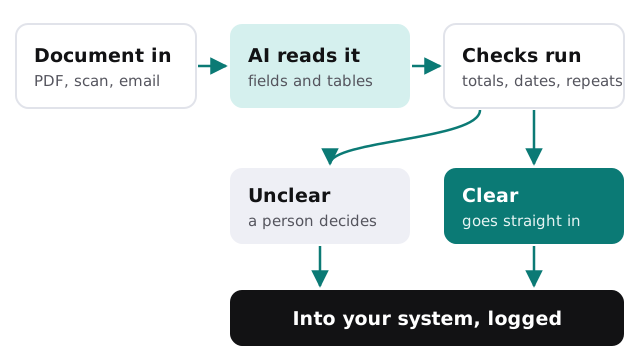
- The document arrives. In a shared inbox, a folder or an upload form, as a PDF, a scan or a photo.
- AI reads it. Not just the text, but the layout: which number is the total, which date is the due date, which rows are line items.
- Fields are matched to your names. “Amount due”, “Balance” and “Total payable” all land in your Total column.
- Checks run. Do the line items add up to the total? Is the date sensible? Have we seen this invoice number before?
- Clear documents go straight in. Anything uncertain goes to a person with the questionable fields highlighted.
- Everything is logged, including who approved what.
What it pulls from a single invoice
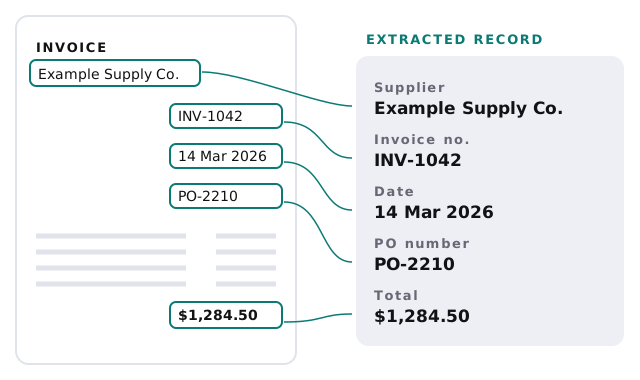
The fields depend on the document. For a supplier invoice, it’s usually the supplier, the invoice number, the dates, the purchase order reference, each line item and the total, which together are enough to match the bill and schedule the payment.
Why this is different from old scanning software
| Template-based OCR | AI extraction | |
|---|---|---|
| A new supplier layout | Needs a new template built | Usually read correctly the first time |
| Stamps, notes and handwriting | Often fails | Better, and still checked |
| Tables of line items | Fragile when rows wrap | Reads rows and totals together |
| When it gets something wrong | Often silently | Flagged by confidence scores and checks |
The checks matter more than the reading. An extraction tool that’s right most of the time and quietly wrong the rest is worse than typing, because nobody looks twice.
Checks that catch mistakes before they spread
- Line items add up to the stated total.
- Dates fall in a sensible range and the due date comes after the invoice date.
- The supplier matches one you already pay.
- The purchase order number exists and isn’t already closed.
- The same invoice number hasn’t been entered before.
What we need from you
A folder of real documents from each type you want handled, including the awkward ones: the supplier with the strange layout, the scan that’s always a bit crooked. We test against those before anything goes live, so you see how it performs on your paperwork rather than on a demo.
Multi-page documents and long tables are where careful setup pays off. Line items that run onto a second page, totals printed only at the end, and attachments that bundle several invoices into one PDF all need rules agreed up front, so the tool splits and joins them the way your team would.
Keeping documents private
Invoices and intake forms carry names, account numbers and sometimes health or financial details, so where they go matters as much as how well they’re read.
- Documents are processed through business accounts with the AI provider, under terms that keep your data out of model training.
- Only the fields you need are stored. The original stays where it already lives, such as your inbox or document folder.
- Access to the review queue is limited to the people who would have typed the data anyway.
- A log shows which documents were processed, what was extracted and who approved each one.
If your team doesn’t have written rules for what may go into AI tools yet, our guide to writing an AI use policy for a small business is a good place to start.
If a document type is too sensitive to send to an outside service at all, we’ll say so and leave it with a person.
Start with the one document type your team types most often. When that runs quietly for a month, add the next.