It is Saturday at 11am. You are at an open house, and your phone shows three new inquiries from a portal. By the time you are back at your desk, two of them have also written to another agent. Lead follow up automation for real estate agents is about closing that gap: a reply drafted the moment a lead arrives, and a person, you, deciding what happens next.
It does not replace the relationship. It replaces the typing, and the remembering.
Five sources, one list
Leads arrive from many places and end up scattered across inboxes, sign-in sheets and phone notes. The first job is to bring them into one list, tagged by where they came from.
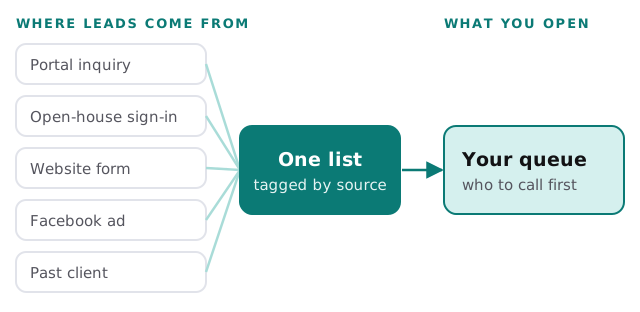
If the pieces are already in a CRM, we connect them. Our notes on Facebook lead ads to a CRM, website forms to a CRM and Gmail to a CRM cover the plumbing.
What each lead type gets
| Lead | First message | What happens later |
|---|---|---|
| Portal inquiry | A reply that answers the question they asked, with the listing | A check-in about their search |
| Open-house sign-in | A thank-you that mentions the house they saw | Similar listings, if they said what they want |
| Website form | A reply to what they typed, in your voice | A call task for you |
| Past client | A short personal note, never a template-looking blast | A yearly check-in and a market note |
| Facebook ad | An acknowledgement of the ad, plus one question | A call task if they answer |
Each row is a set of rules written with you, not a script lifted from somewhere else.
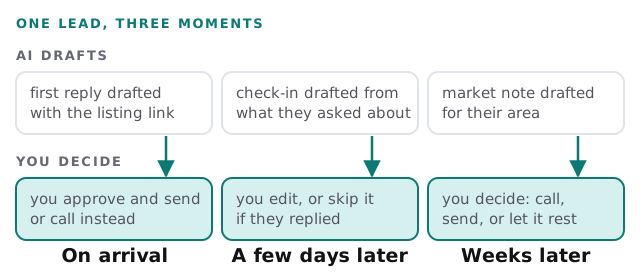
One lead, three moments
A buyer who says “just looking” in March may buy in October. The follow-up that keeps you in the picture is slow and patient.
Setting it up
- List your lead sources. Include the unglamorous ones: the sign-in sheet, the DM, the person who texted your old number.
- Write your voice into the rules. A few messages you actually sent and liked, plus phrases you never use.
- Choose the stopping rules. A reply, a booked showing or an unsubscribe ends the sequence at once.
- Pick who sees the queue. You, or you and an assistant. A team lead may want to see the whole list.
- Start with one source. Usually portal inquiries, since they are the most time-sensitive.
- Review a week of drafts before you let any of them go out unattended.
Reading the draft is the part that keeps it yours. For the writing side on its own, see the AI follow-up email generator, and for sorting which leads deserve a call first, AI lead qualification for small business. The wider picture for an office is in AI automation for real estate offices.
The email rules, briefly
The FTC’s CAN-SPAM guide sets out a short list for commercial email: truthful header information, a subject line that matches the content, a clear statement that the message is an advertisement, a valid postal address, and an opt-out that you honour within 10 business days. It also states that the law covers all commercial email, and that it makes no exception for messages to past customers. Every draft we set up includes an unsubscribe route and your address. We are not lawyers; if you are unsure how the rules apply to you, ask one.
Signs you need this
- Leads from a weekend are answered on Tuesday.
- You have a spreadsheet of sign-ins that never got a follow-up.
- Your past clients hear from you only when you want a referral.
- Nobody remembers who said “call me in the spring”.
Rather build it yourself? The guide to drafting email replies with Zapier and AI shows one route, and setting up HubSpot for your team covers the CRM it feeds. The hard part is keeping it tuned as your market and your wording change.
The agent who replies first is not always the one who wins. The agent who is still replying in October often is.
What we need from you
- Access to your lead sources, such as the portal accounts and web form.
- Examples of messages you have sent that worked.
- The list of things you never want said on your behalf.