Brokerages grow by accretion. A transaction system was chosen by one broker, a CRM by another, e-signature by whoever needed it that week, and an MLS login by each agent. IT consulting for real estate offices is the exercise of stepping back and looking at the whole pile at once, with someone who doesn’t have a favorite tool.
Four conversations first
The review starts with people, not with devices. In a brokerage, each role sees a different slice of the technology, and the gaps are usually between slices.
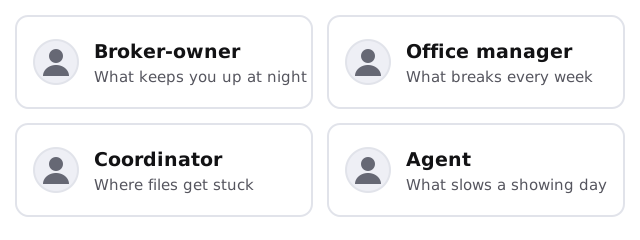
The broker-owner knows what worries them. The office manager knows what breaks. The coordinator knows where files stall between a signed offer and a closing, and an agent knows what slows the day. We ask all four, because no single one has the full picture.
What the tool inventory looks like
Most brokerages run the same handful of categories, even when the products differ. For each one we ask something specific.
| Category | What we ask |
|---|---|
| Transaction management or shared folders | Who can see every file? Who can delete? |
| CRM and lead sources | Whose list is it? What happens to it when an agent leaves? |
| E-signature and form libraries | Is it one office account or several personal ones? |
| MLS and showing tools | Which are paid by the office and which by agents? |
| Listing photos and marketing files | Where do they live, and who can share them? |
| Website and listing feeds | Which vendor runs it, and who holds the logins? |
| Phones, printers and scanners | Who set them up, and is anything still on defaults? |
Names of tools aren’t the point. A brokerage can be well run on almost any of them. What matters is whether the answer to each question is written down.
Keep, fix or replace
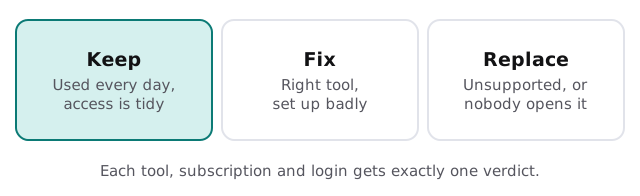
Every item in the inventory ends up with one verdict. The discipline of choosing only one is what turns a pile of observations into a plan.
Findings we’d expect to see
- Two people sharing one login for the e-signature account
- Transaction files reachable by every agent in the office
- A former agent’s email still forwarding client mail
- A subscription nobody remembers buying, renewed every month
- A website vendor holding the only admin login for the domain
None of these is unusual, and none of them is hard to fix once somebody has the list.
A busy month and a quiet one
Spring and summer bring listings and closings, and with them the temptation to postpone anything that touches how people work. Review in the quiet weeks and the changes land before the rush. If you’ve already had a stressful closing season, say so at the start. It tells us which findings to put first.
What you get at the end
- A one-page map of the tools, who uses them and who pays.
- A ranked list of fixes, each with a plain-words reason.
- A fixed quote for the work you choose to do, and none for the work you don’t.
- A short list of habits for the office manager to keep the map current.
What we need from you
- An hour with each of the four people above
- A list of the subscriptions you know about, including the ones agents pay for
- Admin access, read-only is fine, to the main systems
- Honest examples of the last time something went wrong
The first step is the free IT check, and a real person replies within one business hour, Monday to Friday, 9am to 5pm Pacific. If you’d like ongoing care afterwards, our page on managed IT services for real estate offices describes it, and AI automation for real estate offices covers what a tidy toolset makes possible.
A brokerage doesn’t have too many tools. It has too many tools nobody has listed.