Employee onboarding and offboarding IT is a small thing until someone starts on a Monday with no laptop, or leaves on a Friday and can still read the client inbox in March. Both are the same problem: nobody had the full list of what a person touches. This page is that list, in order.
The two ends of one list
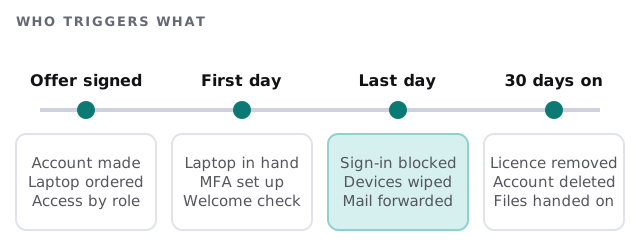
Onboarding: ready before day one
- Create the account with a role-based set of groups, so a new salesperson gets what the last one had, not whatever someone remembers.
- Order and prepare the device. Updates applied, disk encrypted, management in place, so it can be handed over and used.
- Set up sign-in. Multi-factor authentication registered in front of you, with a password manager if you use one.
- Add the shared things. Shared mailboxes, team folders, the phone system, and the line-of-business software.
- Check the first hour. Can they print, join a call, open the files they need, find the wifi?
A new person who loses a morning to setup has formed a view of your company by lunch. Most of this can be done a week ahead.
Offboarding: Microsoft’s order
For Microsoft 365, Microsoft’s own guidance sets out the steps and the reason behind each. The order matters, because some steps become harder once an earlier one is done.
| Step | Why it’s there |
|---|---|
| Block sign-in | Stops access to Microsoft 365 services and organization data |
| Save the mailbox contents | Gives whoever takes over the work the history |
| Wipe and block the phone or tablet | Removes company data from a personal device |
| Forward email or make a shared mailbox | Keeps customers’ messages from going nowhere |
| Give another person access to OneDrive and Outlook data | Hands the files to a named owner |
| Remove the licence | Frees it for the next person |
| Delete the account | Stops mail arriving at an address that nobody reads |
The 30-day clock
Two of these steps start a clock. Microsoft says that after you delete an account, its OneDrive and Outlook content is kept for 30 days, and you can restore the user during that time. Removing a licence is similar: email, contacts and calendar are kept for 30 days and then deleted permanently. If you only remove the licence and leave the account, the OneDrive content stays accessible.
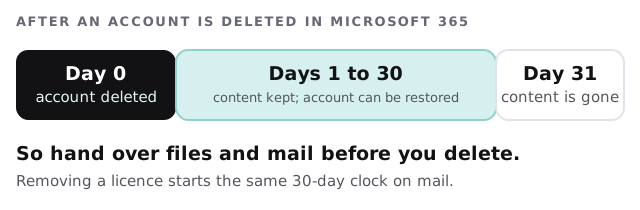
Microsoft also notes that if your accounts sync from a local Active Directory, you delete and restore them there, not in Microsoft 365.
Beyond the main account
The main login is the easy part. A leaver usually also has:
- A login to accounting, payroll or the CRM.
- Shared passwords written down somewhere.
- Access to social accounts, ad accounts and the website.
- Company data on a personal phone.
- Keys, door codes and a company card.
We keep a list of every system by person, and the system owner signs off on that line. It’s what makes a leaver’s last afternoon short.
A leaver, on a Friday
Dana resigns on Monday and finishes Friday. By Monday evening IT has the date. During the week her files are copied to her manager, and the shared inbox she watched is reassigned. At 5 p.m. on Friday her sign-in is blocked and her phone is wiped of company data. The following week her mailbox becomes a shared one, and a month later the account is closed. Nobody has had to ask who still has access to what.
What we need from you
- A heads-up from whoever manages people when an offer is signed or notice is given.
- A list of the systems each role uses.
- A named manager who takes over each leaver’s files and mail.
- Admin access to Microsoft 365 or Google Workspace, and to the line-of-business systems.
Offboarding is only finished when you can say, system by system, that the person can no longer get in.