A lead form on Facebook is easy for the customer, and that is the problem. The tap takes seconds, so the person has already moved on to the next thing by the time anyone looks at your list. If the lead waits in a download until Monday, it has gone cold. Facebook lead ads to CRM automation closes that gap: the instant someone submits, a record appears where your team already works. It is the practical answer to anyone trying to send Facebook leads to a CRM without exporting spreadsheets.
A lead at 7:42 in the evening
Someone sees your ad on the sofa and fills in the form. Without automation, it sits in an ad dashboard until somebody remembers to export it. With it, the contact exists in your CRM before they put the phone down, tagged with the ad, assigned to whoever covers that area, with a task to ring them in the morning and a short message already queued.
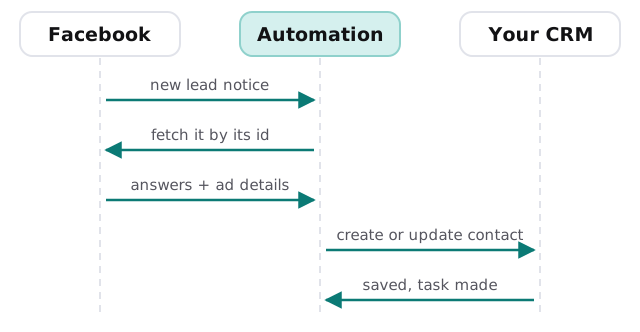
How the lead travels
Meta’s developer documentation says leads can be retrieved with webhooks or with a bulk read. A webhook gives real-time updates for new leads. The notice itself is small: it carries an identifier for the lead, called leadgen_id, which you then use to fetch the actual answers.
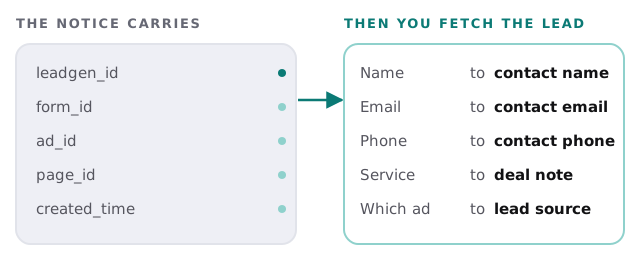
What is in the notice, and what you do with it
The documentation lists the details the webhook includes: the lead id, the page, the form, the ad group, the ad and the time it was created. Those are the useful ones for reporting, because they tell you which creative produced the enquiry. The answers the person typed come from the fetch.
Rules we usually add
- Match before creating. Search the CRM for the email or phone, and update an existing contact when there is one.
- Write the source properly. Store the ad and the form so you can see which campaigns produce leads, not just clicks.
- Route by rule. Area, service or ad decides who owns the lead.
- Create the first task. A call, a message, a deadline, so the lead has an owner and a time.
- Handle bad data. A phone number with letters, an email without an at-sign, or a blank form goes to a review list instead of the pipeline.
- Alert on silence. If no leads arrive for longer than usual while the ad is running, a named person is told.
What to test before you spend on ads
Submit a test lead of your own and follow it all the way. Check the contact in the CRM, the owner, the source tag, the task and the alert. Then submit the same details again to confirm it updates instead of duplicating, and submit one with a deliberately broken phone number to see where it lands. Ten minutes of testing here is cheaper than a weekend of ad spend feeding a pipeline that quietly drops leads.
Signs it is time
- You export leads to a spreadsheet and paste them in.
- Different people each remember to check the ad dashboard.
- You cannot say which ad produced the customers you actually won.
- Replies to new leads take a day or more.
Rather build it yourself?
For a simple link, a connector tool may be enough. Our guide to setting up Zapier for your team covers building it, and the guide to HubSpot covers having a CRM ready to receive it. If the same enquiries also arrive through your website, see our page on website form to CRM automation, because both sources should land in the same place.
What we need from you
- Admin access to the Facebook page and the ad account.
- Your CRM, and the fields you want filled.
- Rules for who owns which leads.
We start with a plan and a fixed quote, and a person approves the matching and routing rules before the first live lead is processed.
A lead is worth most in the first few minutes. Every manual step between the form and the phone spends some of that.