AI automation for medical practices is mostly about the work that happens between visits. The exam room is where the practice earns its living. The hours around it are spent reading a portal queue, finding a fax that arrived Tuesday, and wondering whether a patient ever booked the cardiology appointment you referred them to.
We build small AI tools and internal tools for that in-between work. Staff review whatever reaches a patient.
The inbox that three people share
Open the shared inbox on a Monday and it holds several different jobs wearing the same clothes. A refill request, a billing complaint, a request to move a Thursday appointment and a message that says “my chest feels tight again” all arrive as text. Staff read each one, work out whose it is and forward it.
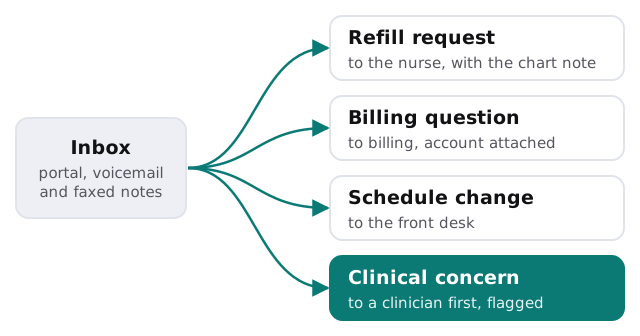
What changes on the staff side:
- Each message arrives already labeled, with the matching appointment or account beside it.
- Routine replies are drafted for the person who owns that queue, who edits and sends.
- Anything the tool is unsure about goes to a human unlabeled, not guessed at.
- A daily count shows what’s waiting, so a Friday backlog stops being a surprise.
Referrals that don’t vanish
A referral is a promise the practice makes to a patient. It is easy to break by accident: the specialist’s office is busy, the patient is busy, and nobody is holding the thread.
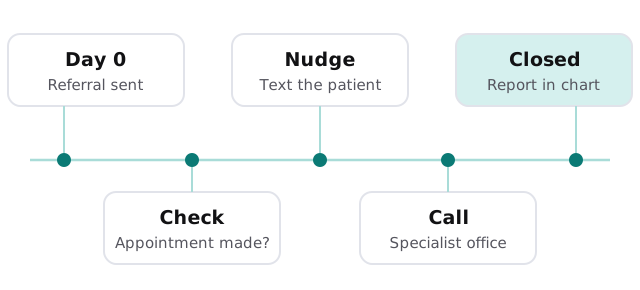
- Log. The referral is recorded when it’s ordered, with the specialist, the reason and the date.
- Check. A few days later, the tool looks for a booked appointment and flags the ones with none.
- Nudge. A drafted text or call script goes to your referral coordinator, who decides whether to send it.
- Chase. If the patient was seen, the tool lists the reports still missing.
- Close. When the report is filed in the chart, the item leaves the list.
Prior authorizations and the paper chase
Prior authorization is repetitive in a specific way: the same clinical facts, retyped for each payer’s form. A tool can pull the diagnosis, the earlier treatments and the order into a draft packet that your authorization specialist checks against the chart. It can also keep a list of requests still waiting on a payer, with how long each has been open.
Records requests have a clock
Federal rules give patients a right to see and get a copy of their records, and the access rule sets a response window. Under 45 CFR 164.524, a practice generally has to act on a request within 30 days, with one possible 30-day extension if it explains the delay in writing. The point isn’t to promise any outcome. It’s that a request sitting unseen in a mailbox is how a practice ends up late. A tool can log each request the day it arrives, show the days left and remind the person who handles records. What is released is always decided by your staff, and the rule’s minimum-necessary thinking in 45 CFR 164.502 is why we keep tools to the least information a task needs.
The software around the practice
| Category | What you may already run | What a tool adds |
|---|---|---|
| Electronic health record | Charts, orders, notes | Reads a narrow slice, drafts beside it |
| Patient portal and messaging | Secure messages, forms | Sorts and drafts replies for staff |
| Practice management and billing | Scheduling, claims | Lists open balances and stalled claims |
| Fax and document capture | Incoming reports | Names and files documents for review |
| Phone system | Voicemail, call logs | Turns messages into a queue |
A Tuesday in the front office
The office manager arrives to a short list instead of a pile: fourteen portal messages sorted into four piles, three referrals with no appointment, one records request on day twenty. She starts with the clinical-flagged message, walks it to the nurse and moves on. By nine, the sorting that used to eat the morning is done.
Questions to ask any provider
- What exactly can the tool read, and can it work from less?
- Which agreement do you need us to sign before it touches patient information, and with whom?
- Can staff see every message it drafted and what it changed?
- How do we switch it off, and what happens to what it stored?
What we need from you
Walk us through how a message and a referral move through the office today, and tell us which systems hold them. After the free IT check we return a plan and a fixed quote. A real person replies within 1 business hour, Monday to Friday, 9am to 5pm Pacific. If you’d rather trial drafting yourself first, choose an AI assistant for your team walks through the options.
Practices rarely lose patients in the exam room. They lose them in the gaps between visits, and gaps are exactly what lists are good at.