AI automation for physical therapy clinics begins with an uncomfortable fact about the business: the product is a series of appointments, and a series breaks easily. A patient cancels at 9:40. An authorization runs dry at visit eight. A good note gets typed at home at 8pm. Each is small, and together they decide how the clinic’s month goes.
We build small AI tools and internal tools for that rhythm. Your therapists and front desk approve what a patient sees.
The plan of care, one visit at a time
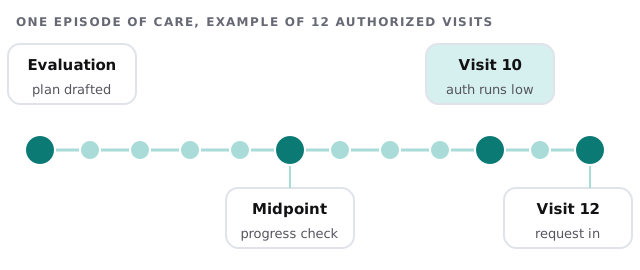
A tool that watches the count keeps two lists current. One is patients approaching the end of an authorization, with a draft request ready for your billing person. The other is patients near a progress check or re-evaluation date, so the therapist isn’t surprised by a visit that is suddenly due for one.
When a slot opens at 9:40
A cancellation costs the clinic only if the hour stays empty. Filling it means someone has to call people, and no one has time.
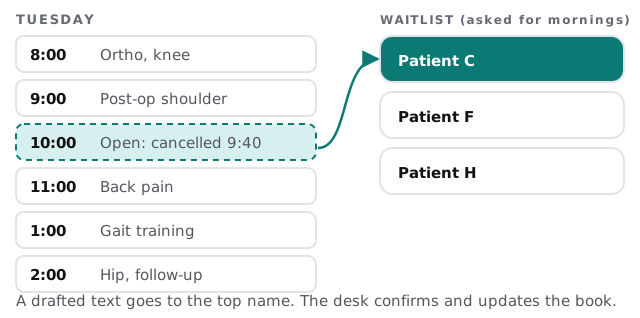
- Notice. The cancellation appears in your scheduling system.
- Match. The tool finds waitlisted patients whose preferences fit the slot and whose care type fits the therapist.
- Offer. A short text goes to the first one, with a clear way to say yes.
- Confirm. When someone says yes, your desk confirms and updates the book. If nobody answers, the next name is tried.
Notes, scaffolded
Documentation is where a clinic’s evenings go. Therapists take notes during treatment, but turning them into a complete daily note takes longer than anyone planned.
- The tool assembles exercises, parameters and measurements already entered during the visit.
- It leaves clearly marked blanks for the assessment and plan.
- It flags missing elements your clinic requires, such as a goal that’s never been updated.
- The therapist writes, edits and signs. Nothing is filed without them.
Keeping patients through the middle
Many patients drop out between visit three and visit eight, once the pain has eased and life gets busy. A tool can notice a gap since the last visit, draft a short check-in in your therapist’s name and put it on the front desk list. It can also send the home exercise program with a plain reminder, so the work between visits doesn’t fade.
Who does what
| Person | Today | With a tool beside them |
|---|---|---|
| Therapist | Notes after hours | Reviews a scaffold at the end of each visit |
| Front desk | Calls down a waitlist | Approves an offer and confirms |
| Billing | Counts visits by hand | Sees a list of authorizations running low |
| Owner | Learns of dropouts at month-end | Sees gaps weekly |
Seasons in a clinic
January brings new benefit years and patients returning after the holidays. Late summer brings school sports. Post-surgery referrals arrive all year. Your schedule has its own pattern, and the first thing we ask is to see it.
The software around a clinic
Typical categories are a rehab-focused electronic record, scheduling, a patient-messaging or home exercise tool, and billing with a clearinghouse. Each limits what outside tools may read, so we check yours before promising any connection.
Questions to ask any provider
- Which fields does the tool read when it builds a note scaffold?
- What does it do when a patient replies with something unexpected?
- Can we see everything it drafted and what we changed?
- What agreement does the vendor expect from us?
What we need from you
A typical week’s schedule with names removed, how your authorizations are tracked now and the systems you use. We send back a plan and a fixed quote after the free IT check. A real person replies within 1 business hour, Monday to Friday, 9am to 5pm Pacific. To explore a simple scheduling reminder flow yourself, set up Zapier for your team covers the basics.
A full schedule and a finished note by five o’clock are not luxuries. They’re the result of fifty small things not slipping.