AI automation for retail stores starts with a boring question: how many are there? The shelf says four, the point-of-sale system says six and the website says two. Everything else a store does, from reordering to advertising to apologizing, depends on that number. We build small AI tools and internal tools that keep it honest and take the typing out of the work around it.
Three counts that never agree
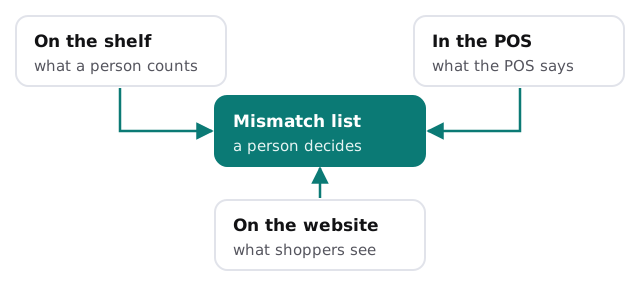
Most stores compare these by walking the floor with a clipboard. A tool can do the comparison for you: it reads the exports your systems already produce, lines up each product and lists the ones that disagree, ranked by how much they sold. Your team checks the shelf for those few items instead of counting everything.
Receiving a delivery, in five steps
- The packing slip is photographed at the back door.
- A tool reads the lines and matches them to the open purchase order.
- Shortages, substitutions and extras are listed, not buried.
- A person confirms against what is actually on the pallet.
- The record updates in your inventory system, and the vendor invoice has something to be checked against.
Nothing here replaces the person at the door. It replaces the re-keying afterwards.
Who gets which job
Words for products
Online
New arrivals need a title, a description, tags and sometimes a size guide. Give a tool your style and the vendor’s spec sheet and it drafts these in your voice. Someone checks each one, because a wrong dimension or a materials claim is a return waiting to happen.
In the store
The same record can print shelf tags, sale signs and the short card that explains why a product is worth its price. Fewer versions of the truth means fewer signs that disagree with the register.
Customers who write in
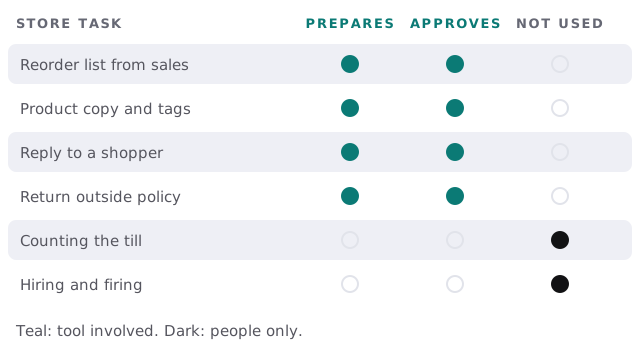
Questions arrive by email, Instagram and the contact form: is it in stock, can I return it, do you have it in blue. A tool drafts replies from your policies and live inventory. A person approves anything that involves money, a complaint or an exception.
Returns outside the window are the place to be careful. A tool can pull the order, the date and your written policy onto one screen so the manager decides in ten seconds instead of hunting for them. It does not decide.
Q4 is a project, not a season
For many stores the holiday quarter is the year. The pressure lands in the weeks before it: purchase orders, seasonal hires, receiving, then returns and a count in January. We would start in the quiet months with reorders and receiving, so the tools have been used and trusted before the rush begins. Starting in November is possible but far less comfortable.
Staff and the schedule
Shift swaps, availability and a surprise sick call are a daily text chain for most managers. A tool can keep availability in one place, draft the week around expected foot traffic and offer a short list of people who could cover a gap. The manager makes the call.
The software around a store
Retail usually means a point-of-sale system, an inventory or purchasing module, an online store platform, a marketplace or two, email and loyalty, a time clock and bookkeeping. Whether each lets another tool read it varies. That is the first thing we find out.
Questions to ask any provider
- Which of our systems will you read from, and which will you write to?
- What happens when two systems disagree: who decides?
- Can a reorder ever be placed without a person?
- Where do our product and customer exports live?
What we need from you
Export a recent sales and inventory file, two vendor invoices and your returns policy. After the free IT check you get a plan and a fixed quote. A real person replies within 1 business hour, Monday to Friday, 9am to 5pm Pacific. To try drafting customer replies yourself first, drafting email replies with Zapier and AI shows one way.
A store sells what it can find. The best tool is the one that makes sure the number on the screen is the number on the shelf.