AI automation for salons does not touch the chair. A cut, a color or a blowout is a craft, and clients choose you for it. What a tool can touch is everything that happens before the client sits down and after she leaves: the rebooking, the reminder, the cancellation, the note and the reorder. That is where a salon’s income quietly drops. We build small AI tools and internal tools for that part, and your team approves the wording.
Signs the front desk is carrying too much
- Clients leave without a next appointment and nobody follows up.
- A stylist spends a lunch break answering Instagram messages.
- Cancellations are discovered when the client does not show up.
- Color notes live in three apps and a notebook.
- You order product when a stylist says it ran out.
The loop that fills a calendar
A salon’s best revenue is the regular who comes back on schedule. Most of the work is keeping that loop turning.
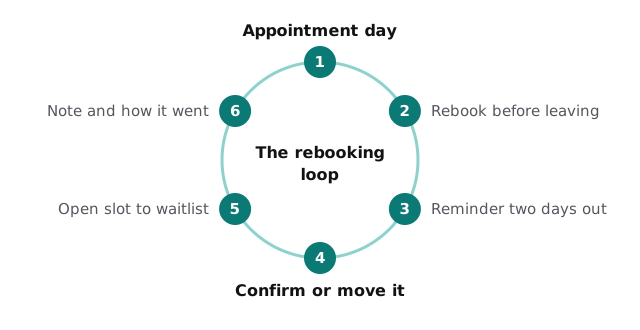
Rebooking happens at the chair, so a tool cannot do it. What it can do is catch the client who left without one. Based on the service and your usual interval, it lists the people who are due and drafts a short message for the stylist or front desk to send.
A cancelled slot is revenue that can still be saved
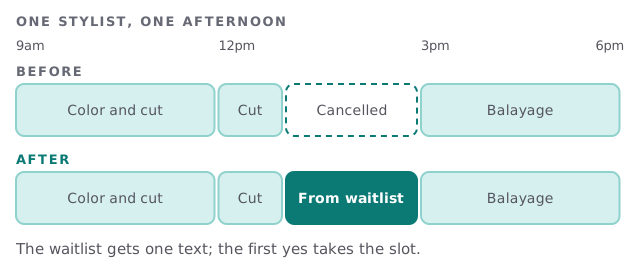
When someone cancels, the tool checks the waitlist for clients who want that service, with that stylist, on that kind of day. It drafts one text to the first few, and the first yes takes the slot. A person still decides the order if it is not obvious.
Notes a stylist can actually use
Stylists write notes between clients: a formula, a developer strength, a comment about sensitivity. Those notes get short, and then they get lost. A tool can turn a voice note or a hurried line into a tidy record under the client’s profile and attach the photo the stylist took. The stylist reads it and corrects it.
For allergies or skin reactions, the record is a flag, not a verdict. The stylist decides, every time.
Whose job is it?
| Role | Weekly chore | What a tool drafts |
|---|---|---|
| Owner | Product orders, payroll or commission summary, reviews | A reorder list, a summary for the accountant, reply drafts |
| Front desk | Confirmations, waitlist, inbox | Reminder batches, waitlist texts, answers to common questions |
| Stylist | Notes, rebooking, social posts | A tidy note and a caption from a photo |
| Assistant | Back bar counts | A short list of what ran low |
Back bar, retail shelf and the quiet money
Back bar supplies and retail products usually live in different places, and nobody compares them. A tool that reads your service log can estimate how much color a week of appointments should use, and flag when a bottle is running down sooner than it should. That is also a quiet check on waste.
The year has a few big weekends
Prom season, wedding season, back-to-school and the run-up to the holidays squeeze a salon from both sides: more clients, and shorter notice. January is slower, so that is when we would build. A salon that has its reminders and waitlist working before spring has one less thing to think about in May.
The software around a salon
You probably run an appointment and point-of-sale system, a card reader, online booking, a text-reminder tool, payroll or commission tracking, a website and a few social accounts. Some of these export data, some do not. Whether a new tool can read your booking book is the first thing we check.
What we need from you
Tell us which system holds your appointments, how you pay your stylists and which chore bothers you most. After the free IT check you get a plan and a fixed quote. A real person replies within 1 business hour, Monday to Friday, 9am to 5pm Pacific.
Clients come back to the person who did the work. The goal is to make sure the next appointment is already on the books when they do.