Writing a proposal is the job most owners put off until evening. The call went well, the client is waiting, and the draft starts from a blank page or last year’s file with the wrong name still in the header. An AI proposal generator for small business takes the blank page away. It’s the same idea as an AI proposal writer for service businesses: you supply the facts and the judgment, it supplies the first draft.
The proposal you’d write at 9pm
Picture a plumbing contractor, a bookkeeper or a landscaper after a good first call. You have rough notes, a photo or two, and a price list. The work that follows is mostly assembly:
- Copy the client’s name and address across.
- Describe the problem so they feel heard.
- Lay out what you’ll do, in the order you’ll do it.
- Add up the prices.
- Paste in the standard terms.
Four of those five are repetition. The tool does the repetition and leaves you the part that takes judgment.
Three kinds of content in one document
Not every part of a proposal should be treated the same way. Getting this split right is most of the design.
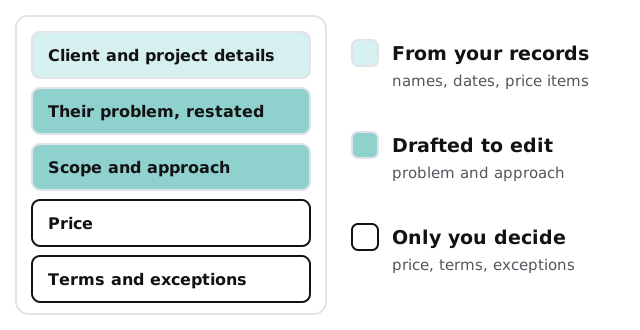
| Kind | Examples | How it’s handled |
|---|---|---|
| Looked up | Client name, address, date, contact | Copied exactly from your records, never reworded |
| Drafted | Their problem, your approach, the next steps | Written in your voice from notes, flagged for your edit |
| Decided | Final price, discounts, terms, exceptions | Left for you, or filled only from items you’ve approved |
Your words, not generic ones
A proposal that could have come from any company wins less work than one that sounds like you. That depends on what the tool is shown.
- Your past proposals. Especially the ones that won.
- Your price list or service menu. One source of line items, kept current.
- A few phrases you always use. And a few you’d never use.
- Your standard terms. Pasted as written, not paraphrased.
Terms deserve a note. Anything with legal weight should be copied from the version you or your adviser approved. The AI shouldn’t rewrite it in friendlier words.
Getting from notes to draft
- You add the notes. Typed, dictated or taken from a call recording you already have permission to use.
- It drafts. A proposal appears in your document tool with gaps marked in plain brackets.
- You fill the gaps. Price, timing, anything it flagged as unclear.
- You edit the voice. Cut what’s off, keep what’s right.
- You send it. Nothing leaves without you.
A loop, not a one-off
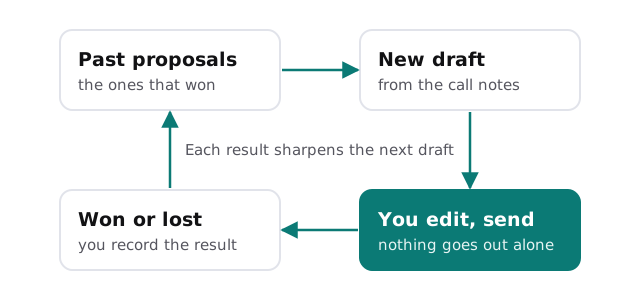
The best versions improve with use. When a proposal wins or loses, you record it, and the tool learns which phrasing and structure went with the wins.
Questions to ask any provider
- Can I see a draft built from my own notes, not a demo?
- Which parts are copied from my records and which are written fresh?
- Can it ever fill in a price I haven’t set?
- Where are my past proposals stored, and who else can read them?
- How do I correct it so it stops making the same mistake?
Rather build it yourself?
If you’d like to try drafting with a general assistant first, our guide to setting up ChatGPT for your business covers how to give a team a shared, controlled workspace. Paste in a past proposal and your notes and see how far it gets. We come in when you want drafts built straight from your price list and CRM, with the lookups done for you.
What we need from you
- Five to ten past proposals, including a couple that won.
- Your price list or service menu.
- Your standard terms, exactly as approved.
- The document tool you use today.
We start with a plan and a fixed quote, and a person approves how the tool pulls prices and terms before it produces anything a client could see.
Let the tool write the first draft. You keep the price, the promise and the send button.