An AI quote generator for contractors solves a narrow, expensive problem. You walk the job, you know exactly what it needs, and then the quote sits in your head for two evenings because you’re on another site. Meanwhile the customer is collecting quotes from people who wrote theirs the same day. If you want to turn field notes into quotes faster, what has to speed up is the typing, not your judgment.
What it’s doing behind the scenes
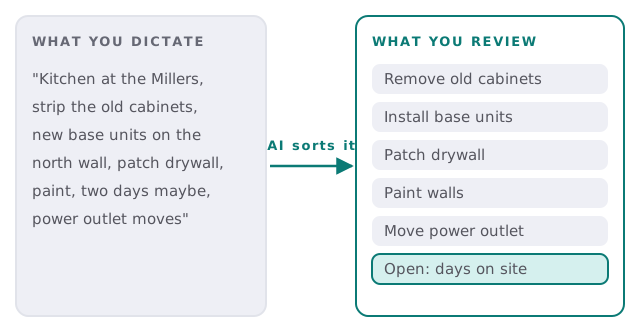
Take a typical dictation after a kitchen walk-through. It’s rambling, out of order, and full of shorthand only you understand. The tool sorts it into lines you can read in ten seconds, and flags what it wasn’t told.
From the driveway to the draft
- Capture. A voice note, a few typed lines, and photos of the site, sent from your phone to a single address or app.
- Sort. The AI splits the note into separate pieces of work, in the order a customer would expect to read them.
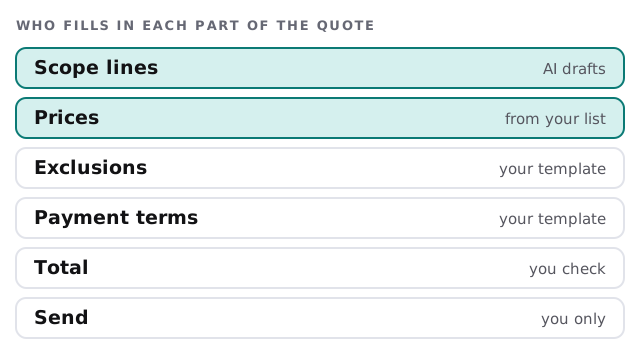
- Price. Each line is matched to your price list or to similar past jobs. Matches are shown; gaps are left empty.
- Wrap. Your standard exclusions, payment terms and validity period are added from your own template.
- Review. You get the draft with its open questions on top. You fix, fill and approve.
- Send. A PDF in your branding goes to the customer from you, not from the tool.
Who types what
Parts of a quote people forget
A quote that wins work is also a quote that protects you. The template we set up reminds you each time of the pieces that usually get skipped:
- Exclusions. What the price does not cover, written plainly.
- Allowances. Fixtures, tiles or materials the customer will choose later.
- Access and conditions. Parking, working hours, who moves furniture.
- Validity. How long the price stands, since costs move.
- Change handling. What happens when the customer adds something mid-job.
Signs you’d benefit
- Quotes go out two or three days after the visit.
- You’ve quoted from memory and underpriced the same job twice.
- Your best estimator is also your best installer, and can’t do both.
- Customers ask you to re-send a quote because they can’t find it.
- Each quote is built from a blank page, even for jobs you do every month.
What to be careful about
An AI quote generator is only as good as the price list behind it. If your numbers are out of date, the drafts will be too, politely and quickly. So we begin by tidying the list, and the tool makes it easy to update a line once and see it reflected everywhere. We also keep the pricing rules explicit: markups, minimum charges and travel are set by you and are visible, not buried in a prompt.
It doesn’t see the site. A photo helps, but a crawl space or a wall with a surprise behind it isn’t in the picture. That’s why it asks questions and leaves open lines rather than filling every gap.
What we need from you
- Your current price list, or your last ten quotes if you don’t have one.
- A sample of a quote you were pleased with.
- Your standard terms and exclusions.
- Which jobs you want covered first.
- The name of whoever approves before sending.
If you’ve been thinking of stitching something together yourself, setting up Zapier for your team covers the connecting pieces. Estimating logic and your price rules are the part worth getting right with someone who has built one.
The tool saves you the typing. The judgment about the job is still yours, and so is the signature.