The Wi-Fi in most small offices was set up on the day the internet arrived, by whoever was around, and hasn’t been looked at since. The password is on a sticky note by the printer, former staff still know it, and the router is running whatever software it shipped with. Business wifi security isn’t glamorous. It’s five or six settings, done once and checked now and then.
A day it matters
A supplier visits to drop off a sample. He asks for the Wi-Fi, someone reads out the password, and his laptop joins the same network as your accounting computer and the file share. Nothing happens. It doesn’t need to. The point is that on a flat network, anyone you’ve ever given the password to is inside the room, as far as your computers are concerned.
Split the network
The single most useful change is to stop having one network. Three is a good number.
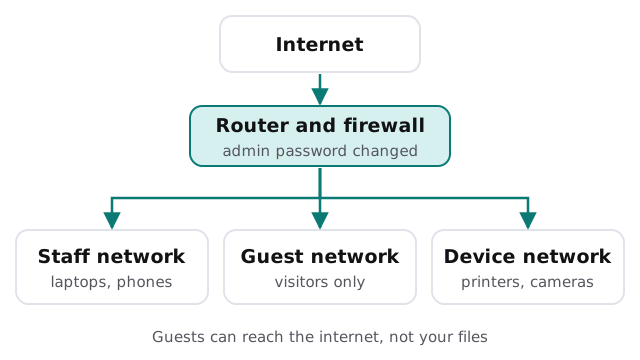
CISA’s guidance backs the guest part directly: give visitors their own network with its own password, so your primary credentials stay private. Printers, cameras and smart gadgets deserve the same treatment, because they’re rarely updated and often the weakest link.
The settings that matter
Encryption
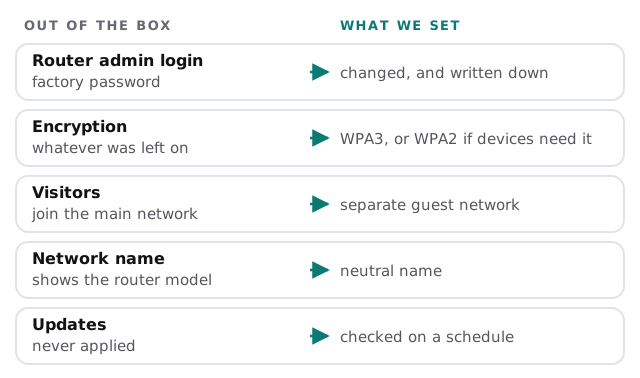
CISA describes WPA3 as the strongest wireless encryption available today, and advises using equipment that supports it. Older devices sometimes can’t join a WPA3 network, in which case WPA2 remains an acceptable fallback. The thing to avoid is anything older, or an open network with no encryption.
The router’s own login
There are two passwords, and offices tend to remember only one. The Wi-Fi password lets devices join. The admin password lets someone reconfigure the router. CISA’s advice is to change the factory admin password, since defaults are easy to find online.
Updates
Router makers publish fixes for security holes. CISA advises checking the manufacturer’s site regularly and applying updates to your access points. In practice that means putting it on a schedule, since nobody remembers a task with no due date.
The network name
Don’t broadcast the router’s make and model in its name. CISA suggests changing the default name from the manufacturer’s so an attacker can’t tell which router you have.
Questions to ask whoever sets it up
- Who has the router’s admin login, and where is it written down?
- How many separate networks will there be, and which devices go on each?
- When the Wi-Fi password changes, how are staff devices updated?
- Who checks for router updates, and how often?
- What happens to access when someone leaves?
Where staff come in
This is also where the sticky note comes down. If the password has to be shared, share it through a password manager rather than a note by the printer, and change it when someone who knew it leaves.
The best settings fail when the password is reused everywhere. People should know not to share the staff password with visitors, and to point guests at the guest network instead. A one-line note on the wall near reception does more than a policy document nobody opens.
What we need from you
- Access to the router, or the name of whoever installed it.
- The make and model of the access points if you have more than one.
- A list of what’s connected: printers, cameras, door systems, tills.
- A rough sense of where the signal drops, because security and coverage are usually fixed in the same visit.
If the connection itself is the problem rather than security, that’s a separate job, and we’d start with a look at where the weak spots are.
A strong Wi-Fi password protects you from strangers. A separate guest network protects you from everyone else.