An office network is easier to understand as a chain than as a cloud. Office network setup for small business starts at the street and works inwards: the internet line, a modem, a firewall, a switch, and then the Wi-Fi and cabled devices that hang off it. Small office Wi-Fi setup service work is mostly about getting each link right and knowing which one to look at when something fails.
The chain, link by link
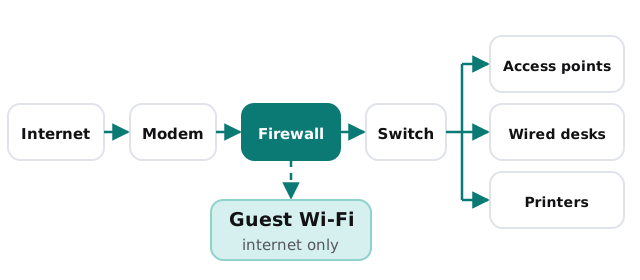
The line and the modem
Your provider supplies these. The only decisions on your side are which provider and whether you need a second line as a fallback if the office can’t afford to be offline.
The firewall
This decides what’s allowed in and out. It’s also where guest and staff networks get separated, so it’s the most important box on the list. Its administrator login should be changed from the default and held by the business.
The switch
A switch connects the wired parts of the office: desktops, printers, phones and the access points themselves. It does nothing clever, which is why people forget it exists until one fails.
The access points
These provide Wi-Fi. They go where people sit, usually on ceilings or high walls, and they’re cabled back to the switch. One router in a cupboard at the end of a corridor is how most “the Wi-Fi is bad in the back room” complaints begin.
What goes on wire, what goes on Wi-Fi
| Device | Usually best on | Reason |
|---|---|---|
| Desktop computers | Cable | Steadier, and it frees Wi-Fi for everything else |
| Printers and scanners | Cable | Fixed location, and they stay reachable |
| Desk phones | Cable | They suffer most when a connection stutters |
| Laptops and phones | Wi-Fi | People move around |
| Meeting-room screens | Cable if possible | A frozen video call is noticed by everyone |
| Visitors’ devices | Guest Wi-Fi only | They shouldn’t reach your internal devices |
Before anyone pulls a cable
- Get the floor plan. Even a sketch shows where people sit and where walls are.
- Count the wired points. Desks, printers, phones, meeting rooms. Plan for a few spare ports.
- Decide where the equipment lives. Somewhere with power, ventilation and a door that locks.
- Plan the Wi-Fi for people. Put access points where people work, not just where cables are easy.
- Choose the separate networks. At least staff and guest. Anything else, like cameras or a payment terminal, gets its own plan.
- Agree who holds the logins. The business, written down, not one installer’s notebook.
Write it down
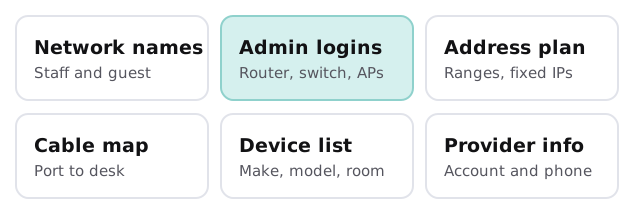
The finished network matters less than the record of it. A one-page record is what lets a different person fix it at 4pm on a Friday.
Signs yours was never planned
- Wi-Fi only works near the router.
- Visitors use the same Wi-Fi password as staff.
- Nobody knows which cable goes to which desk.
- Extra switches have been added under desks to cope with more people.
- The router’s admin login is still the one printed on the label.
If yours looks like that, the fix is a short project, not a replacement of everything. For symptoms rather than layout, what to do when office internet keeps dropping works through them, and business Wi-Fi security covers the encryption and router settings. Setting up a whole new space? See IT setup for a new office.
What we need from you
- A floor plan, or a sketch with the desks marked.
- A list of what needs a cable: desktops, printers, phones, screens.
- The name of your internet provider and whoever holds the account.
- Any equipment you already own that you want to reuse.
We start with the free IT check and give you a plan and a fixed quote. A real person replies within one business hour, Monday to Friday, 9am to 5pm Pacific.
A good office network is boring: each box has one job, the guests are kept separate, and the notes are where anyone can find them.