An office move rarely breaks because of the move. It breaks because of the things nobody listed: the printer on a fixed address, the alarm panel that uses the old line, the one app that only works from the old building. Good office move IT services treat the move as a short project with a start, a list and a test.
What actually moves
Most of what you own falls into three groups, and sorting them early removes half the surprises.
| Travels with you | Gets replaced or rebuilt | Gets cancelled or closed |
|---|---|---|
| Laptops and desktops | The internet line to the new address | The old internet line, once the new one works |
| Monitors and peripherals | Cabling and the network cupboard | Old equipment leases or contracts, if any |
| Printers and scanners that are still good | Wi-Fi access points placed for the new floor plan | Old alarm and door-entry lines, if separate |
| Phones and headsets | A server, if the old one is due to go | Unused licences and old accounts |
Walk the old office with a clipboard and write down everything that has a plug. Then add anything that doesn’t, such as logins and the services you pay for monthly.
The timeline
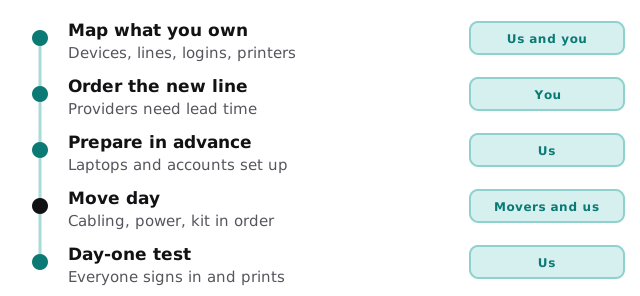
Work backwards from move day and the order becomes obvious.
Keep the old line alive
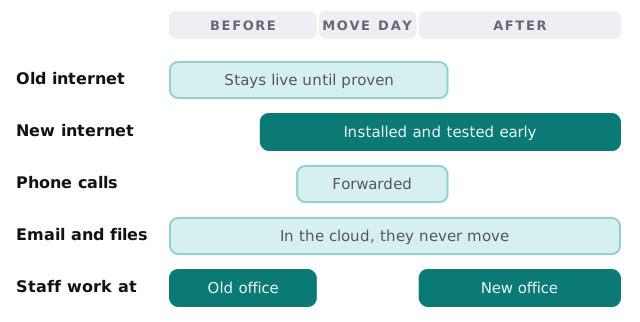
The most useful idea in any move is overlap. Don’t switch from one thing to the next. Run both for a while, and only close the first when the second has proved itself.
On the day
- Check backups first. Before anything is unplugged, confirm that a backup exists and restores.
- Label as you disconnect. Cable ends, ports and device names, with a photo of the back of each rack or desk.
- Move the network first. Get the new router and switches in place so that devices have something to connect to.
- Then the devices. Laptops and printers connect to a network that’s already working.
- Run the test sheet. Sign in, send an email, open a shared file, print, take a call, join a video meeting.
- Fix what failed, then stop. Keep a short list of anything unresolved for the next morning.
What Monday morning should look like
Staff arrive, find their desks and sign in. The first print job goes out. Someone joins a video call from a meeting room. Nobody queues at the IT cupboard, because the test sheet was run on Friday and the failures were fixed. That ordinary start is the whole goal. If it’s dull, the planning worked, and the only people who remember the move are the ones who carried boxes.
Where moves go wrong
- The new internet line was ordered too late, so the office opens on a mobile hotspot.
- Nobody wrote down which printer used which address, so the first day is lost to printing.
- The server was carried over without a verified backup.
- Staff sign-ins were never tested in the new building, and nobody can reach the VPN.
- The old line was cancelled the day before the move.
If your move also involves setting up space from scratch, IT setup for a new office covers the build side. And if the old server is part of the problem, replacing an old server looks at moving to something that can’t be dropped on the stairs.
What we need from you
- The move date and the new address, as early as you have them.
- The floor plan for the new space, even a sketch.
- A list of everything you use: devices, phone lines, subscriptions, alarms.
- Who on your side can open the door and call the provider.
We start with the free IT check, then give you a plan and a fixed quote. A real person replies within one business hour, Monday to Friday, 9am to 5pm Pacific.
A move goes well when the new office is working before the old one stops.