Think of the last time a member of staff asked, “Who do we call about the internet?” and three people gave three different answers. That gap is what IT documentation for small business closes. It is not for auditors. It is for the person standing in your office on a bad morning, who needs the next step and cannot ask the one person who knows.
CISA’s Cyber Essentials lists crisis response as one of six areas for small business leaders, with the aim of limiting damage and restoring normal operations more quickly. You cannot respond to something you cannot find written down.
The five-page set
Resist the urge to document everything. Five pages are more likely to be kept true than fifty.
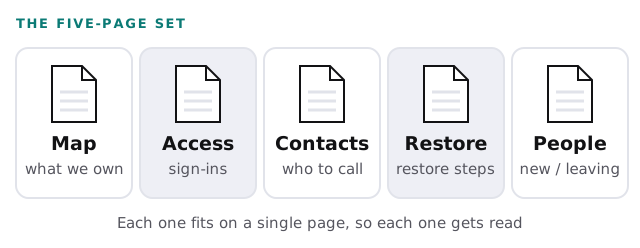
- Map. What you own and what it does: the internet line, the router, the main applications, the domain, the backup. A list with one line each, not a diagram of cables.
- Access. Where sign-ins live and who holds the keys. It points to the password vault; it does not contain passwords.
- Contacts. Every vendor, with a phone number, an account number and what they are responsible for.
- Restore. How to get a file back, and how to get the whole office back. Written as steps, tested at least once.
- People. What happens on the first and last day of an employee, covered more fully in employee onboarding and offboarding IT.
What never goes in the document
- Passwords, recovery codes and security answers. Put them in a vault and name the vault.
- Screenshots of admin pages showing keys or tokens.
- Guesses. A page that says “I think the backup runs at night” does harm. Write “unknown, to check”.
Who reads which page
| Page | Who reads it | How often to review |
|---|---|---|
| Map | New hires, advisers, insurers | When you buy or retire something |
| Access | The two people who can approve changes | Every quarter, and whenever someone leaves |
| Contacts | Anyone, in a crisis | Twice a year |
| Restore | Whoever is on duty when things break | After every real or practice restore |
| People | The manager of a starter or leaver | When your tools change |
Put the review dates in a calendar with a name next to each. A document nobody owns turns into history within a year.
What a good Restore page looks like
Picture a Thursday when a shared folder is emptied by mistake. The Restore page says, in four lines, where the backup lives, who can open it, how to pick yesterday’s copy and who to tell once it is back. It names the person on duty and the person who covers them. It does not explain how backups work. The reader already has a problem; they need steps, not theory.
Write the page, then run it once for real on a harmless file. Anything that confused you on the day goes straight back into the text.
The test: one person unreachable
The best check is imaginary. Suppose the one person who understands your systems cannot be reached. What does the document need to answer, and when?
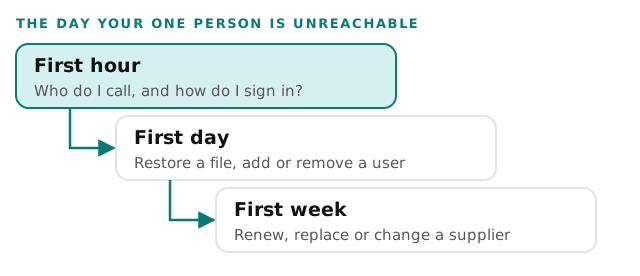
If your honest answer is that the first hour would already be a problem, read what to do when your IT person quits. It starts from the same gap. For a device-by-device record, see IT asset tracking for small business.
Keeping it alive
- Make one person responsible, and tell the rest of the team who it is.
- Change the document when you change the system, in the same sitting.
- Print the Contacts page. A copy on paper still works when the network does not.
- Once a year, repeat the stranger test with a different stranger.
The best IT documentation is boring. If it reads like a story, nobody will use it at 8am on a Monday.
What we need from you
- Access for the free IT check, so we can gather the facts you would otherwise type out.
- Someone to correct our first draft. You know which vendor is really called what.
- A name for the person who will keep it current after we hand it over.