Nobody enjoys a data migration, because the risk is invisible. A record that doesn’t arrive doesn’t raise an alert. You find out in three months when a client asks about an old job and it isn’t there. Data migration services for small business exist to make that moment impossible, mostly by being boring and thorough before the switch.
Start by finding out what you have
The old system is almost always messier than anyone remembers. Before we touch a field, we run a short inventory:
- Where it lives: one database, five spreadsheets, a shared drive, someone’s inbox.
- How much there is: records, files and attachments, counted rather than guessed.
- What’s in bad shape: duplicates, blank required fields, dates in three formats.
- Who relies on it: the people who’ll notice first if something is wrong.
That count becomes the number we answer to at the end.
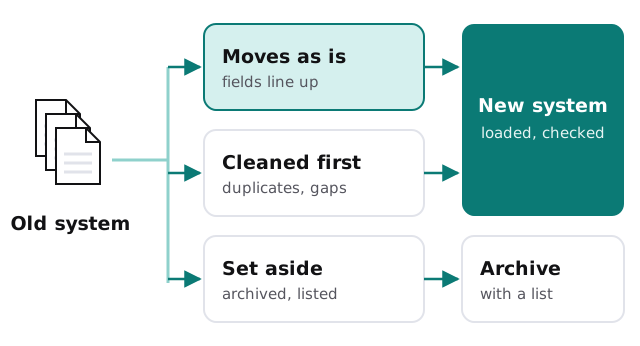
Three decisions that shape the job
What to bring
Ten years of data isn’t always worth ten years of cleaning. Closed jobs from a decade ago might sit in an archive you can search, while live clients and open work move across fully. You decide the line, and we write it down.
How fields map
The old system calls it “Client Ref”. The new one wants a customer ID and a separate account number. We write a mapping sheet that says, field by field, where everything goes. You read it and correct it before any data moves, because you know what “Ref” really meant.
When to switch
We rehearse the move with a copy, check the result with you, and only then pick the cutover. The old system stays readable afterwards so you can look something up if a question comes up. Nobody should have to take our word that the new one is complete.
Who tests it
Someone who uses the data daily should open the rehearsal copy and try their normal morning: find a client, pull a report, look up last month’s job. They’ll spot a missing field in minutes that a script check would take hours to suspect. We build that session into the plan and fix what they find before the real load.
The proof at the end
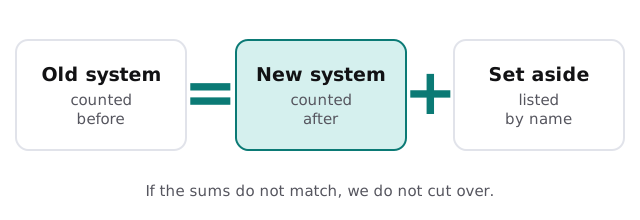
What we check, and against what
| Check | Against |
|---|---|
| Record counts | The numbers from the inventory |
| A sample of full records | The original, opened side by side |
| Totals that matter | Balances, open invoices, stock on hand |
| Links between records | A client’s jobs still point to that client |
| Attachments | Files open and belong to the right record |
Where it connects to other projects
Data rarely moves alone. If your move is customer records into a CRM, our page on CRM data migration goes deeper on that path, and Excel to CRM migration covers the spreadsheet start. Going from a spreadsheet to something sturdier? See Google Sheets to database migration. For accounting packages, there’s QuickBooks Desktop to Online.
If the move is one piece of a larger change, such as an office move or a server retirement, our IT project management page explains how we keep the pieces in order.
What we need from you
- Admin access to the old system, set up with you rather than sent in a message.
- Someone who can answer “what does this field mean?” while we map it.
- A list of the reports and lookups people use most, so we can test them.
- A backup of the old system before we start, which we’ll help you take.
You receive a plan and a fixed quote before any data moves.
A migration isn’t done when the data arrives. It’s done when the counts match and someone who uses it every day says it looks right.