Plenty of small businesses want the same simple thing: a deal is won in HubSpot, and the customer and invoice appear in QuickBooks without anybody retyping them. HubSpot offers a native connection for exactly that. This page is about the QuickBooks Online and HubSpot pair, what HubSpot’s own documentation says it does, and the places where you should expect friction. For the general idea across any CRM, see QuickBooks and CRM integration.
What gets synced
HubSpot’s help pages list four objects, each with its own direction setting.
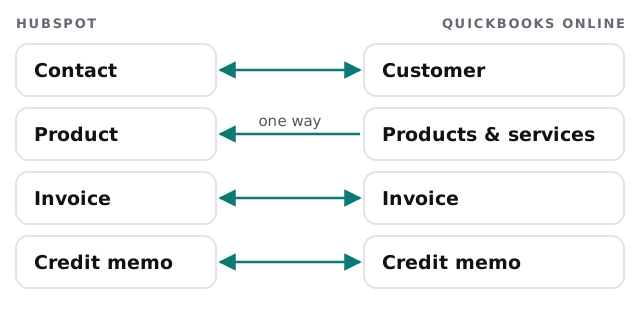
Connecting it needs a Super Admin or someone with App Marketplace permissions. HubSpot’s setup path is Settings, Integrations, Connected apps, then QuickBooks Online. During setup you choose which system wins when data conflicts.
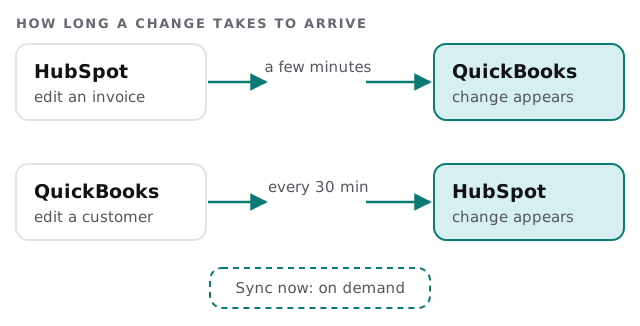
When changes show up
Where it stops
These come straight from HubSpot’s documentation, and each one decides whether the native connection is enough for you.
- Invoice edits. Financial changes to a HubSpot-created invoice have to be made in HubSpot, or the sync fails.
- Duplicate customers. Display Names must be unique, so use one billing contact per company.
- Payments. Payments applied to more than one invoice don’t sync to HubSpot, and only payments created after you connect will sync.
- Card fees. Processing fees don’t sync, which can leave manual reconciliation.
- Tax. Non-U.S. QuickBooks Online accounts that require tax on invoices can’t use the invoice feature, because HubSpot invoices can’t include tax.
- Deals. Invoices synced from QuickBooks aren’t automatically associated with a HubSpot deal.
Native, or something built for you?
| Your situation | Likely answer |
|---|---|
| One billing contact per company, simple invoices | The native connection |
| Your bookkeeper edits invoice lines in QuickBooks | Change the habit, or build around it |
| Payments often cover several invoices | A custom build or a manual step |
| Invoices must tie back to a deal automatically | A custom build that stores both IDs |
| Rules about when an invoice is raised | A custom build |
A custom build is also an option for the gaps above. A QuickBooks integration developer can draft invoices from won deals and hold them for a person to approve. That keeps human judgement in the loop, which suits a bookkeeper’s Monday. For a wider look at connecting HubSpot to other apps, see HubSpot integration services.
What a good week looks like
A deal is marked won on Monday. The customer already exists in QuickBooks from an earlier job, so the invoice attaches to them and no second record appears. The bookkeeper sees it in QuickBooks within the half-hour, spots a wrong quantity, and goes back to HubSpot to fix it there, because she knows that is where invoice lines get edited. On Friday the payment lands, and the deal shows it. Nothing in that week was retyped. It works because the team agreed the habits first, and the connection only follows them.
Before you switch it on
- Agree one billing contact per company in HubSpot.
- Clean your customer list on both sides, so matching has something to work with.
- Decide who wins a conflict, HubSpot or QuickBooks, field by field.
- Try a few harmless records first, since a sandbox can’t be connected.
- Tell the bookkeeper which edits belong in HubSpot, and which in QuickBooks.
What we need from you
- Admin access to HubSpot and QuickBooks Online.
- Your current routine from “deal won” to “invoice sent”.
- Two or three real examples that went wrong in the past.
Most sync problems are really “two people edited the same thing in two places”. Settle who edits what first.