Make is a visual automation tool: you drag modules onto a canvas, connect them and call the result a scenario. It’s very good at branching logic, which is why people pick it over simpler tools. It’s also why a scenario built in a hurry turns into a plate of spaghetti nobody dares to touch. A Make consultant for small business is brought in to build it so it can be read, trusted and handed over. People also search for a Make automation expert or a Make expert for small business; it’s the same work.
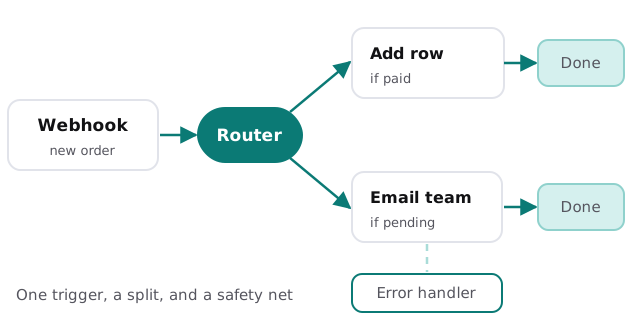
The scenario, drawn once
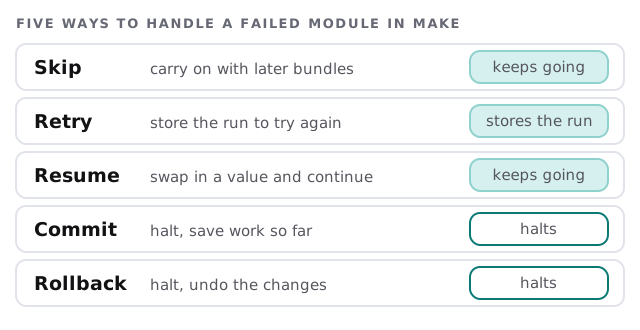
Five ways a failed step can go
Make’s help center lists these error handlers. Choosing between them is the single most useful design decision in a scenario.
| Situation | Handler we’d lean towards |
|---|---|
| A nice-to-have step, such as a Slack ping | Skip, so it doesn’t block the real work |
| A temporary outage at an app | Retry, so the run is stored for another go |
| A missing optional value | Resume, with a sensible default |
| A multi-step change that must be all or nothing | Rollback |
Settings that change how a scenario behaves
Make’s scenario settings are easy to miss and they matter:
- Process data in order. Runs go one at a time. Useful when order matters, such as updating the same record twice.
- Keep data confidential. Make logs that a run happened but not the payload. Good for sensitive data, but it makes fixing errors harder.
- Store incomplete executions. Failed runs pause and wait for you, instead of stopping and rolling back. Stored data counts toward your plan’s storage limit.
- Commit after each module. Saves as it goes, though committed data can’t be restored if a later module fails.
One scenario or three?
A common mistake is putting everything in one scenario because it’s one process. When it breaks, all of it stops, and nobody can test a part in isolation. We usually split by job: one scenario that receives and validates, one that writes to your systems, one that notifies people. Each is small enough to read at a glance and can be switched off alone when something upstream changes.
A good handover
- A list of scenarios. Name, purpose, trigger, apps touched, owner.
- Naming that makes sense. Modules labelled for what they do, not “HTTP 3”.
- Error handling noted. For every module, which handler and why.
- A named person who receives failure alerts.
- Notes on what would break if each connected app changed.
Signs you need a Make consultant
Most of these are about trust, not technology:
- Scenarios were built by someone who has left.
- A failed run is found by a customer, not by you.
- One scenario has so many branches that nobody will edit it.
- You aren’t sure what data Make is storing.
- Nobody can say what happens if one app changes a field name.
Questions to ask before hiring
- How will I know when a scenario fails?
- Which error handler will you use, and why?
- Where is my customers’ data stored while a scenario runs?
- Can I take over without you?
Rather start on your own? Our guide to setting up Make for your team covers accounts, teams and a first scenario. If you’re comparing tools, see our pages on a Zapier expert for small business and an n8n consultant. We start with the free IT check, then give you a plan and a fixed quote.
A scenario that fails quietly is worse than one that fails loudly. Decide how each step should fail before you build it.