A new client’s security questionnaire lands in your inbox on a Tuesday. It asks where their documents will live, who will be able to open them and what happens on the last day. Managed IT services for consulting firms exist so that you can answer in an hour, from facts you already have.
An engagement is a small company
Each project has a start, a team, a pile of someone else’s information and an end. Treating it like that is most of good consulting IT.
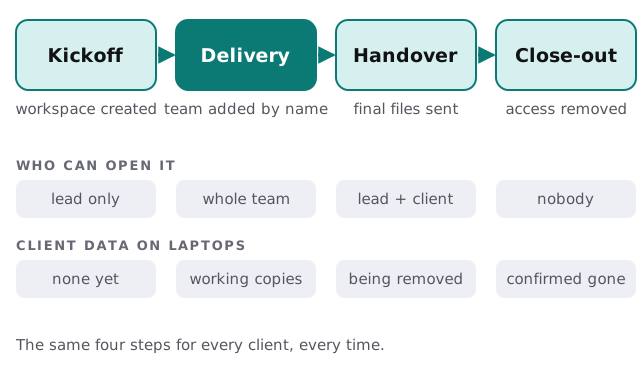
- Kickoff. Create the workspace and name its owner. Only the lead has access at first.
- Delivery. Add each team member by name. Partners, analysts and any outside associates sign in as themselves.
- Handover. Send final files from the workspace, not from a laptop’s desktop.
- Close-out. Remove access, delete working copies, and note the date. Keep what your client agreement says to keep.
Three layers, kept apart
The mistake we see most often is one big shared drive where a firm’s own templates, one client’s data and another client’s data all mix.
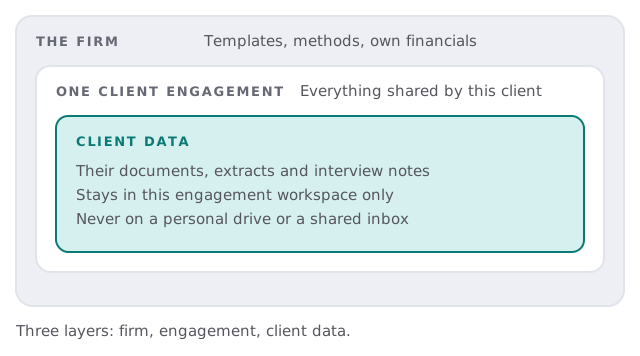
Your frameworks, proposals and slide templates belong at the firm level and everyone can use them. Client material belongs inside its engagement, and nowhere else.
What consultants actually carry
Consultants work from client sites, airports and kitchen tables. That puts weight on the laptop, and on what is stored on it.
- Full-disk encryption and a screen lock. So a lost bag isn’t a client incident.
- Accounts with a second sign-in step. A stolen password alone shouldn’t open the workspace.
- Backups of the firm’s work. A laptop that dies the night before a steering meeting shouldn’t take the deck with it.
- Sign-in to client systems. Some clients issue their own accounts. Those logins stay separate from yours.
The tools behind the work
Most consulting firms run a surprisingly small set of tools, and each has its own way of going wrong.
- Document storage and editing. Where decks and models live. The failure is a copy emailed around until nobody knows which is final.
- Time tracking and billing. Hours logged against engagements. The failure is a spreadsheet that one person understands.
- Video calls and recordings. Client workshops are often recorded. Decide where recordings go and when they are deleted.
- Notes and knowledge. Interview notes and research. These can be the most sensitive items of all, because they hold what people said off the record.
- Contacts and proposals. A simple CRM or a shared list, so a prospect isn’t lost when a partner is travelling.
What you set, what we run
| You decide | We set up and keep running |
|---|---|
| Which clients get their own workspace | The workspaces, named access and the end-of-engagement removal |
| Who counts as a team member | Accounts, second sign-in step and device checks |
| What your client contracts require | A written description of how things really work |
| When an engagement is over | A reminder and the close-out checklist |
The questionnaire, answered
Clients differ, but the same few questions return: how are accounts protected, where is data kept, how are devices secured, who is removed when they leave. We write those answers down once, from what’s actually in place. When the next questionnaire arrives, you adjust a document instead of starting over.
When associates and subcontractors join
Most small firms flex with outside associates during busy engagements. They bring their own laptops and their own habits. Give them a named account on the engagement, ask them to work in the workspace rather than download, and close the account at handover. If their own device is the only option, a firm-managed browser session is better than a copy of the files on their drive.
What we need from you
- A list of current engagements and who is on each.
- The tools the team uses for files, notes, time tracking and billing.
- Your last two client questionnaires, if any.
- A sense of who works from where.
Monthly care covers access controls, backups and updates. Start with the free IT check, which ends in a plan and a fixed quote.
Consultants are trusted with their clients’ most awkward information. Treat each engagement as something with an end date.