Managed IT services for engineering firms depend on one uncomfortable truth: the expensive things in your office are software licences and the few machines that run them. When either is unavailable, billable hours stop.
Machines have jobs
Engineering offices don’t run one kind of computer. They run several, with different needs, and most trouble comes from treating them alike.
| Machine | Typical work | What it needs | What goes wrong |
|---|---|---|---|
| Design workstation | CAD or BIM modelling | Strong graphics and memory | Driver updates change behavior |
| Analysis machine | Structural, hydraulic or thermal runs | Processing power, steady power | Runs for hours, then reboots after an update |
| Everyday laptop | Calculations, reports, email | Reliability, battery | Local copies of project files |
| Field laptop or tablet | Site notes, photos, measurements | Ruggedness, offline use | Data trapped on the device |
| Plotter and large-format printer | Drawing sets | Queue and drivers | Printing breaks after an OS change |
An update that is harmless on a laptop can ruin an overnight analysis run. We schedule updates for these machines on their own calendar, test them on one machine first and keep a record of what’s installed where.
The licence server
Many engineering applications are licensed from a shared pool, with a server that hands out seats.
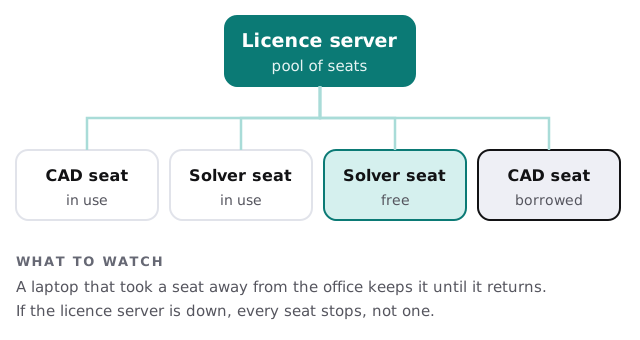
Three habits keep it dull. Back up the licence files and know where to restore them. Keep a note of which software versions each seat is entitled to. And check regularly that nobody’s travelling laptop is holding a seat the office needs. Some products let a user borrow a seat for an off-network trip, and forgetting to return it is a classic cause of “we have six licences but only five work”.
Files that stop changing
Engineering work has a moment when a set becomes official: it’s checked, signed off and issued. After that, changes should be new revisions, not quiet edits.
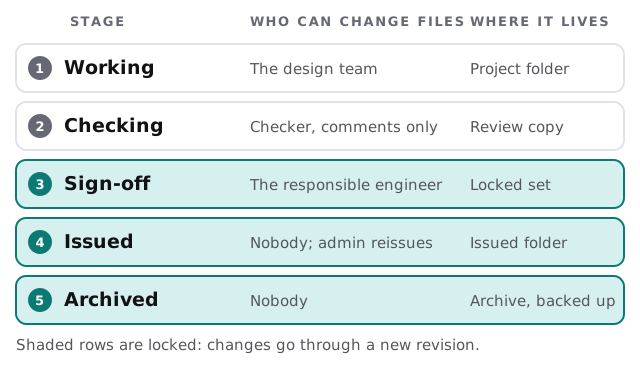
- Working copies stay in the project folder. Everyone on the team can edit.
- Review copies are separate. A checker adds comments, not changes.
- Sign-off locks the set. Only the responsible engineer or an administrator can touch it.
- Issued sets live in their own folder. A change means a new revision, filed beside the old one.
- The archive is backed up. It’s the record you may need years later.
Big files, small office
Models and survey data can run to many gigabytes. If every engineer opens them from one shared drive over the ordinary network, one person’s heavy file slows everyone’s email. We look at where large files live, how fast they can be read and whether the network between the workstations and the storage is fit for it.
Submission week
Engineering firms have deadlines that fall in clumps: a permit submission, a bid package, a design milestone. In that week the whole office is on the same files, the plotter is busy and the analysis machines have been running for days. It’s the worst possible time for a surprise update or a full disk. We keep a calendar of your known deadlines, hold non-urgent changes until after them and check disk space and backups beforehand.
Working on site and from home
Engineers visit sites, and some work from home. A field tablet that stores survey notes only on itself is a liability, so notes and photos should sync to the project record when there’s a signal. A home workstation running the same software should reach the licence pool and project files through a protected connection, never through a copied drive. When someone leaves, their access to the project folders and the licence pool ends with their account.
What we need from you
- A machine list, with what each runs.
- Your licence arrangement, including where the licence server sits.
- Your project folder layout and how sign-off works today.
- Your busiest weeks, usually the ones before a submission.
We keep the accounts, backups and updates in order as part of monthly care. The free IT check ends in a plan and a fixed quote.
Engineers are paid for judgement, not for waiting on a licence server. Take the waiting out.