Managed IT services for event planners are tested on a day that can’t be moved. There’s no second Saturday. Whatever the laptop, the hotspot, the check-in tablet and the shared plan do on the day is what the client remembers. We build around that: a short list of things that must work, each with a backup.
The calendar is the plan
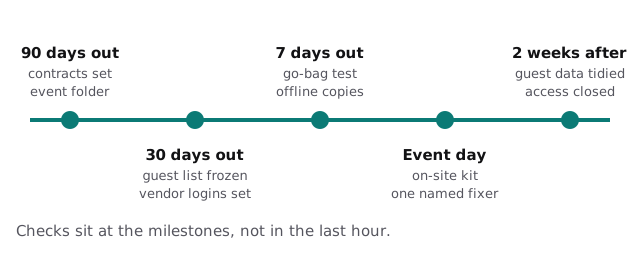
Event IT isn’t a steady load. It builds toward one date, spikes, and then needs to be cleaned up. Spreading the checks across that timeline is far easier than a panic in the last hour.
If it fails, what’s the backup?
Think in pairs. For every piece you’ll rely on in the room, decide what takes over if it fails.
| On the day you rely on | If it fails | Backup |
|---|---|---|
| Venue Wi-Fi | Slow or blocked | Your own hotspot with a data plan |
| The master run of show online | No signal | An offline copy on the laptop and a printout |
| Check-in tablet | Battery, crash | Second tablet or printed list, same data |
| Payment terminal | Reader fails | Paper process for a card on file |
| Your own laptop | Dies, stolen | Second device already signed in |
| Phone | Drops or dies | Charger, power bank, named alternate contact |
Vendors see their slice
An event is a temporary company made of vendors you don’t employ. Each one needs part of the plan and none needs all of it.
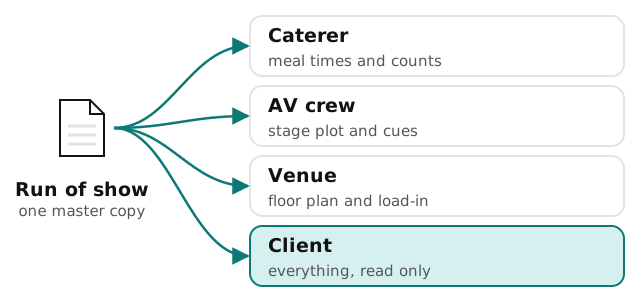
Sending the full document as an email attachment spreads your client’s details and the budget to everyone, and you can’t take it back. A shared folder with named access, or per-vendor views, lets you remove a vendor the day their job ends.
What event planners run
- Event or registration platform. Tickets, RSVPs, guest lists, badges.
- Planning documents. Run of show, floor plans, seating charts, timelines.
- Contracts and payments. Vendor agreements, deposits, client invoices.
- Communication. Group messages, vendor threads, a shared inbox for the event.
- On-site tools. Tablets, badge printers, scanners, audio and presentation machines.
Saturday, 4:10 pm
Doors open at six. The venue’s network has just stopped admitting new devices because two other events are using it. The check-in tablet is the one thing that needs the internet, so it switches to your hotspot, which was tested on Tuesday in the same room. The caterer asks for a final count and gets the current number from their own view of the plan. Your laptop is plugged in, signed in and already synced. Nothing about this is heroic, because each piece had a backup chosen weeks ago.
Temporary staff and freelancers
Events pull in day-of staff: greeters, runners, extra AV hands. They need a way to check guests in or see the schedule, and nothing else. Give them a view-only link or a limited login for that event, never your own account, and switch it off when the event ends. Phones lent to temporary staff should be wiped and re-issued, not handed around with last month’s guest list still on them.
Guest data has a shelf life
A guest list can hold names, emails, phone numbers, dietary needs and accessibility requests. It’s useful for a few weeks, and a liability for years. At close-out, deliver what the client needs, delete working copies from laptops and shared folders, and keep only what your contract requires.
What we need from you
- Your next three events, with their dates and venues.
- Your tools for registration, planning, contracts and payments.
- Your on-site kit, and the last time you tested it.
- Your vendors, and how plans are shared with them now.
Monthly care covers access controls, backups and updates, which matters most for the laptops that go into the room. Start with the free IT check, which ends in a plan and a fixed quote.
Event IT succeeds when nobody in the room notices it. That takes a backup for every single thing you rely on.