Managed IT services for nonprofits begin with an honest look at who actually runs the technology. At most small nonprofits, it is a person with another job: the operations manager, a development coordinator or a board member who is good with computers. They keep it going, but the knowledge sits in one head.
One organization, three kinds of user
Staff, volunteers and board members all need something from your systems. They should not all get the same thing.
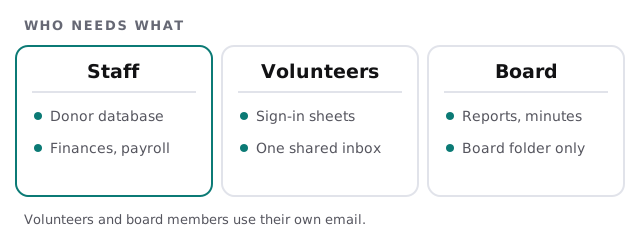
A board treasurer needs the books. A volunteer running a check-in table needs a sign-in sheet. Neither needs the whole donor list. When everyone shares one login for simplicity, you lose the ability to say who saw what.
What a nonprofit usually runs
The usual six
- Donor database or CRM. Gifts, pledges and contact history. Fails when one export becomes many stale copies.
- Online giving and receipts. Payments and thank-you letters. Fails when receipts don’t match the ledger.
- Accounting. Funds, restricted gifts and reports. Fails when only one person can use it.
- Email marketing. Newsletters and appeals. Fails when nobody tracked where the list came from.
- Volunteer and event tools. Shifts, tickets and sign-in. Fail through shared logins with no end date.
- Website and domain. The public face and the donation page. Fails when a former volunteer still owns them.
Ask of each one: who administers it, who pays for it and who is the second person who could step in?
Grants are record-keeping with a deadline
A grant can last a year or more, and the report arrives long after the work. By then the person who ran the program may have gone.
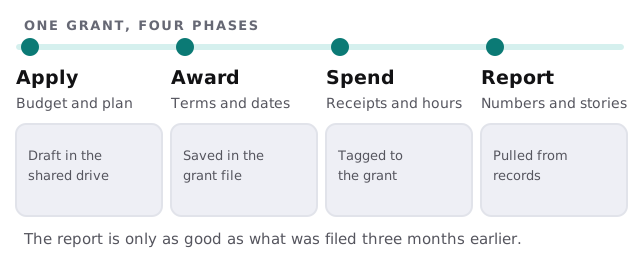
A shared drive with one folder per grant, a plain naming habit and backups you have tested will do more for reporting than most software. The IT job is to make sure the folder survives a laptop failure and a staff change.
Year-end giving
For many nonprofits, giving picks up in the final weeks of the year. That is the worst time to discover that the donation page broke after a website update. A short routine in October prevents it:
- Test a real donation from start to finish, including the receipt email.
- Confirm the gift reaches the donor database and the ledger.
- Freeze changes to the website and email tools during the peak weeks, unless they are urgent.
- Name who checks the inbox, and who covers when they are out.
- Write down the vendor contacts for the payment page, the website and the email platform.
Handing over without losing everything
Nonprofits often change staff. Prepare for a departure before it happens: every system has two administrators, passwords sit in a manager the organization controls, and the ownership of domains and subscriptions is recorded. When someone leaves, the checklist runs the same afternoon, covering accounts, devices and forwarding.
Money is tight, so we start small
You don’t need everything on day one. A good first step is the quiet but important set: named accounts, backups of the donor database and the grant folders, device updates and a simple sign-in protection for email. The rest follows as the budget allows.
What we need from you
- A list of the systems in use, and who pays for each.
- Your grant calendar and your busiest giving weeks.
- Your people: staff, regular volunteers and board officers.
- The login to the domain, or the name of whoever holds it.
Monthly care covers access controls, backups and updates. We begin with the free IT check, which ends in a plan and a fixed quote.
When the person who set it up moves on, the mission shouldn’t stall. Write it down while they’re still there.