Phishing training for employees has one job: make the suspicious message feel odd to the person reading it, and make reporting it feel easier than ignoring it. Most small offices have software that filters mail. Filters miss things. The person at the keyboard is the last layer, and that person is usually busy.
Teach five signs, not fifty
People can’t remember a long list. CISA’s guidance on recognizing phishing boils it down to a handful of cues, and these are the ones worth teaching:
- Urgent or emotional language, especially a threat that something bad happens if you don’t respond right now.
- A request for personal or financial details that the sender should already have.
- Links you don’t trust, including shortened ones that hide where they go.
- Addresses or links that are slightly off, like one swapped letter in a company name.
- Anything too good to be true, such as an unexpected prize or refund.
CISA also points out that bad grammar used to be a giveaway, but AI can now produce flawless text. So tell your team that a clean-looking message proves nothing. The signs above matter more than the spelling.
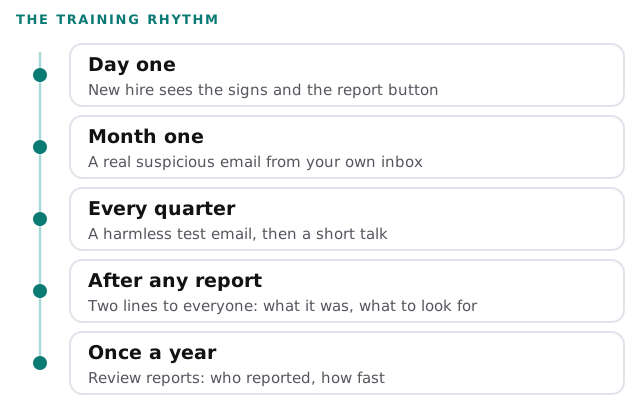
A rhythm instead of an event
Training that happens once gets forgotten. Spreading it out costs the team a few minutes at a time and keeps the signs in mind.
Make the first report easy
If reporting takes five steps, people won’t do it. Set it up so it takes one.
- Pick one place to send suspicious mail. A report button in the mail program is best. A shared address like a “report phishing” mailbox works too.
- Say what not to do. Don’t click, don’t open attachments, don’t reply, don’t use any “unsubscribe” link. That’s CISA’s advice, and it fits on a sticker.
- Say what to do instead. Report it, then delete it. If a message might be real, contact the company through a website or phone number you find yourself, never through the message.
- Thank the reporter. Publicly, every time, including the false alarms.
- Tell people it’s safe to say “I clicked.” An admission in the first hour is worth far more than a cover-up on day three.
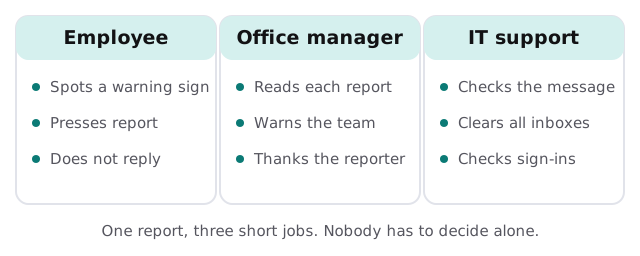
Who does what when a report arrives
A report that nobody acts on teaches the team that reporting is pointless. Decide the three jobs in advance.
What the training can’t do
| Training helps with | It doesn’t replace |
|---|---|
| Spotting a lookalike sender or an odd link | Filtering that holds the message back first |
| Reporting quickly | Multi-factor sign-in, so a stolen password isn’t enough |
| Asking before sending money or data | A second person approving payment changes |
| Admitting a click | Backups and a plan for restoring a damaged account |
CISA’s Cyber Essentials treats staff awareness as one of six areas, next to systems, data and crisis response. That’s the right proportion: training is one layer, and it works best when the others are in place too.
A scenario from the front desk
On Thursday afternoon, someone in accounts receives a message that appears to be from your bank, asking her to confirm a login. The urgency is the first sign. The link text doesn’t quite match the bank’s name, the second. She doesn’t click. She presses the report button, which sends it to IT and the office manager at once. Within the hour, the office manager sends the team two lines: what it looked like, and what gave it away. Nobody lost a password, and the next person who sees a similar message knows what to do.
Rather build it yourself?
Nothing here requires special software. You can run the rhythm above with a calendar, a shared mailbox and fifteen minutes a quarter. If you’d like help setting up the report path, tightening sign-in rules or running practice emails, the free IT check is a good place to start, and we’ll send a plan and a fixed quote for anything it turns up.
People report what’s easy to report and safe to admit. Build both, and the training mostly runs itself.