You open the pipeline on Monday. A long column of deals is marked “Proposal sent”, and nobody can say which of them are alive. That’s the moment people search for a Pipedrive consultant. This page is about improving a pipeline that already runs. If you’re starting from nothing, we’ve written separately about Pipedrive setup for small business.
Where pipelines usually leak
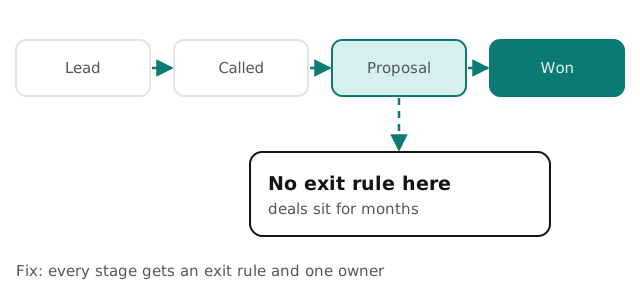
A stage should answer a question: what has to be true before a deal moves on, and who moves it? When the answer is “whenever someone remembers”, deals pile up. Typical leaks:
- A stage that means three different things to three different reps.
- Deals with no activity scheduled, so nothing prompts anyone to act.
- Lost deals left open because the “lost reason” field is a chore.
- Contacts duplicated because email and web forms create their own records.
Ten questions we ask first
- Which stage do deals stall in longest?
- Who is allowed to move a deal, and when?
- What does “lost” mean here, and is the reason recorded?
- Which fields get filled in on every deal, and which never?
- Which reports does the owner actually open?
- Which automations run, and when did one last fire?
- Where do new leads come from, and do they arrive as duplicates?
- Who can see all deals, and should they?
- What do reps keep in a spreadsheet instead?
- If you could remove one step from the daily routine, which?
Those answers tell us what to fix, and just as usefully, what to leave alone.
Automations have edges
Pipedrive’s usage-limits page spells out what one automation path can hold. The numbers are small enough that a flow built to do everything will hit them.
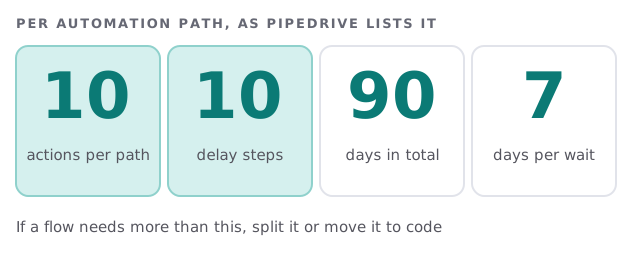
If an automation needs long waits, many branches or data from outside Pipedrive, a small custom integration often does it more clearly. Our n8n consultant page covers one way to build those, and the Zapier versus custom integration comparison helps you choose.
What a fix week can look like
Here’s the shape of it. On the first day we read the account without changing anything, then talk to the person who runs the weekly pipeline meeting and to one salesperson. By midweek you have a short list of what’s leaking, ordered by how much it costs you. We then fix in small steps: rename stages, close or archive dead deals, merge duplicates and switch off automations that no longer match how you sell. Your team keeps working in the same pipeline throughout, and nothing changes shape overnight. Every change is written down, so you can see what moved and why.
What you get at the end
| Deliverable | What it is |
|---|---|
| Pipeline description | One page: each stage, its exit rule and its owner |
| Cleaned data | Duplicates merged, stale deals archived or closed |
| Field list | What each custom field is for, and who fills it in |
| Automation list | Each automation, what triggers it, and what it needs to keep working |
Signs you should call someone
- The weekly pipeline meeting is spent arguing over what the numbers mean.
- A new rep needs a guided tour just to log a call.
- You added a tool because Pipedrive “couldn’t do” something it probably can.
- The person who built it left, and nobody has opened the automations since.
Rather look at the account yourself first? Our guide to setting up Pipedrive for your team walks through users, visibility and permissions. When you want a second opinion, start with the free IT check, then get a plan and a fixed quote. We reply within 1 business hour, Monday to Friday, 9am to 5pm Pacific.
A pipeline you can’t trust is worse than no pipeline, because it feels like information.