Notion is easy to start and hard to keep tidy. Somebody makes a page for meeting notes, somebody else makes one for clients, and a year later there are three client lists and no one knows which is current. A Notion consultant for small business exists for that moment. Whether you searched for a Notion consultant or Notion workspace setup, the job is the same: decide where each kind of thing lives, then control who can reach it.
Signs your Notion has sprawled
- Search returns four pages with the same title.
- New hires ask “where do I put this?” and get four answers.
- Meeting notes are scattered across personal pages.
- Nobody is sure who can see the client pages.
- The top level of the sidebar is longer than a screen.
A layout that stays tidy
The small-business version is boring on purpose: one home page, a handful of areas, and a database or two in each. A database holds many items of the same kind, such as clients, projects or tasks, and lets you filter and sort them. That beats a hundred hand-made pages.
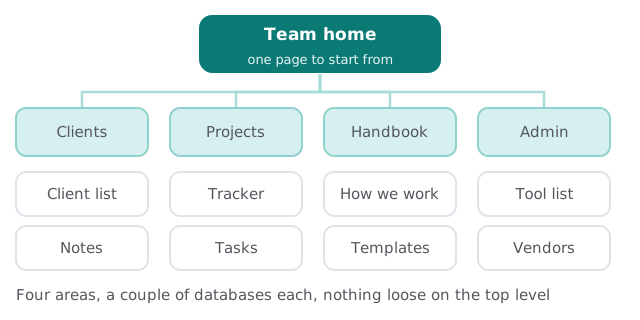
What goes where
| Area | Holds | Usual mistake |
|---|---|---|
| Clients | One database of clients, with notes linked | A page per client, with no shared fields |
| Projects | A tracker and tasks, filtered by owner | Tasks living in meeting notes |
| Handbook | How you work, templates | Out-of-date pages nobody owns |
| Admin | Vendor and tool lists | Logins pasted into pages |
Access: the part that bites later
Notion’s help center describes who can do what at the workspace level, and it’s worth knowing before you invite anyone.
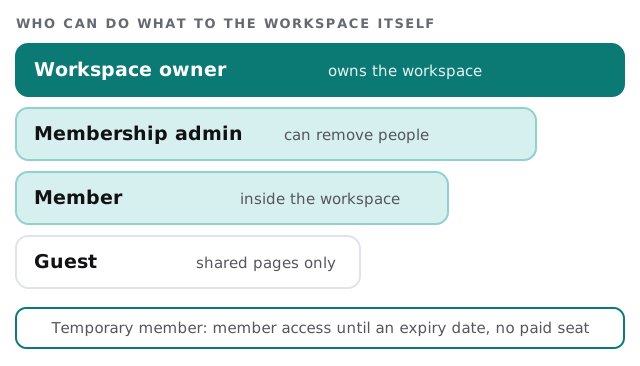
Three points from Notion’s own page matter most:
- Guests get access page by page. They’re people outside your organization, and only see what you share with them.
- Anyone on your organization’s email domain is added as a member, not a guest.
- A person added to a page can reach its sub-pages by default, though you can change that. Put a client page under a shared parent and you may share more than you meant to.
Before moving anything, we also check what links to what. Notion pages often point at each other, and archiving one can leave a dead link in a page someone still uses. We fix those links as part of the move, so nobody discovers the gap a month later.
How an engagement runs
- Look at what you have. Pages, databases, who has access.
- Agree the layout. One page, drawn on the screen, that you approve.
- Move, don’t rebuild. Live material goes into the new structure, dead pages are archived.
- Set access. Owners and admins chosen deliberately, guests added page by page.
- Write the one-page guide. Where things go, who owns each area.
What we need from you
- Access to the workspace as an admin, for the review.
- A list of who works with Notion, including contractors.
- Your two or three real daily uses: notes, client info, tasks.
- A decision on who owns the workspace once we’re done.
Questions to ask any Notion consultant
- Will you rebuild everything or keep what works?
- How will clients and contractors get access?
- Who becomes workspace owner?
- What do I get written down at the end?
Looking at Notion’s AI features? Our guide to setting up Notion AI for your team covers that side. For help with the structure, we start with the free IT check, then give you a plan and a fixed quote.
A tidy Notion has a short top level and a named owner for every area. Everything else can be searched.