An Intercom consultant earns their keep before launch more than after it. The tool is easy to switch on, and that’s the problem: a bot that answers customers from thin or outdated articles gives confident wrong answers, and customers remember them. If you searched for an Intercom expert or Intercom setup help, here’s what the work involves and how to tell if it’s being done properly.
The readiness gates
Intercom’s help center lists what has to be true before Fin can go live over chat. We treat each one as a gate, not a formality.
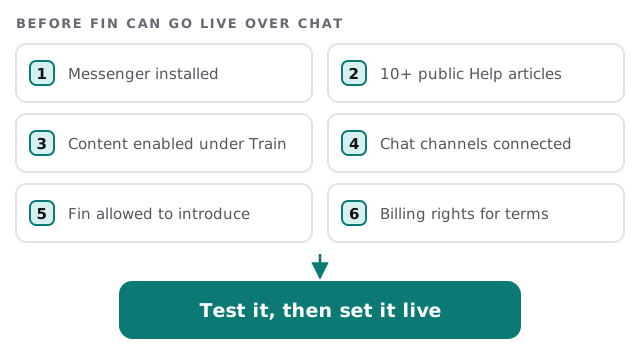
- Install the Messenger. Fin over chat needs it, whether it sits on your website, a logged-in web app or a mobile app.
- Write for the questions you really get. The ten-article minimum is a floor. We start from your last batch of customer questions and write the articles that answer them.
- Turn on only what Fin should use. Intercom says Fin works from content you’ve enabled under Train, so old, internal or contradictory articles stay out.
- Connect the channels. Each chat channel you plan to use is connected first.
- Allow the introduction. Intercom notes Fin won’t engage in chat if the introduction setting is off.
- Check billing permissions. Someone with billing rights has to accept the terms.
Test in three steps, safest first
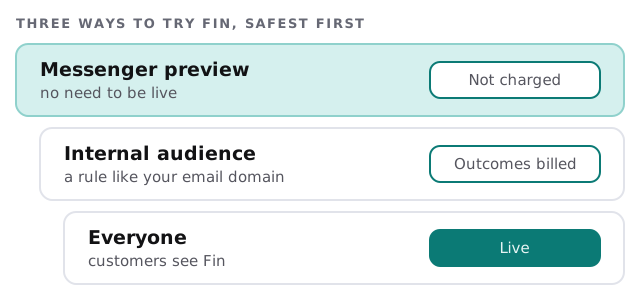
Intercom’s own checklist backs this order. Under Fin’s Test area you can generate questions from past conversations, upload your own list as a CSV or add them by hand, then mark each answer Good or Poor and trace why a poor answer went wrong. Next, the Messenger preview shows you the customer view without charging for conversations. Last, an audience rule such as your company email domain lets your team try Fin live before everyone else.
What you do and what we do
| Task | You | Us |
|---|---|---|
| Know the customer questions | Share your inbox and top complaints | Group them into topics |
| Help Center articles | Check facts and tone | Draft, structure and tidy |
| Fin settings and channels | Approve the scope | Configure and test |
| Reading conversations | A named person, weekly | Show what to look for |
After launch, someone has to read it
Fin’s answers are only as current as your articles. A price changes, a policy moves, and the Help Center still says the old thing. So a named person should skim Fin’s conversations on a schedule and fix the article behind every poor answer. If the plan doesn’t include that person, the launch will decay.
What “good” looks like in the Help Center
Fin can only answer from what you’ve written, so the articles carry the weight. A good one answers a single question, in the words customers use, with the steps in order and a note on who to contact if they fail. A weak one is a policy paragraph with the answer buried in the fourth line. We rewrite the weak ones first, because they cause the poor answers.
Questions to ask any Intercom consultant
- Which questions will Fin answer, and which go to a person?
- How will we test before customers see it?
- Who updates the articles when something changes?
- What does a handoff to a human look like for the customer?
If you want to try the basics first, our guide to setting up Intercom for your team covers the Messenger, teammates and a first test of Fin. For the bigger picture, see AI customer support chatbot for small business and help desk for small business. We start with the free IT check, then give you a plan and a fixed quote.
Test Fin on your hardest ten questions before it meets a customer. The easy ones will take care of themselves.