Someone set Salesforce up for you, perhaps years ago, perhaps well. Since then a dozen people have added things. Now the sales meeting starts with an apology for the dashboard, and the person who “knows Salesforce” is a part-time job on top of their real one. Hiring a Salesforce consultant for small business is how you find out what is actually in there.
Where small orgs go wrong
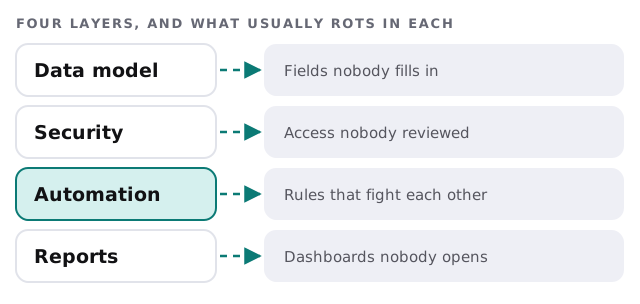
None of this is unusual, and none of it means anyone did a bad job. Salesforce is built to be extended, and every extension makes sense on the day it’s added. It is the pile that hurts.
What we usually find
| Symptom | Common cause | What we do |
|---|---|---|
| Leads convert to the wrong account | Matching rules and conversion habits differ by person | Agree one rule and write it down |
| Two reports give different totals | Different filters, or fields doing double duty | One definition per number |
| Saving a record is slow to the point of annoying | Layers of old automation | Read, merge or remove |
| Nobody can see the pipeline for their team | Access built user by user | Roles and permission sets by job |
| Half the fields on a page are blank | Added for a project that ended | Hide, then remove after a quiet period |
How a review runs
- Listen first. We ask three or four people what they do each day and what slows them down.
- Take stock. Objects, custom fields, automation, users and reports, listed with a last-used note where Salesforce can show one.
- Rank. Each item is marked keep, fix or retire, with the reason.
- Fix in order. Security and data first, automation next, reports last. Changes are made one at a time, so anything that breaks is easy to trace.
- Hand over. A short document anyone can read.
A Monday pipeline meeting, afterwards
The rep opens one list of deals. Each has an owner, a stage that means something, and a next step. The manager’s dashboard adds up to the number the finance person quotes. Nobody had to log a ticket to find out why a lead was missing. This isn’t a grand redesign. It is the same Salesforce, with the clutter gone and each remaining piece explained.
Stay, simplify or move
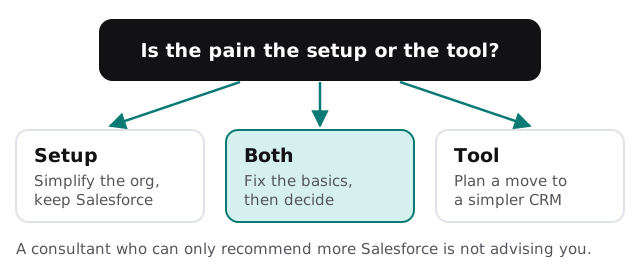
If the verdict is to leave, our pages on a Salesforce to HubSpot migration and a custom CRM for small business cover two destinations. If you are not on Salesforce yet and want a project to bring the team across, that is a Salesforce implementation.
Questions to ask any Salesforce consultant
- What will you remove, and how will you know it’s safe?
- Who owns the documentation when you finish?
- Will you make changes in a copy of the org first where one is available?
- How do you decide between a rule, a flow and a change to how people work?
- Under what conditions would you tell me to stop using Salesforce?
What we need from you
- An admin login, and permission to export a copy of your data before changes.
- The people who use Salesforce daily, for a short conversation each.
- The reports your owner and your finance person rely on.
- A rough idea of what you pay for each month, so we can compare it with what is used.
Prefer to get your hands dirty? Our guide to setting up Salesforce for your team covers the basics, and CRM data migration for small business explains how we protect data when anything has to move.
The best Salesforce advice is often subtraction. Ask what you can delete before asking what you can add.