A store owner’s week fills with small, identical jobs: tag the wholesale orders, hold the ones that look odd, tell the warehouse about a rush, and nudge staff when stock runs low. Each takes a minute. Together, they decide whether you spend Friday growing the shop or clearing a queue. A Shopify automation expert, whether you call them a Shopify automation services provider or someone to automate Shopify store tasks, takes those jobs off the list.
Start with Shopify’s own tool
Shopify Flow is built for this. Shopify’s help center describes it as a tool that watches your store for events and runs actions in response, with each workflow made of three parts.
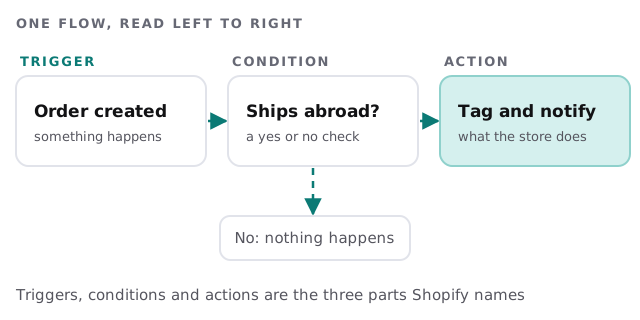
- Trigger: the event that starts it, such as an order being created.
- Condition: a check that decides whether it carries on.
- Action: what Flow then does in your store or across your apps.
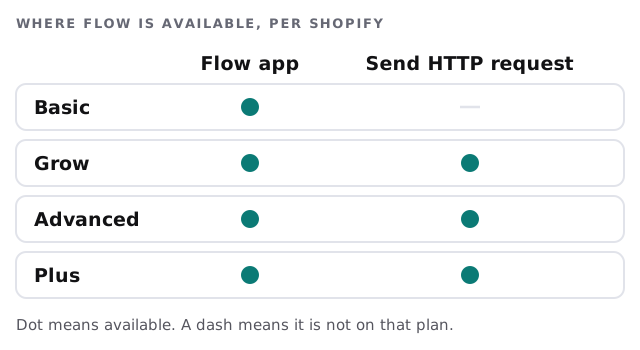
Shopify says the Flow app is free and available on Basic, Grow, Advanced and Plus. Some pieces depend on the plan, as the grid shows.
What’s worth automating
| Job | Trigger | What happens |
|---|---|---|
| Spot wholesale or repeat customers | New order | Tag the order and the customer |
| Flag orders that need a second look | New order | Hold or tag it, and tell a person |
| Warn staff about a problem | A condition is met | Send an email or a Slack message |
| Keep notes with the order | Order updated | Add a note others will see |
| Pass data to a system Shopify doesn’t reach | Event in the store | Send a request to the outside service |
Shopify’s actions reference groups these into store changes, data handling and external services, which matches how we think about them.
Where Flow stops
Flow is excellent inside your store. It gets awkward when:
- The logic is long. Many branches and lookups are hard to read in a visual builder.
- The data lives elsewhere. Accounting, inventory or a CRM may need a proper connection. See Shopify to QuickBooks integration for one example.
- You’ll make many changes. Shopify says usage limits depend on your plan’s API limits, so we check that before designing anything big.
- A mistake is costly. Refunds and cancellations belong behind an approval step.
For those cases, a small custom job is often cleaner than stacking workflows. Our Zapier versus custom integration page explains how we choose, and AI automation for ecommerce businesses covers the wider picture.
A Tuesday with it set up
An order arrives from a repeat customer. Flow tags it, adds a note with their history and tells the warehouse lead in Slack. Another order ships abroad, so Flow tags it and holds it for review. A person looks at that one, decides and releases it. Nobody opened a spreadsheet, and nobody had to remember a rule.
What we need from you
- Staff access to the store with Flow permissions, as Shopify requires.
- The three jobs that waste the most time.
- Who should be told about what.
- A decision on which actions need a person’s approval.
Questions to ask any Shopify automation provider
- What will each workflow do on its own, and what needs approval?
- How will I know when one fails or does the wrong thing?
- Which parts depend on my plan?
- Can my team read and change the workflows afterwards?
We start with the free IT check, then give you a plan and a fixed quote. A real person replies within 1 business hour, Monday to Friday, 9am to 5pm Pacific.
Automate the sorting and the alerts. Keep a person on anything that moves money.