At 20 people, you do not need a department. You still need everything a department does: someone to answer when a laptop dies, someone who knows where the domain is registered, someone who notices when the backup stopped. An IT department for small business is those jobs, covered, without a headcount to match.
The honest way to decide how to cover them is to list the jobs first.
Six jobs hiding inside “IT”
- Answering requests. A password, a printer, a new phone. Small, constant and the part staff notice most.
- Keeping things current. Updates, patches and licences, on a schedule instead of when something breaks.
- Protecting access. Who can sign in to what, with what second step, and what happens the day they leave.
- Backing up. Copies of the data that matters, and a restore someone has tried.
- Buying and choosing. Laptops, software, the internet line, with a reason for each.
- Planning. Which year the server goes, which tool you drop, what the budget needs to hold.
The first four are routine work. The last two are judgement. That split matters, because routine work suits a team behind a help line, and judgement suits someone who knows your business.
Who does what
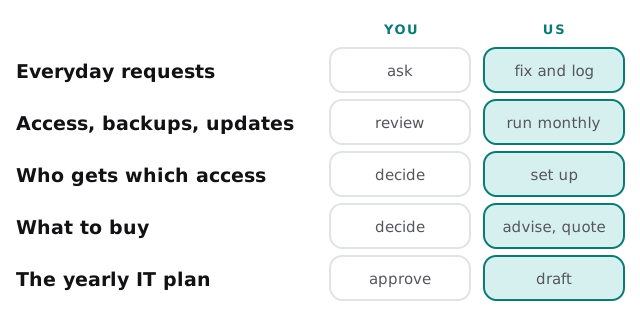
An outsourced department that wants every decision is not a department, it is a dependency. Keep the verbs on the left in your hands.
The department that lives in one head
Many small offices already have an IT department. It is a person, usually someone who was good with computers and got the job by default. They know the router password, the renewal date and which licence belongs to whom.
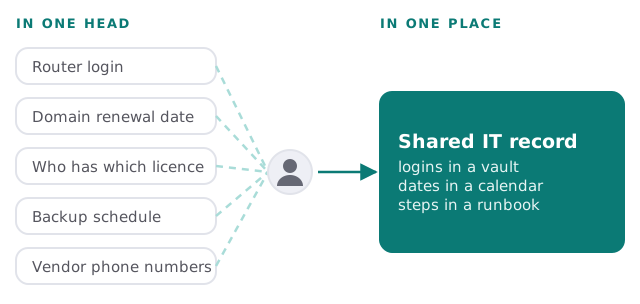
If that person leaves, the department leaves too. Our notes on what to do when your IT person quits are written for that bad Monday, and IT asset tracking covers one of the first records worth writing down.
Three ways to staff it
One employee
A good fit when there is enough steady work to fill their week and a plan for cover when they are away. The risk is the single point of failure, and the cost of a skill set they only use occasionally.
One employee plus outside help
The routine work and the out-of-hours problems of a single person go to a service, and the employee focuses on projects. This is the pattern we see most often. The page on hiring an IT person versus outsourcing compares the two honestly.
The whole department, outsourced
A good fit under about the size where a full-time role would be idle half the time. You get a help line, care every month and someone to talk to about planning. A fractional IT director can sit above that if you want a senior voice in budget meetings.
Signs “whoever is good with computers” has run out of road
- Requests wait because that person is also doing their real job.
- Nobody else knows where the admin logins are.
- Updates happen when someone remembers.
- You have bought something twice because no one knew you owned it.
- A holiday for that person feels like a risk to the business.
Questions to ask any provider offering to be your department
- Who replies, and how quickly?
- What do you do every month without being asked?
- Will I be able to read what you changed and why?
- What happens to the documentation if we part ways?
- Which decisions do you hand back to me?
You are not outsourcing responsibility. You are outsourcing the hours.
What we need from you
- Someone on your side who can approve a purchase or a change.
- A list of people, devices and the main business applications.
- An honest account of what already frustrates staff about IT.