Most small businesses on Google Workspace do not have an administrator. They have someone who clicked the setup buttons years ago and has been the default answer to every question since.
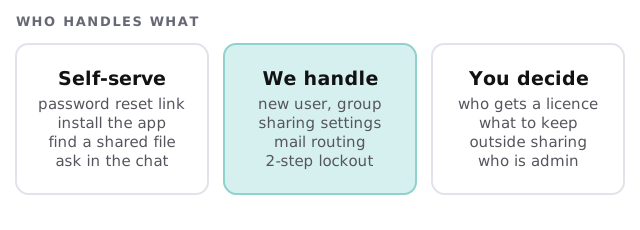
Google Workspace support for small business takes that weight off one person and puts it with someone whose job it is. A real person replies within 1 business hour, Monday to Friday, 9am to 5pm Pacific.
The questions that actually arrive
Here is what a typical month brings:
- “I can’t get into my account after changing phones.”
- “Can you add Jordan to the sales group so she gets the shared mail?”
- “A client says they can’t open the folder I shared.”
- “Why is mail from our own billing address going to spam?”
- “Someone started last Monday and still can’t see the team drive.”
- “Who has access to the payroll folder?”
Almost none of these are emergencies. Most are about permissions, which is why an administrator who understands your layout resolves them faster than a general help line.
The 20-day rule everyone discovers late
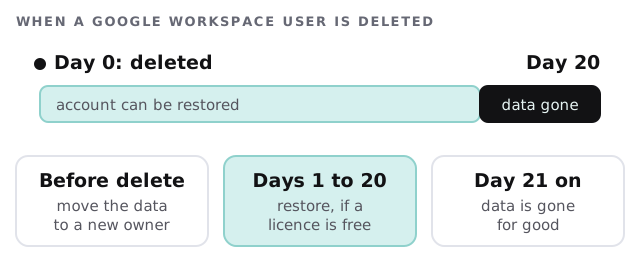
When someone leaves, the tempting move is to delete their account to free the licence. Google’s own guidance gives you a narrow safety net: a deleted user can be restored up to 20 days after deletion, and after 20 days the data is gone and cannot be restored. A restore also fails if there is no free licence for what that user had before.
So we handle a leaver in an order. The files are moved to a named person first. The mailbox is kept or exported as agreed. Only then does the account go away.
For the broader leaver checklist, see employee onboarding and offboarding IT.
What we check on a rhythm
| How often | The check | Why it matters |
|---|---|---|
| Weekly | New users, departures, lockouts | Access should match the people who work here |
| Monthly | Sharing settings and outside-shared files | A link shared “to anyone” once tends to stay that way |
| Monthly | Admin accounts and 2-step status | Google calls admin accounts the most powerful ones |
| Quarterly | Groups and shared drive membership | People change roles and groups don’t follow |
| Yearly | Licences against actual users | Unused seats and missing seats both cost money |
Monthly care covers access controls, backups and updates, so these checks are part of the routine rather than extras you remember to ask for.
Signs you need more than a hero
- Only one person knows the admin password, and that person is also your bookkeeper.
- Departed staff still receive mail from an old group.
- Nobody can say who can see the contracts folder.
- You sometimes pay for licences that nobody uses.
- Phishing reports are discussed in the break room, not logged anywhere. Our guide to email security for small business shows what to put in place.
If you are not sure whether Workspace is the right fit, there is a side-by-side comparison with Microsoft 365.
What a good Tuesday looks like
A new hire’s account was prepared on Friday. She signs in on Monday, adds her second step, and finds the team drive open. On Tuesday the owner asks who can see the contracts folder. The answer takes a few minutes, not an afternoon. No one stops to wonder which person owns the admin login.
Good Workspace support is mostly invisible: permissions that match the people in the building, and a plan for the day somebody leaves.
What we need from you
- Admin access to your Workspace, ideally shared with a second named person.
- A list of the groups you rely on and what each is for.
- A rule for how long a leaver’s mail and files are kept.