The first week of a business is a blur of decisions. Name, bank, insurance, logo. IT sits at the bottom of the list, and the choices made in a hurry tend to stay for years. IT support for new businesses is the habit of making those few early choices on purpose, and leaving everything else until you need it.
You do not need a large setup. You do need to avoid the handful of mistakes that are painful to reverse.
Three choices that are hard to undo
Who owns the domain
The domain is your business address on the internet. Email, website and many sign-ins depend on it. It should be registered under an account the business controls, with a company email address as the contact, not a freelancer’s or a founder’s personal one. See domain and DNS management for how to check.
Which platform holds the email and files
Pick one of the two main suites and commit. Moving later is possible, but it is a project. Our page on Microsoft 365 versus Google Workspace helps you choose, and the setup guides for Microsoft 365 and Google Workspace show the order of work.
Who holds the keys
Two people should be able to administer the system, not one. If the only admin is the founder’s phone number, you have created a lock-out risk on day one.
Build upward, not outward
Once those three are settled, the rest stacks on top of them. Each layer depends on the one below, which is why the order matters more than the tools.
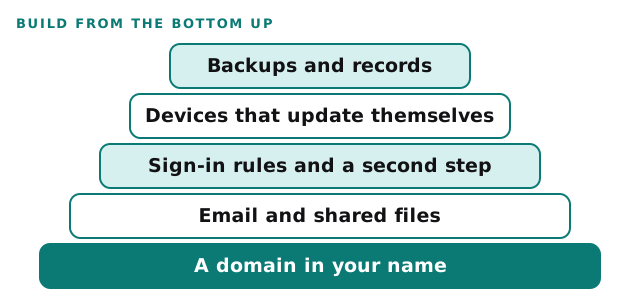
CISA’s Cyber Essentials, written for the leaders of small organisations, puts the same idea another way. It lists six areas, starting with leaders setting strategy and culture, and including backups that keep critical information from being lost and a response plan that limits damage and speeds recovery. None of the six needs a large budget at the start.
What changes as you add people
The right setup for one person is not the right setup for five. Add things when they begin to matter, not before.
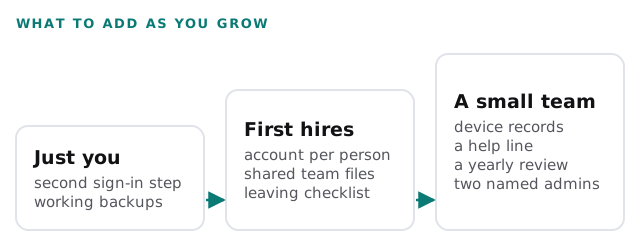
If you work alone from a spare room, IT support for home based businesses goes deeper on that stage. When you are ready to hand the routine work to someone else, see managed IT services for startups.
Mistakes we see most
| Mistake | Why it happens | The fix |
|---|---|---|
| Domain bought by a friend or freelancer | It was quick | Move it to a business-controlled account |
| One shared admin password | Everyone needed access once | An account per person, one admin each for two people |
| Personal email used for business | The first week was a rush | Move to a business address early |
| No backup of the shared files | Cloud storage feels safe | A separate copy you have restored once |
| Nothing written down | Nobody had time | A one-page record of accounts and vendors |
Questions to ask any IT provider
- What do you suggest we do now, and what can wait?
- Who will own the accounts when you finish?
- Will you tell me when something is not worth buying?
- How do I reach someone, and how soon do they reply?
- What happens if we outgrow your service?
Insurers also start asking about security early. Our page on IT requirements for cyber insurance explains what they tend to look for.
The cheapest time to set up IT properly is before you have anything to lose. The second cheapest is today.
What we need from you
- The business name, the domain if you have one, and who registered it.
- The tools you already use or plan to use.
- How many people you expect to add in the next year.