Managed IT services for startups should start small. A three-person company with ten SaaS tools doesn’t need an IT department. It needs a handful of decisions made early, so that nothing important lives in one founder’s inbox, and a person to ask when it breaks.
Five decisions for day one
- Register everything to company addresses. Hosting, domains, payments and design tools belong to the company, not to whoever signed up first.
- Use a password vault, shared by role, with a second sign-in step on the vault and on email.
- Lock every laptop with a disk password and a screen lock, and know how to wipe it.
- Pick one place for documents, so a file isn’t an attachment in someone’s sent folder.
- Write the list: every tool, who administers it, who pays for it.
Stages, not a shopping list
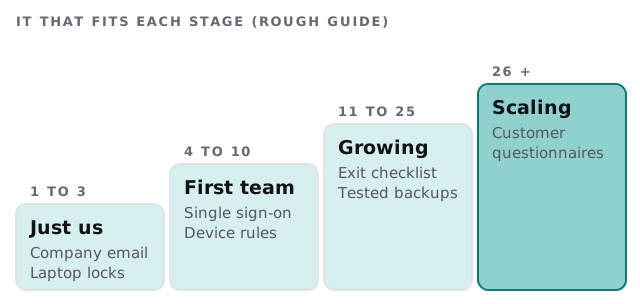
| Stage | Worth doing | Safe to wait |
|---|---|---|
| Just you and a few others | Company accounts, vault, locked laptops | Device-management software |
| First team | Single sign-on if your tools support it, device rules | A formal policy binder |
| Growing | Exit checklist, tested backups, an access review | A dedicated IT hire |
| Scaling | Evidence for customers’ questions | A heavier policy set |
The founder’s personal accounts
Early on, things get set up on whatever email was open. A year later the domain is registered to a founder’s Gmail, payments go to a card that belongs to someone else and the analytics login is on a phone nobody can find. Moving them is simple while everyone is still friends and still employed. Make an hour for it once, then keep a living list.
When a customer asks
Sooner or later a bigger customer sends a questionnaire about how you protect their data. It might arrive during a sales cycle, and it can stall a deal.
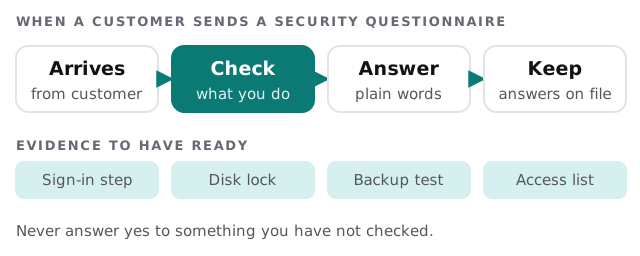
We help you find the true answers, such as whether sign-in steps are on, laptops are locked and backups have been restored. We don’t claim certifications for anyone and we don’t tell you to say yes to things you haven’t done.
Things to skip for now
- A long security policy nobody reads, before you have a team to follow it.
- Buying tools to solve a process problem.
- Complex networks for an office of four, when everyone works from a laptop and the cloud.
- Per-person custom setups, which make the next hire slower.
When someone leaves
Even at five people, an exit needs a list: close their accounts, move their files, take back the laptop and change any shared password they knew. It takes ten minutes if the list exists and an afternoon if it doesn’t.
Investors and due diligence
A fundraise or an acquisition brings a request for documents, and sometimes a look at who can reach what. Keep a folder ready: the tool list, the access list, the cap table’s home and any contracts that name data you hold. A company that can produce these in a day looks organised, whatever its size. One that takes a month looks like it is hiding something, even when it isn’t.
Remote by default
Many startups have no office. Then the “network” is everyone’s home Wi-Fi. Keep the work in cloud tools with individual logins, make updates automatic and avoid asking people to fix their router. If someone loses a laptop, the answer should be a remote lock, not a crisis.
What we need from you
- A list of the tools you use and who signed up for each.
- How many people, and how many are on the way.
- What your biggest customer or investor has asked about security, if anything.
Monthly care covers access controls, backups and updates. The free IT check ends in a plan and a fixed quote.
Early IT is mostly paperwork: who owns what, and where it’s written down. Do it once, while it’s easy.