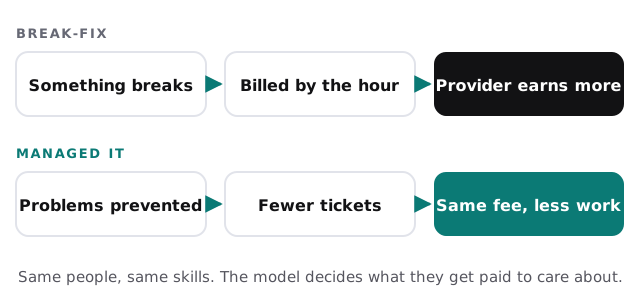
Most small businesses start with break-fix without ever choosing it. Something breaks, someone gets called, an invoice arrives. It works fine until the business has more people, more devices and more client data than one phone call can cover. That’s usually when the managed IT vs break fix question comes up.
How each model works
| Break-fix | Managed IT | |
|---|---|---|
| How you pay | Per hour or per job | A fixed monthly fee |
| Who watches your systems | Nobody, until you call | The provider, continuously |
| Updates and backups | When someone remembers | On a schedule, checked |
| When you need help | When they’re free | Within an agreed reply time |
| Budgeting | Hard to predict | The same each month |
| Knowledge of your setup | Rebuilt on every visit | Written down and kept current |
When break-fix is the right call
Break-fix isn’t wrong. It’s a good fit when:
- There are only a few computers and they rarely change.
- Someone in-house is comfortable with the basics.
- You hold little sensitive client information.
- Downtime is an annoyance rather than lost revenue.
When managed IT starts paying for itself
- Staff lose hours each month to slow machines, sign-in problems and printers.
- You’re covered by a rule about client data, such as the FTC Safeguards Rule for tax preparers or confidentiality duties for lawyers.
- People work from home or from more than one location.
- You’re hiring, and every new starter needs a laptop, accounts and access on day one.
Four questions that settle it
- How many hours did your team lose to IT problems last month?
- When did anyone last restore a file from backup to prove it works?
- Who would notice if a laptop went three months without security updates?
- What happens when your go-to computer person is on vacation?
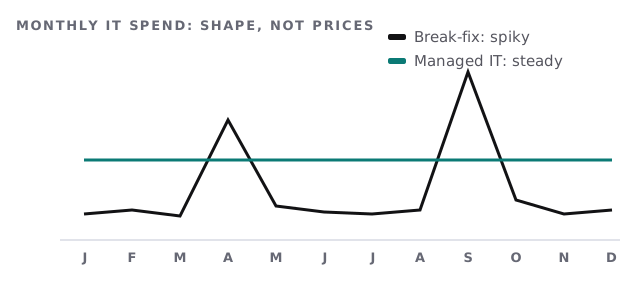
If the honest answers are “lots”, “never”, “nobody” and “we wait”, the monthly model is probably already cheaper than it looks.
A middle path
Some businesses keep break-fix for hands-on jobs and add monitoring, updates and backups on a monthly basis. It’s a reasonable step if you’re not ready to hand over everything at once, as long as someone is clearly responsible for the gaps between the two.
What “managed” should include at a minimum
The word gets stretched. Whoever you choose, a managed arrangement worth paying for should cover at least:
- A current list of every device, account and piece of software.
- Security updates applied on a schedule, with exceptions recorded.
- Backups that are checked, and restores that are actually tested.
- Multi-factor sign-in across email and admin accounts.
- New starters set up and leavers removed on the day.
- Written documentation the business can read without the provider.
- A named person who knows your setup and replies within an agreed time.
If a proposal can’t say how each of these is handled, it’s break-fix with a monthly invoice.
Making the switch
Moving from break-fix to managed IT starts with a baseline: a list of every device and account, a check that backups run and restore, multi-factor sign-in turned on where it’s missing, and admin accounts moved into the business’s name. Nothing about the day-to-day changes for your team except that problems start getting fixed before they notice them. The biggest shift is on your side: one place to call, and one monthly number to plan around.
The question isn’t which model is cheaper. It’s whether you want to pay for problems or pay to prevent them.