Microsoft 365 support for small business gets confused with the vendor’s own help line. They aren’t the same job. Microsoft keeps the service running. Someone on your side, or hired by you, decides who holds which keys, keeps accounts tidy and notices when something is set up badly. Microsoft designs its Business Premium plan for organizations of up to 300 users, so most small firms are well inside the range where one careful admin, or one provider, can look after the lot.
What you’re really buying support for
Microsoft 365 admin support usually breaks down into six areas. Each one has a request you’ll recognise and a failure you can predict.
| Area | A typical request | What happens without an owner |
|---|---|---|
| Accounts and licences | A new starter needs email by Monday | Seats pile up for people who left |
| Email and calendar | Shared inbox, forwarding, a lost message | Fixes are made one mailbox at a time |
| Files | Who can open the finance folder | Sharing links stay open forever |
| Teams | A new project space | Dozens of half-used channels |
| Security settings | Turn on multi-factor sign-in | It’s on for some staff and not others |
| Devices | A laptop should reach company files | Personal machines hold company data |
Most of these aren’t emergencies. They’re small jobs that go wrong when nobody is responsible for them, which is why this is a better fit for a standing arrangement than a one-off call.
Who should hold which admin role
Microsoft’s own guidance is to use the role with the fewest permissions and to keep the number of people with administrator rights small. Global Administrators have almost unlimited access, so they should be rare. Resetting a password doesn’t need that power: Microsoft points to the Password Administrator and Helpdesk Administrator roles for that job instead.
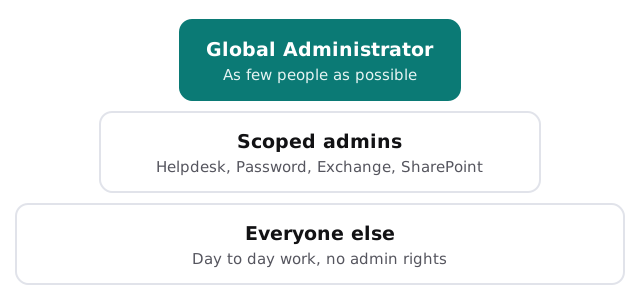
Microsoft also recommends requiring multi-factor authentication for administrators in particular. And if a provider helps you, Microsoft lets you grant a partner delegated roles, including a Helpdesk Agent role, and remove the relationship later. Whoever you choose, you should be able to open your own admin center and see exactly who has what.
A sensible month
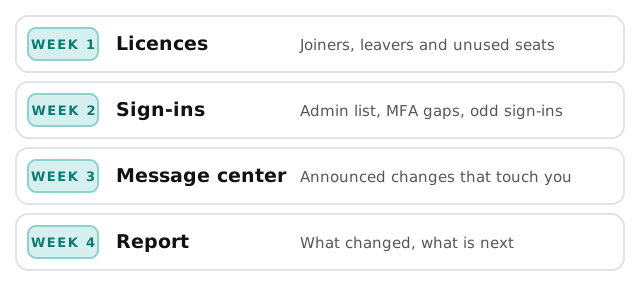
Support works best as a rhythm rather than a scramble. A month of looking after a small tenant might run like this.
Reading the Message center
Microsoft posts announced changes in the admin center’s Message center. Most are irrelevant to you. A few change how people sign in or what a setting does. Someone has to read them, and decide which need a note to staff.
Keeping the report short
A good monthly note is a page: what changed, what was fixed, what needs your decision. If it takes longer to read than the work took to do, it isn’t helping.
Questions to ask any provider first
- Whose name is the subscription in? It should be yours.
- How many people will hold Global Administrator rights, and who are they?
- How do you handle a leaver? Ask for the steps, in order.
- Where do I see what you changed? A change log you can read is worth more than a promise.
- What happens if I end the arrangement? Access should be removable from your side in an afternoon.
What we need from you
- Read access to your admin center, or a named admin who can grant it.
- A list of current staff and which of them should have what.
- Your view of what’s causing the most friction today.
Monthly care from us covers access controls, backups and updates, and the free IT check shows where your tenant stands before you commit to anything. You get a plan and a fixed quote, and a real person replies within one business hour, Monday to Friday, 9am to 5pm Pacific.
Good Microsoft 365 support is mostly knowing who holds the keys, and making sure the answer is short.