Start with one question: is a Zapier to Make migration worth doing for you? Teams move for different reasons: more branching than Zapier handles comfortably, a preference for Make’s visual canvas, or simply wanting one tool across the business. Cost is a common reason too, but it needs checking against your own usage, not assuming. If your zaps work and nobody is unhappy, the best migration may be none.
If you’ve decided to move, here’s how to do it without losing a record.
First, count what you’ve got
Open your Zapier account and list every zap. For each one, write down:
- what starts it, and what it does;
- which apps it touches;
- who depends on its result;
- when it last ran.
You’ll almost always find zaps that haven’t run in months and a few that do the same job twice. Those don’t get migrated. This is also the cheapest part of the project, and it makes the rest smaller. If your zaps have grown messy, our page on a Zapier expert for small business covers cleaning them up in place instead.
The same ideas, different names
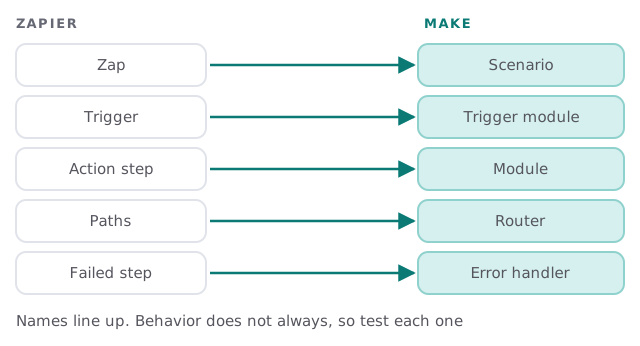
The vocabulary maps cleanly. The behavior doesn’t always, so we test rather than assume.
What changes, and what to check
| In Zapier | In Make | Check |
|---|---|---|
| Filters and Paths don’t use tasks | Branching is done with filters and routers | Whether the same records still get through |
| A step that errors doesn’t use a task | Each module can have an error handler | Which handler fits, so a failure isn’t silent |
| Test runs don’t use tasks | You run scenarios on demand while building | That test data doesn’t reach live systems |
| Zap history shows past runs | Scenario history and stored incomplete runs | Whether failed runs wait for you or roll back |
The left column comes from Zapier’s own help page on how it measures task usage. On Make’s side, its scenario settings let you store incomplete executions, so a failed run waits for you to fix and resume it. If you turn that off, the run stops and rolls back instead.
The cut-over, one workflow at a time
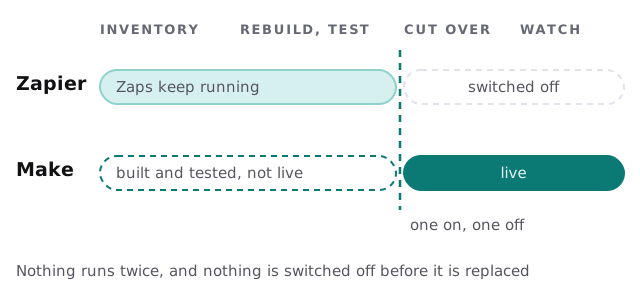
- Pick the least risky zap first. A notification, not an invoice.
- Rebuild it as a scenario. Keep it switched off.
- Test with real examples. Use past records that you know the right result for.
- Cut over. Turn the scenario on and the zap off, in the same sitting.
- Watch it. Check the first real runs and the error alerts.
- Repeat. Next zap, only once the last one is calm.
What can go wrong
- Duplicates. Both tools running the same job writes every record twice.
- Gaps. Turning the old one off before the new one is proven loses records.
- Hidden dependencies. A zap someone forgot about feeds a spreadsheet the finance team uses.
- Different timing. A trigger that fired instantly may now run on a schedule.
What we need from you
- Admin access to Zapier, and to the apps involved.
- A list of the zaps you consider critical.
- A person who knows what each one is for.
- A quiet window for the critical cut-overs.
If your workflows have outgrown both tools, a custom integration or an n8n consultant may suit better. And to learn Make before you decide, see our guide to setting up Make for your team. We start with the free IT check, then give you a plan and a fixed quote.
Migrate by retiring zaps one at a time. A big-bang switch-over is how records go missing.