AI automation for project managers is less about managing tasks and more about everything around them: the notes, the nudges, the status updates and the updates to the updates. That’s the part that crowds out the actual managing.
Picture the week that follows, and notice where your own judgment shows up.
The week, as it could look
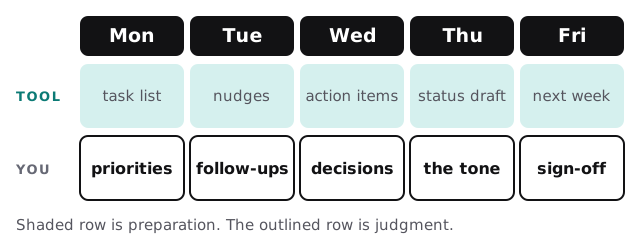
After the meeting: from conversation to commitments
Meetings end with a vague sense of who agreed to what. The follow-up email is where it either becomes real or doesn’t.
- The recording is transcribed. Tools such as Fireflies, Otter or Fathom do this well enough that it is no longer the hard part.
- A tool pulls out the commitments. Not a summary of the discussion, but a short list: what, who, by when, as best as the conversation made clear.
- Gaps are flagged. “Someone will update the vendor” gets marked as having no owner.
- You review in two minutes. You fix a name, add a date and delete the item that was only a joke.
- Tasks are created on your board. Each links back to the moment in the recording it came from.
If you want to try the transcription step by yourself first, our guide to recording and summarizing meetings with AI explains how.
Status reports from one set of facts
Reports take time because the same information has to be reworded for each reader. A sponsor wants one paragraph. The team wants a list. A client wants plain words and no internal jargon.
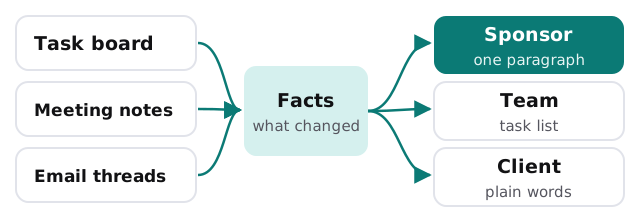
The tool reads the board for what moved, the notes for what was decided, and the email thread for what’s blocked. It drafts each version and marks any line it’s unsure about. Nothing is sent without you.
Where the time goes, and what changes
| Chore | Today | With a tool |
|---|---|---|
| Writing up meeting notes | Typed from memory, hours later | Draft ready when the call ends |
| Chasing overdue tasks | Scrolling the board, messaging each person | A list of who’s late, with drafted nudges |
| Weekly status | Rebuilt from scratch | Assembled, then edited |
| Risk log | Updated when someone remembers | Candidates suggested from recent threads |
A Wednesday afternoon
It’s 2pm and the design review just ended. Before you’ve closed the laptop, a list is waiting: six items, two without owners, one with a date that contradicts the schedule. You assign the two orphans, correct the date, and the board updates. Later, a nudge to the contractor who hasn’t sent drawings sits in your drafts, polite and specific. You edit one line and send it. The whole thing took less time than finding last week’s notes would have.
Software you probably have
Project managers usually live across a task board, a calendar, email, a chat tool and a document space. A custom piece makes sense when information has to cross two of those, such as turning a chat decision into a task with a due date. If your team lives in Notion, setting up Notion AI for your team covers what’s built in.
Rules we recommend
- The tool never assigns work. It proposes, and a person confirms.
- Dates are only filled in when someone actually said one.
- Anything about people’s performance stays out of automated summaries.
- Every action item points back to its source.
Next step
Tell us which board and which meeting tool you use. The free IT check maps how information moves between them, and we return a plan and a fixed quote. A real person replies within 1 business hour, Monday to Friday, 9am to 5pm Pacific.
A project manager’s time should go to unblocking people, not to retyping what they already said.