Key takeaways
- Double data entry is the same patient details typed into more than one place: scheduling, billing, insurance portals and forms.
- The yearly cost is the hours spent retyping, times what a staff hour costs, times 50 weeks, plus the cost of each typo that comes back as a denial or a call.
- CAQH measures what a manual transaction costs a medical provider. Its number leaves out the time spent gathering the details, so your real cost is higher than the benchmark.
- A tool that copies details between systems still leaves you with copies. Look for one record that every screen reads from.
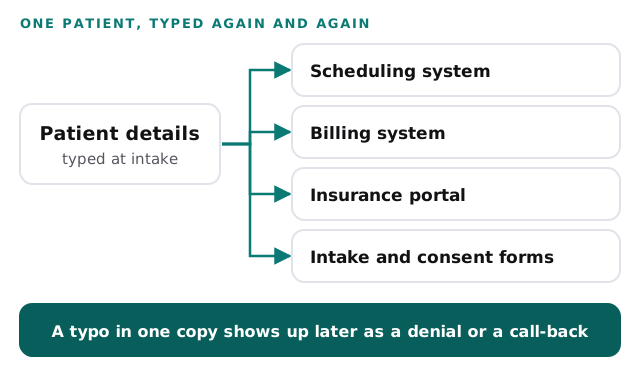
Double data entry is the same patient details typed into more than one system, and you can measure it in your own practice this week. A new patient calls. Someone types their name and birth date into the scheduling system. Later the same details go into the billing system. Then they go into an insurance portal to check coverage, and again into a form that needs a signature.
Each retype takes a minute or two, and that is the problem with it: a minute is too small to notice. This post helps you count the minutes, put a yearly price on them and decide what to ask for instead.
Where the same details get typed
Walk through one new patient and mark each place the details are entered by hand. Your list will differ from the one below, so add rows for your own systems.
| Where it is typed | What goes in | Typed by hand at your practice? |
|---|---|---|
| Scheduling system | Name, birth date, phone, reason for the visit | |
| Billing system | Name, birth date, address, insurance details | |
| Insurance portal | Name, birth date, member ID, to check coverage | |
| Intake or consent forms | The same details, again, on paper or a screen | |
| Reminder or recall list | Name and phone, copied into a spreadsheet |
Fill in the last column honestly. A place only counts if a person types the details in. If a screen fills itself from another one, it belongs in the “not counted” pile.
What the CAQH Index can and cannot tell you
CAQH publishes a yearly report, the CAQH Index, that tracks how health plans and providers handle administrative transactions such as checking eligibility, sending claims and asking for approvals. It counts a transaction as manual when it takes end-to-end human effort by phone, mail, fax or email (CAQH, 2024).
In the 2025 Index, a manual transaction cost medical providers an average of $8.03, and a fully electronic one cost $2.65 (CAQH, 2025). For eligibility and benefit verification, the 2024 report put the time providers could save at 12 minutes per transaction for medical providers and 8 minutes for dental providers, by moving to fully electronic (CAQH, 2024).
Read those figures with care, because they measure something different from your retyping. The Index counts transactions between a practice and a health plan. Typing into a web portal sits in a separate group it calls partially electronic, which the $8.03 figure does not cover. The Index also counts labor, including wages, benefits and related overhead, but not the time spent gathering the information for a transaction or following up on it.
That last point is the useful one for you. Gathering the details and following up are exactly where retyping and call-backs live. So the benchmark shows what one manual touch costs, and your own week shows how many touches you have.
Count your own week
Pick a normal week and ask each person who enters patient details to keep a tally.
- Make one mark each time you type details that already exist somewhere else.
- Next to the mark, write the minutes it took, including the time spent looking up the original.
- Add a second tally for fixes: each time a typo had to be corrected or a patient had to be called back.
- At the end of the week, turn the minutes into hours for each person.
For the hourly cost, use your own payroll number for a front desk hour, with benefits included. The example below uses $30.
The numbers below are made up to show the format. Put in your own in the calculator underneath.
| Line | Example | Yours |
|---|---|---|
| People who retype patient details | 3 | |
| Hours a week each spent retyping | 4 | |
| Hours a week across the practice | 12 | |
| Cost of a staff hour | $30 | |
| Retyping time for the year (12 × $30 × 50) | $18,000 | |
| Typos a year that came back as a denial or a call | 24 | |
| What fixing one costs in staff time | $60 | |
| Fixing typos for the year (24 × $60) | $1,440 | |
| Total for the year | $19,440 |
The cost nobody counts: one typo, many copies
Retyping time is the steady cost. The typo is the expensive one, because it travels. A wrong digit in a member ID or a misspelled name goes into the scheduling system, and nothing in that system knows it is wrong. It shows up later, when a claim is sent back or a reminder reaches the wrong person, and someone has to work out where the mistake began.
You can measure this without any outside study. Take your last month of rejected claims and your call notes. For each one, ask whether the details were wrong at the source or were wrong because someone retyped them. The count of retyped ones is your typo line in the worksheet.
The more places the details live, the harder that question is to answer. If a patient’s phone number was correct in one system and wrong in two others, which one is true? Your team ends up phoning the patient to find out, and that call is a cost too.
For the broader version of this problem, our post on too many apps shows how one customer ends up in five systems, none of them quite right.
Why the usual fix makes it worse
Practice software vendors are not hiding anything when they offer fixes for this. The fixes help in a narrow way. They just leave the real problem in place.
An add-on that “syncs” your systems. A sync copies details from one system to another. It saves the typing, which is real value. But you still have several copies of the same patient, and a typo in the first one is copied faithfully into the rest. You have automated the spread of the mistake.
A bigger all-in-one package. Moving everything into one product can end the copying. It also means a large switch, new training for the whole front desk and a long list of things to move across. If you cannot afford a month of disruption, the plan can stall and the retyping carries on.
A faster way to type. Autofill, saved templates and shortcuts speed up the keystrokes. They do nothing about the number of places that need the keystrokes, so the count of retypes stays the same.
None of these is wrong to buy. They just treat the symptom. The cause is that the details exist as copies, not as one record.
What to look for instead
The fix that lasts is to type the details once, at intake, and have every other screen read from that record.
| Ask for | Instead of |
|---|---|
| One record per patient that every screen reads from | A copy in each system, kept in line by a nightly job |
| A correction made once, in one place | The same fix made by hand in three systems |
| A record that starts at intake and follows the patient onward | Details retyped at each step of the visit |
| A short pilot on your own intake process first | A full switch of every system on day one |
| A clear answer to “which copy is right?” | Two systems that disagree and a person to referee |
Then measure again. After a month, repeat the one-week tally. The drop in retyping hours, times your hourly cost, times 50, is the value of the change.
If your practice is medical, our page on AI automation for medical practices covers the front desk tasks in more detail. For dentists, there is a matching page on AI automation for dental offices. You can also see how we think about healthcare practices as a whole.
One shared record, seen up close
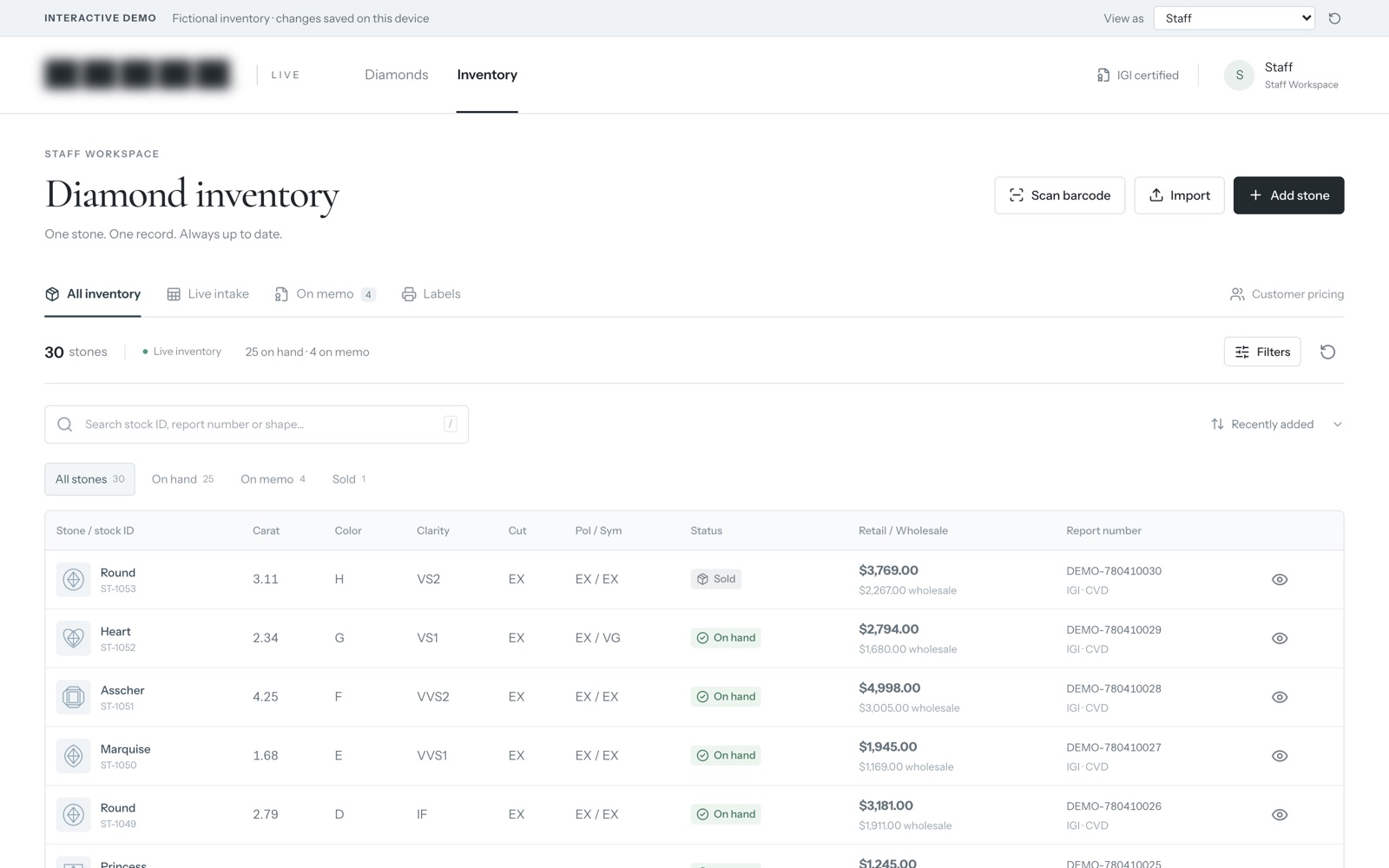
Here is one system we built: an inventory system and online catalog for a diamond retailer. Staff track every stone from intake to memo to sale, and customers see the price their account allows. It is shown here on sample data.
It isn’t a patient records system. We show it because of how it is organised. Each item is one record from the moment it comes in, and the later stages are steps in that same record, not new copies typed into new places. That is the shape you want for a patient: details entered once at intake, then carried forward.
What is worth seeing up close is how a system like this is put together, and how its screens follow the steps staff already take.
Behind the scenes
Want a behind-the-scenes walkthrough of a real build?
We will take you through it screen by screen: what each person sees, how a record moves through it, and why we built it that way. Then we can talk about the task that costs you most.
Frequently asked questions
How do we find out how many times our team retypes the same details?
Follow one new patient from the first phone call to the paid claim. At each step, write down the screen or form where someone typed their name, birth date or insurance details. Repeat it for two or three more patients and the pattern is clear.
What counts as a typo that costs us money?
Any slip that comes back to your desk: a claim that is sent back, a reminder that goes to a wrong number, a call to the patient to fix a spelling. Your own rejection reports and call notes will show which ones came from retyping.
Do we have to replace every system to stop retyping?
No. Start by deciding which system holds the details first. Then list every other place that asks for them again. The first list is your source of truth, and the second is where the work is.
Sources
About the author
Andy Kang, AI Partner Team. Andy Kang writes the blog for AI Partner Team, which builds AI tools and internal apps for small businesses alongside managed IT and IT projects. The blog shows the math and the reasoning behind that work, so you can check it against your own business.
- Every fact links to the page it came from, listed under Sources.
- Example numbers are labelled as examples, and you can swap in your own.
- Builds are shown on sample data, with no client names or client figures.