Client intake automation for law firms isn’t about answering faster for its own sake. It’s about what happens between the moment a stranger writes to you and the moment a lawyer decides what to say back. In most small firms that gap is a sticky note, a voicemail and somebody’s memory.
What Tuesday night looks like
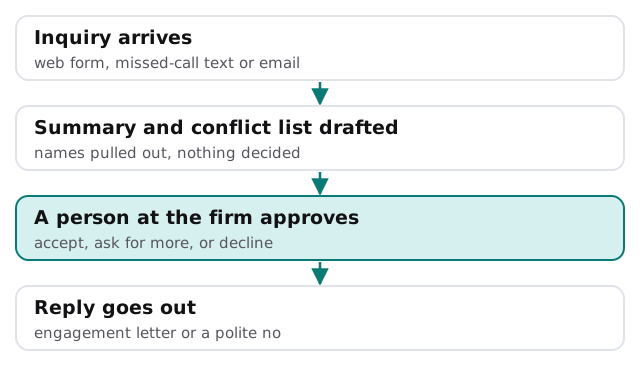
At 9:40 pm someone fills in the form on your site about a landlord dispute. Before you open your laptop the next morning, a record exists. It holds their contact details, the matter type, the other party’s name, a three-line summary, and a flag saying the other party’s name still needs a conflict check. A draft reply is waiting, but nothing has been sent. You read it, change a line, and approve it. That’s the whole job.
Why the form asks for so little
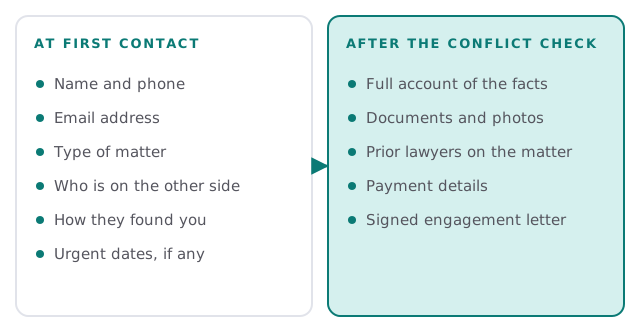
Under ABA Model Rule 1.18, a person who consults a lawyer about possibly forming a client relationship is a prospective client. The lawyer can’t use or reveal what they said, even if the matter never starts. Some information can also create a conflict that follows the whole firm. So an intake form that invites a full account of the facts on day one gives you more to protect and more to be conflicted by.
State versions of the rules differ, so have your own ethics counsel look at the wording. What we build is simple: collect enough to decide, hold the rest until you’ve decided.
What gets built
- The front door. One form, written in plain words, plus a way to turn missed-call texts and emails to your intake address into the same kind of record.
- The summary. An AI step reads the inquiry and writes a few lines for a lawyer, along with a list of every person and company named.
- The conflict list. The names go into a checklist in the format your conflict search expects. The check itself stays with you.
- The draft reply. One of three templates, filled in: we’d like to talk, we need a little more, or we’re not the right firm.
- The approval step. A lawyer or an office manager you’ve named sees the pile and clears it.
- The hand-off. Accepted inquiries land in your practice software or a shared tracker with the details attached.
Signs it’s time
- Inquiries come in through four places and are checked in two.
- Nobody can say how many people were never answered last month.
- Conflict checks happen from memory.
- The best new matters go to whichever firm replied first.
- Declining a case politely takes a lawyer ten minutes it doesn’t have.
What we need from you
- Your current intake form or the questions you ask on the phone.
- Your three most common matter types, in your own words.
- The name of whoever approves replies, and a backup.
- Which practice software or tracker should receive accepted inquiries.
- Your conflict-check process, even if it’s a spreadsheet.
What it doesn’t do
It also doesn’t replace the first conversation. The point of the build is that the first conversation starts from a prepared page instead of a blank one, so the lawyer spends the call listening instead of typing.
It doesn’t give legal advice, promise an outcome, or tell a stranger whether they have a case. The templates say what you’d say yourself, and the tool is not allowed to improvise beyond them. If you’d like to see how the underlying tools get wired together, setting up Zapier for your team walks through the do-it-yourself version. The legal wording and what to ask are yours to settle.
The firm that replies first often gets the call. Build the reply to be fast, and build the approval so it is also careful.