Most small firms do not decide on their technology. It accumulates. The email system came with the first office. The document folders reflect whoever set them up. The remote access arrangement dates from a trial in 2020.
IT consulting for law firms is the deliberate version: one look at everything, a ranked list of what matters, and a decision on each item that the partners can put their names to.
Why it is a partner’s question
California’s Comment [1] to Rule 1.1 says competence includes a duty to keep abreast of changes in the law and its practice, including the benefits and risks associated with relevant technology. The California Supreme Court approved it on March 22, 2021, and the State Bar described the language as modeled on a similar ABA comment. Other states have adopted comparable wording, but yours may differ.
You do not need to read that as a threat. Read it as a reason to be able to say, calmly, what your firm uses, what could go wrong with it and what you have done about it. If you want the confidentiality side, managed IT services for law firms sets out the day-to-day care.
The assessment sheet
The first deliverable is deliberately small: six areas, one question each, filled in with the people who actually do the work.
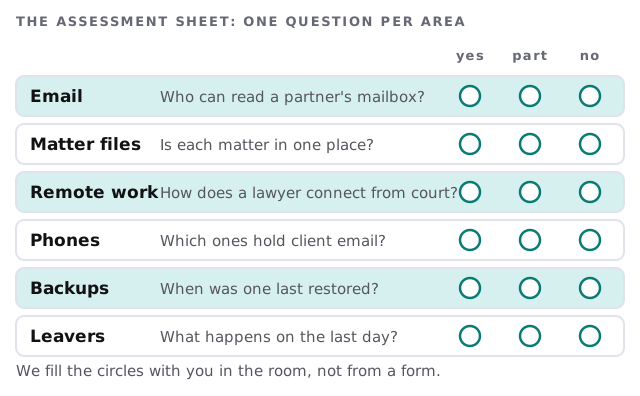
A legal secretary will answer the backups question differently from a partner, and the gap between the two answers is the finding.
Typical engagements
| Engagement | The question it answers | What you hold afterwards |
|---|---|---|
| Assessment | Where are we exposed? | The sheet, plus a ranked list |
| Document and email structure | Can we find, and protect, each matter? | A folder and permission plan |
| Remote working review | How do people work from court or home? | A short policy and settings to match |
| Software selection | Which practice tool fits us? | A tested shortlist |
| Departures and arrivals | What happens on a person’s first and last day? | A checklist per role |
Most firms start with the assessment and one other row. Which one depends on what hurt last: a missed deadline points to software, a lost laptop points to devices, a departing associate points to leavers. We do not recommend doing everything at once, because a firm that tries to change email, files and billing in one quarter ends up with three half-finished projects and tired staff.
Choosing practice software like a partner
Practice and case management tools handle time, billing, deadlines, conflicts and documents. They are also the hardest thing in the office to change once everyone is trained. The sensible approach is to narrow in stages.
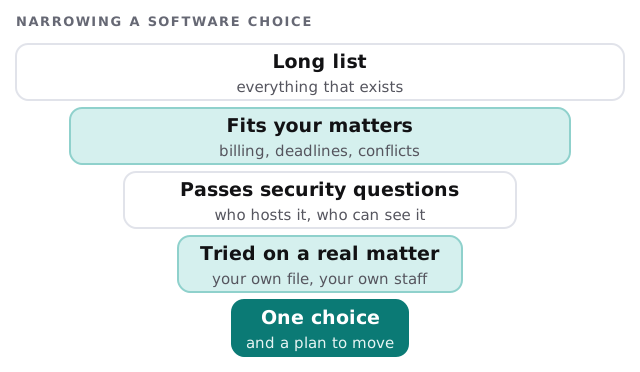
Questions at the security stage are plain: who hosts the data, who at the vendor can see it, how do you export everything if you leave, and how does it handle a lawyer who leaves the firm.
Where firms get stuck
- Email as the filing cabinet. Matter correspondence lives in one lawyer’s mailbox, not with the matter.
- Rule of one. The one assistant who knows how billing works, and has never taken a holiday.
- Personal devices. Client email on a phone that also belongs to a teenager.
- No leaving plan. A departing associate’s access is shut off when somebody remembers.
The partners’ meeting
We bring a single page. It lists three decisions, shows the options, names our recommendation and the effort involved, and says what happens if you do nothing. The meeting is short. The page is kept with the minutes. A year later, someone can see what was decided and why.
The firm that can explain its technology decisions to a client, an insurer or a bar investigator is in a very different position from the one that can only say it inherited them.
What we need from you
- Ten minutes each with a partner, a paralegal and whoever does billing.
- A list of the software the firm pays for, and the software people pay for themselves.
- Agreement on what we may see, and what we will not open.