Managed IT services for retail stores start with one list: what you have, and where. The register, the web shop, a marketplace listing and the back room each hold part of the answer. When they disagree, customers find out first, usually as an order for something you can’t ship.
One count, many places to sell
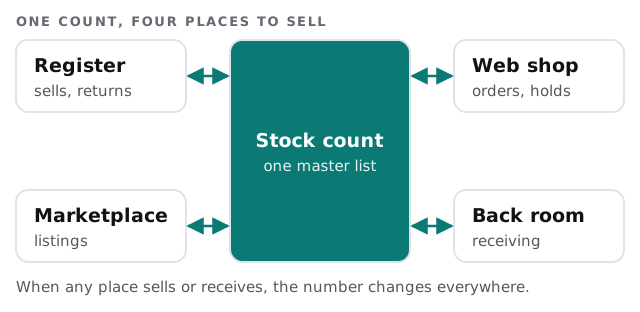
Most stores buy the register first and add the web shop later. The two then have to share a number. Our job is the plain part: confirm which system is the master, how fast it syncs and who gets alerted when the connection breaks.
Signs the count has drifted
- Shelf and screen disagree by more than a few units.
- Refunds don’t return stock to the web shop.
- Prices change in one system and not in another.
- Cycle counts are done on paper, then typed in days later.
The register is a small computer
Behind the counter is a computer, a scanner, a receipt printer, a drawer, a card reader and often a customer-facing screen. We treat it as a computer, because it is one.
Terminals and tablets
Keep them updated outside opening hours, lock them to the POS app and give each cashier their own login. A shared “front desk” password makes it impossible to see who voided a sale.
Scanners and printers
These are cheap and boring, which is why they are forgotten. Keep a spare of each in the stockroom, with the right cable, so a dead scanner is a two-minute swap.
The back room
Receiving stock, printing labels and counting cycles happen there. A handheld scanner on poor Wi-Fi sends the wrong count. Check coverage in the stockroom as carefully as you check it on the shop floor.
Card payments and the standard behind them
The card brands set the rules for businesses that take payment cards, through the PCI Security Standards Council and its data security standard. Your payment provider will tell you which version of the questionnaire you must complete. We help with the practical side: separate networks, current software and limited access to the equipment. We don’t certify anything or promise a result, and the questionnaire stays yours.
The holiday calendar
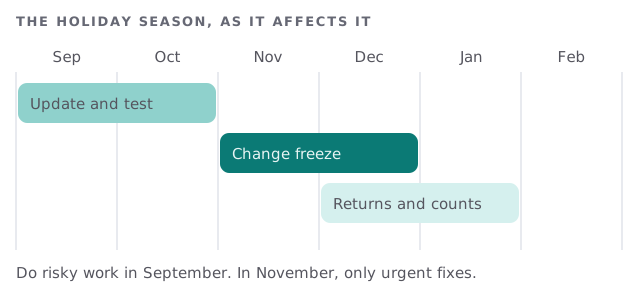
- Replace aging devices in the autumn, while there is time to set them up.
- Run a full test sale at each register, with each payment type.
- Add seasonal logins by name, with an end date.
- Write the freeze rule: who may approve a change, and what counts as urgent.
- Plan the January count, and who reconciles it.
Returns, exchanges and gift cards
Returns are where systems most often disagree. A refund at the register should put the item back in stock, in the right place, and reverse the payment on the right card. Gift cards and store credit add a balance that has to match across every register. Test each of these by hand after any software update: sell one item, return it and buy it again. If the count is the same at the end, the loop holds.
A second store
Opening a second location is the point where informal setups give way. Decide early whether both stores share one catalog and one customer list, who may change a price and whether stock can be moved between them. We would rather plan it with you before the lease is signed than rewire it after.
Staff who come for a season
Seasonal hires need access for a few weeks and nothing afterwards. Create each account with an end date, give it the register and nothing else, and collect any key or device on the last shift.
What we need from you
- Your POS, web shop and payment providers, and who set each up.
- How stock is counted and where the master list lives.
- Your trading hours and your busiest dates.
Monthly care covers access controls, backups and updates. The free IT check ends in a plan and a fixed quote.
A shelf can only be right if every screen agrees with it. Make one system the boss.