Managed IT services for trucking companies, and for the logistics offices around them, have one measure: how fast the paperwork follows the freight. A load isn’t finished when it’s delivered. It’s finished when the proof of delivery reaches billing and the invoice goes out. Anywhere that chain slows, the cash slows.
What rides in the cab
| Device | What it does | What tends to go wrong |
|---|---|---|
| Electronic logging device | Records driving hours | Loses its connection, or is paired with the wrong truck |
| Driver phone or tablet | Messages, navigation, scans | Cracked, out of data, unlocked |
| Dash camera | Records the road | Memory full, no one reviews it |
| Fuel card and its app | Pays for fuel | Used on the wrong vehicle |
Most of these come from separate vendors. The IT work is keeping a list of what is installed in each truck, who has the login for each service and what happens when a device is swapped.
The paperwork path
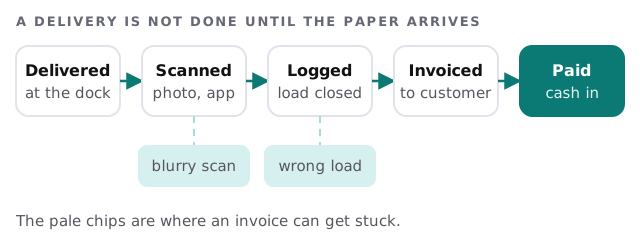
A good driver app helps. It asks for the load number, rejects a blurry photo before the driver leaves the dock and sends the file straight to the load record. That’s software configuration, not new hardware.
Dispatch is where the screens live
Dispatchers watch loads, drivers and trucks all day. Give each dispatcher an individual login and put the transport-management system on a stable network. Keep a fallback ready, such as a shared sheet and a list of driver numbers. If the TMS is down for an hour, the phones still have to work.
How long records stay
The federal motor carrier safety rules for drivers’ records of duty status include a retention requirement. The carrier keeps the records and supporting documents for at least six months from the date it receives them, and the driver keeps a copy of the previous seven days.
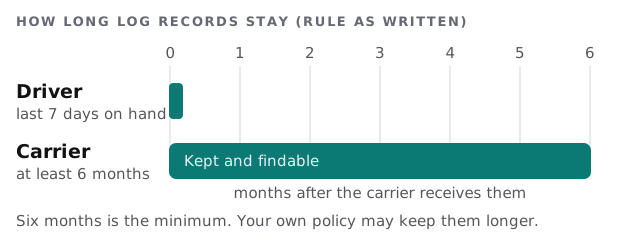
For IT, that means a place where the records are backed up, protected and searchable by driver and date. We explain what a rule says, not whether you comply. Your safety lead or counsel decides that.
Between the cab and the office
Drivers rarely sit at a desk, so the tools have to work in a parking lot with a thumb. Test the scan app on the oldest phone you issue and on a weak signal. Check that a driver can reach a person when the app fails, and that the person can see the load from the office. A policy of “use the app” works only when the app works at the dock at night.
The yard and the office
A small yard has a dispatch office, a shop, a scale and a gate. Often one router serves all of them. Separate the office network from the shop and from guests, such as drivers waiting for paperwork. Check that the cameras and the gate controller aren’t on the same network as payroll.
Drivers come and go
Drivers change jobs. When one leaves, their app login, their device, their fuel card and their access to the yard all need to end the same day. Keep a short exit list and tick it off.
What we need from you
- Your ELD, dispatch and billing tools, and who administers each.
- A count of trucks and devices, and which are shared.
- How proof of delivery reaches the office today.
- Where driver log records are kept.
Monthly care covers access controls, backups and updates. The free IT check ends in a plan and a fixed quote.
Freight earns nothing until the paperwork arrives. Make the scan the easy part.